Drupal8 : ReCaptcha V3 の使用時にクラス(ReCaptcha)が見つからないエラーおよび対処法
モジュール(reCAPTCHA v3)が通常にインストール
- モジュール:reCAPTCHA v3 が説明通りにDrupal8にインストール、有効化します
- 依存しているモジュール: captcha もインストール、有効化します
- サイト設定(Home >> Administration >> Configuration >> People >> CAPTCHA settings)でReCaptchaを設定します
- まず、設定ページ上の「register for reCAPTCHA」リンクをクリックして、Googleの reCAPTCHA v3 (v2ではない)でSite Key/Secret Key を作成します
- 作成されたSite Key/Secret Keyをコピーして、ReCaptchaモジュールの設定画面にペストします
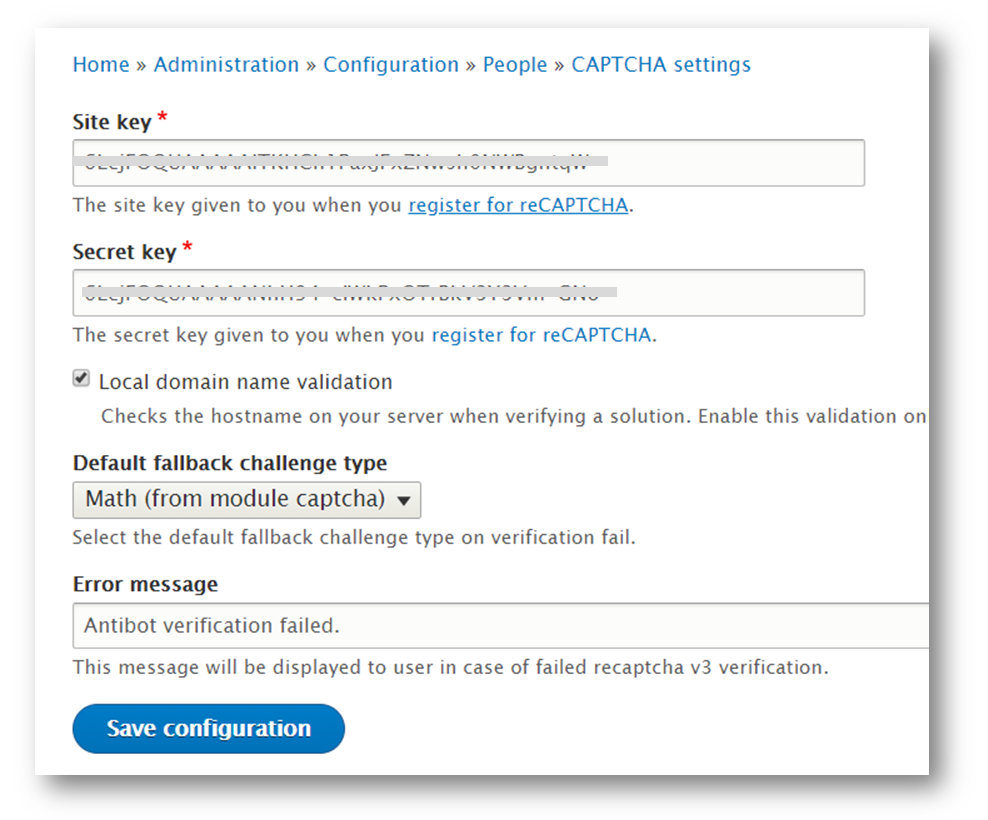
- 「reCAPTCHA v3 actions」タブで任意名前でreCAPTCHAアクションを作成します
- 「CAPTCHA settings」タブで、作成したreCAPTCHAアクションを「Default challenge type」に設定します
- 最後、「Form settings」タブで、必要なフォーム(例:ログインページ)にCAPTCHA を有効にします
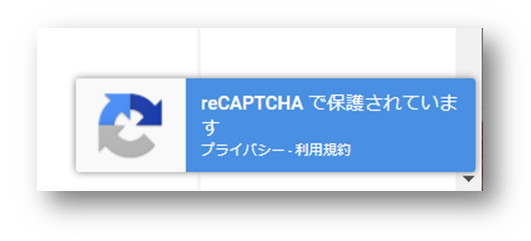
- CAPTCHA が有効なページ(例:ログインページ)に遷移し、reCaptchaが動作していることを確認します
クラス(ReCaptcha)が見つからないエラーが発生
- reCAPTCHAのアクションが有効なページ(例:ログインページ)が動作(ログイン動作)時に、ReCaptchaクラスが見つからないエラーが発生しました。
The website encountered an unexpected error. Please try again later.
Error: Class 'ReCaptcha\ReCaptcha' not found in _recaptcha_v3_verify_captcha_response() (line 264 of modules/contrib/recaptcha_v3/recaptcha_v3.module).
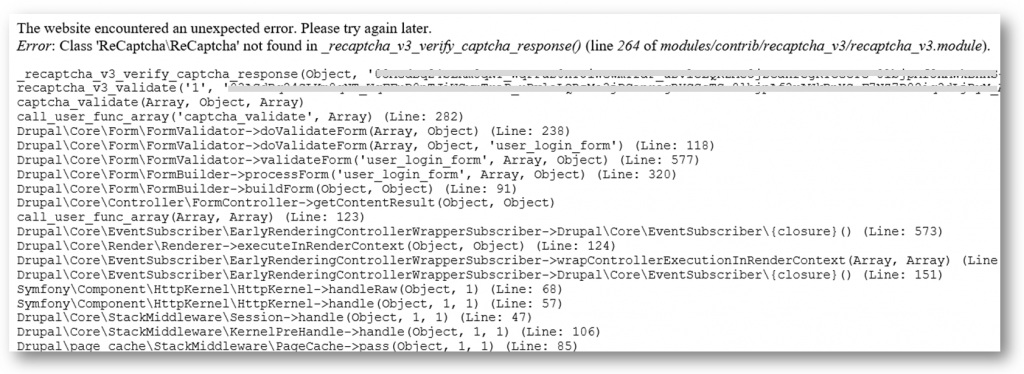
- モジュール(reCaptcha v3)のソースコードを解析してみたら、どこもReCaptchaクラスを定義していないないです
- クラス(ReCaptcha)を読めるように「drupal8: モジュール(ReCaptha)のコードを変更せず、読み込む方法」をご参考ください
- モジュール(reCaptcha v3)のREADMEを読んでみたら、実はgoogle/reCaptchaライブラリを依存しています
・・・・・・・・・・・・・・・・・
・・・・・・・・・・・・・・・・・

REQUIREMENTS
------------

This module requires the following module:

 * Captcha (https://www.drupal.org/project/captcha)

This module requires the following library:

 * google/recaptacha (https://github.com/google/recaptcha)

RECOMMENDED MODULES
-------------------

 * reCAPTCHA (https://www.drupal.org/project/recaptcha):
   When enabled, reCAPTCHA v2 becomes available as fallback challenge.

INSTALLATION
------------

 * Install as you would normally install a contributed Drupal module. Visit
   https://www.drupal.org/documentation/install/modules-themes/modules-8
   for further information.

 * If not using Composer,
   install the google/recaptacha (https://github.com/google/recaptcha) library.
- READMEの説明通りに、githubでgoogle/recaptchaのPHPライブラリをダウンロードして、ライブラリの下に置き来ます
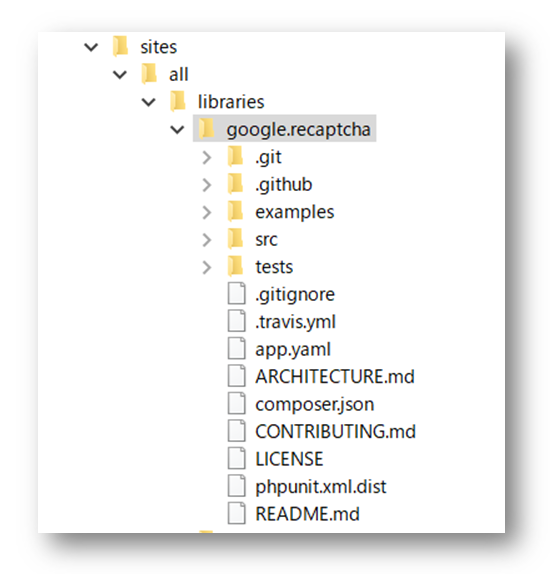
- sites/all/libraries/google.recaptcha
- もちろん、Librariesモジュールもインストール、有効化する必要があります
Drupal7の初期のモジュール管理画面ではでモジュールの検索、グルーピングはできません
- Drupal7では、モジュールの管理画面がシンプルで、検索、グルーピングなどの機能はありません
- モジュールが少ない時に問題はあまりないようで、かつ開発環境でなければ、モジュールに関する操作は少ないから、そのままで良いでしょう
- モジュールの数が多くなると、また開発環境で、頻繁にモジュールのインストール、有効化設定を行うと、やはりモジュールの検索、グルーピング機能が必要となります
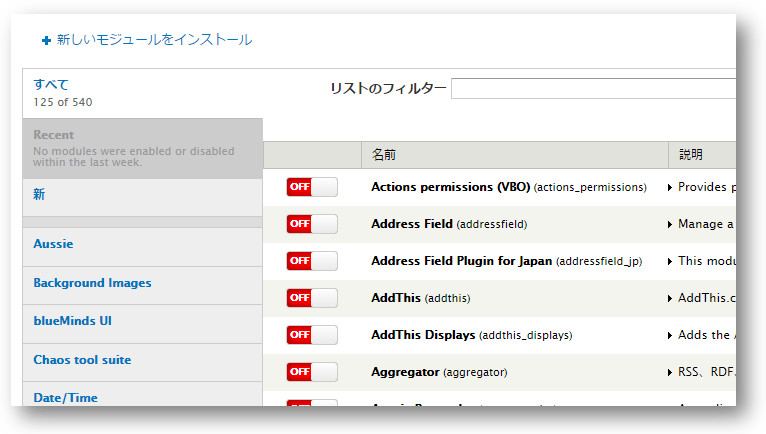
モジュールを管理するモジュール(Module Filter)の導入より検索、グルーピング化が可能になる
- モジュール:Modu Filter7.x-2.0をダウンロード、インストール、有効化します
- 以下のようなモジュールグルーピング化され、モジュールの検索も可能となります
今回、画面でポップアップでデータ入力、ajaxでデータを更新することを試みたいですが、jQuery、Bootstrapなどのmodalライブラリで実現ができます。但しDrupalサイトでポップアップを作るとしたら、やはりctoolsのModal機能を利用してみたいです(ctools(Chaos tool suite)はDrualの開発によく利用されているAPI)。
やりたいこと:ポップアップを立ち上げて入力したデータをajaxでサーバーと交信
- ポップアップ(modal)の作成
- データ入力フォームの表示
- 入力されたデータをajaxでサーバーに送信、データ更新
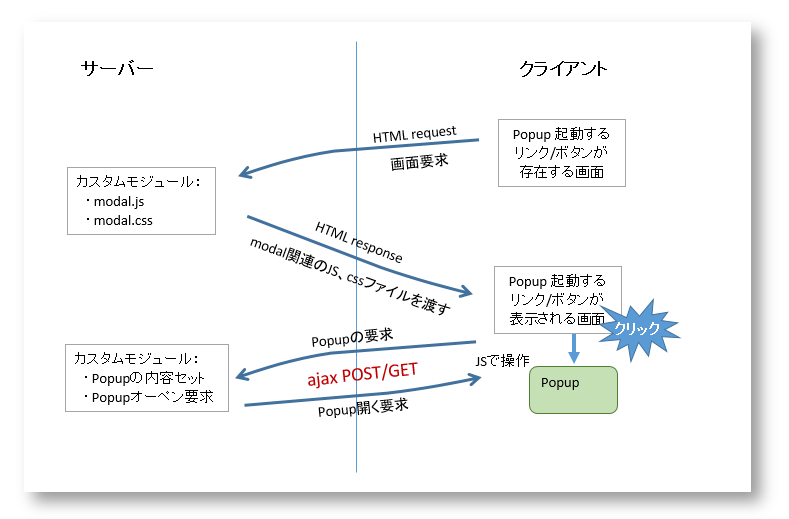
ポップアップ作成の流れの基本:ctoolsのmodal.jsを利用します
- ポップアップを開くリンク/ボタンの作成
- ctoolsのmodal.js、modal.cssをこのページに入れる(ajaxで操作するため)
- ポップアップのリンク/ボタンがクリックされた、ポップアップが開く
- ポップアップのフォームにデータ入力、送信ボタンクリック
- 入力されたデータをサーバーにajaxで送信、データ更新される
- 入力されたデータをサーバーにajaxで送信、データ更新される
ctoolsのmodal利用の問題点
- ctoolsのmodal利用に関する紹介はウェブ上にたくさんあります。また、インストールされたctools(modules\ctools\ctools_ajax_sample\ctools_ajax_sample.module)にサンプルプログラムもあります
- 問題点1:ポップアップに表示されるフォームはjavascriptでhtmlコードとして吐き出されています(modules\ctools\ctools_ajax_sample\js\ctools-ajax-sample.js)
- 簡単なフォームに問題はないが、複雑なフォームに煩雑になります
- 問題点2:ポップアップウィンドウに関する設定はphpソースコード内で定義
- ロジックとUI設定を分離しべき、ポップアップに関する設定はcss、jsに任せるべき
ctoolsのmodal利用の改善
- 上記問題1は、DrupalのForm APIを利用して、フォーム作成を行います
- 上記問題2は、ポップアップの外観はサイト全体のテーマ(bootstrap)に統一し、背景、フォントサイズなどはcssファイルで個別に設定します
ポップアップの作成
- ポップアップを起動するリンク/ボタンの作成は省略します
- ポップアップとの通信URLをhook_menuで作成
$items['my-module/%ctools_js/add'] = array(
	'page callback' => 'my_module_callback',
	'page arguments' => array(1),
	'access callback' => TRUE,
	'type' => MENU_CALLBACK,
);
- URLの設定に「%ctools_js」部分があります。ここで、'nojs'の定数を入力する必要はあります。例:http://your-site/my-module/nojs/add
- ポップアップの起動リンク/ボタンのクラス属性: class="ctools-use-modal"をセットします(これがないと、Modalポップアップの起動はできないです)
- ページのコールバック関数(my_module_callback)の作成
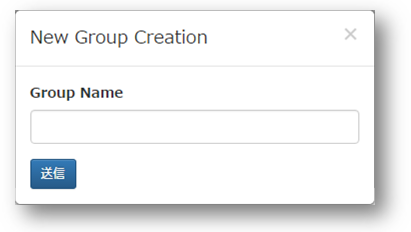
function my_module_callback($ajax) { if ($ajax) { // ctoolsのajax、modalに関するjsファイルをクライアントへ ctools_include('ajax'); ctools_include('modal'); //フォーム作成に関する上方 $form_state = array( 'ajax' => TRUE, 'title' => t('New Group Creation'), ); //ポップアップフォームの作成 //フォームからの更新データを$form_stateにセットする $output = ctools_modal_form_wrapper('my_module_form', $form_state); //新規ポップアップにajaxが有効にする if (!empty($form_state['ajax_commands'])) { $output = $form_state['ajax_commands']; } //ポップアップの出力 print ajax_render($output); drupal_exit(); } else { return drupal_get_form('mymodule_form'); } } // ポップアップにある入力フォームの定義 function my_module_form($form, $form_state) { $form = array(); $form['new_link_text'] = array( '#type' => 'textfield', '#title' => t('Group Name'), ); $form['submit'] = array( '#type' => 'submit', '#value' => t('Submit'), ); return $form; } // データ更新 function my_module_form_submit(&$form, &$form_state) { // データの更新 // ロジックは省略 // ポップアップを閉じるコマンド $form_state['ajax_commands'][] = ctools_modal_command_dismiss(); } - 注目すべき関数の役割: ctools_modal_form_wrapper
- 定義されたフォーム(my_module_form)をレンダリング可能にする
- ajaxからのデータ送信情報を$form_stateに設定
- hook_form_submitなどの起動
やりたいこと:Drupalのプログラムレベルで簡単にajaxを利用してクライアント側でデータ交信をしたいです
- 環境:Drupal7.54
- DrupalのFormAPIで簡単にajaxの実装ができます(Drupalのフォーム(FromAPI)でのajaxの実装 )
- FormAPIだけではなく、Drupalをカスタマイズ時にいろいろなところでajaxを実装したいことがあります
ポイント1:Drupalでajaxに必要なライブラリをロードし、クライアント側にjquery.form.jsファイルをセット
- サーバー側でdrupal.ajaxのライブラリをロードする必要があります
- クライアント側にjquery.form.jsファイルを設置する必要があります
- この処理はajax処理するページをロード時に行えれば良いです。
- 例:hook_init()内で処理する
/**
 * Implements hook_init().
 */
function YOUR_MODULE_NAME_init()
{
  drupal_add_js('misc/jquery.form.js');
  drupal_add_library('system','drupal.ajax');
}
- 例:hook_init()内で処理する
- クライアント側のブラウザのプロパティでjquery.form.jsがセットされたことの確認ができます
ポイント2:クライアント側のajax起動リンク内にajax対応可否のパラメーター「nojs」とクラス属性「use-ajax」のセット
- ajaxの起動リンクの作成基本パターン:
<a href="text/ajax/nojs/1234" class="use-ajax">ajaxリンク</a>
- hrefにある「nojs」が決まりの文字
- hrefにある「1234」はサーバー側に転送したい必要なパラメーター
- class="use-ajax"はこのリンクがajax用に決める
- クライアント側のjsで使用しているブラウザがajax対応可能かを判断して、ajax起動リンクに「nojs」のパラメーターを書き換え(利用可能:nojs⇒ajax)てサーバー側に転送
- サーバー側がajax利用可否よりクライアント側にajax対応有無の結果を返します
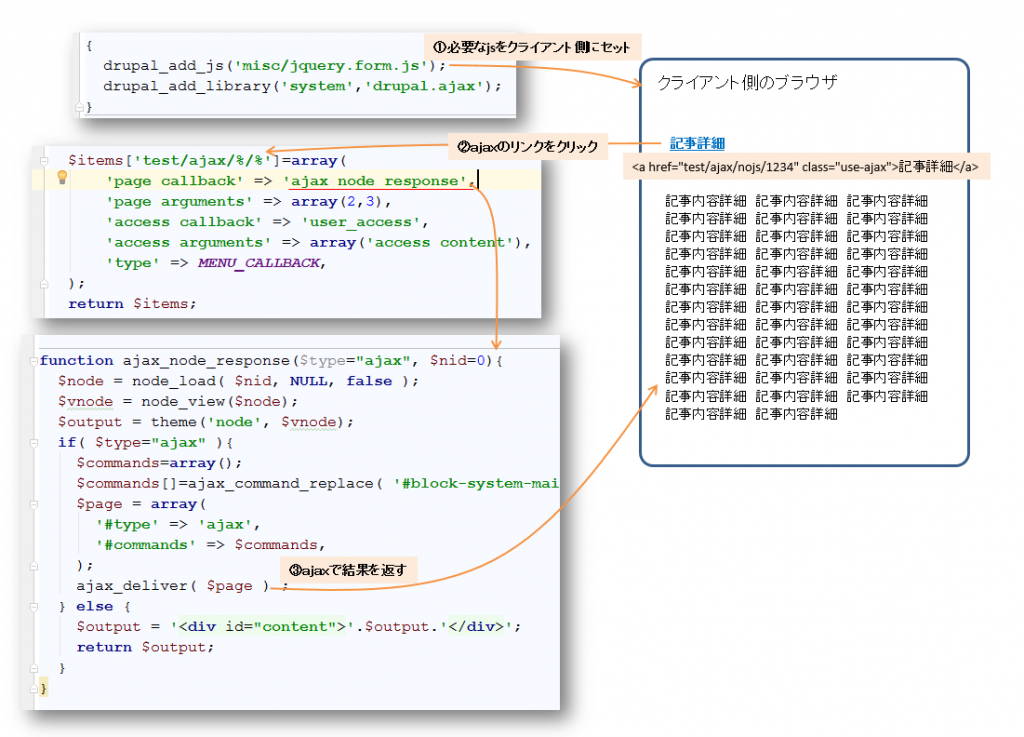
- 上記例のプログラムは以下のようで
/**
 * Implements hook_init().
 */
function test_module_init()
{
  drupal_add_js('misc/jquery.form.js');
  drupal_add_library('system','drupal.ajax');
}

/**
 *  Implementation of hook_menu()
 */
function test_module_menu() {
  $items['test/ajax/%/%']=array(     // URLの2,3番目がクライアント側で生成
      'page callback' => 'ajax_node_response',
      'page arguments' => array(2,3),   // URLの2,3番目の引数をコールバック関数に渡す
      'access callback' => 'user_access',
      'access arguments' => array('access content'),
      'type' => MENU_CALLBACK,
  );
  return $items;
}

function ajax_node_response($type="ajax", $nid=0){
  $node = node_load( $nid, NULL, false );
  $vnode = node_view($node);
  $output = theme('node', $vnode);
  if( $type="ajax" ){
    $commands=array();
    $commands[]=ajax_command_replace( '#block-system-main','<section id="block-system-main">'.$output.'</section>' ) ;
    $page = array(
      '#type' => 'ajax',
      '#commands' => $commands,
    );
    ajax_deliver( $page ) ;   // ajax対応ブラウザの結果
  } else {
    $output = '<div id="content">'.$output.'</div>';  // ajax非対応ブラウザの結果
    return $output;
  }
}
ポイント3:クライアント側で実行させたい部分はajax_commandを使用します
- クライアント側で処理結果をどこに入り替えはajax_command_replaceで指定します
- 結果の挿入、入れ替え、削除、css処理などがいろいろあります。詳細は本家のajax_command一覧を参考してください
モジュール(ReCaptcha V3)がReCaptchaを呼び出せない
- 手動でReCaptcha V3をインストール時に、依存しているモジュール(ReCaptcha)を呼び出せない
- ReCaptcha V3の手動インストールは「Drupal8 : ReCaptcha V3 の使用時にクラス(ReCaptcha)が見つからないエラーおよび対処法」をご参考
- ReCaptcha V3が元々Composerによってインストールされることを設計されています。つまり、Drupalの通常インストール(モジュールのインストール管理画面)ではうまく作動しません
- ReCaptcha V3をComposerでインストールするときに、ほか(ReCaptcha)の依存関係をauto_loadなどのファイルに自動的に関連付けています
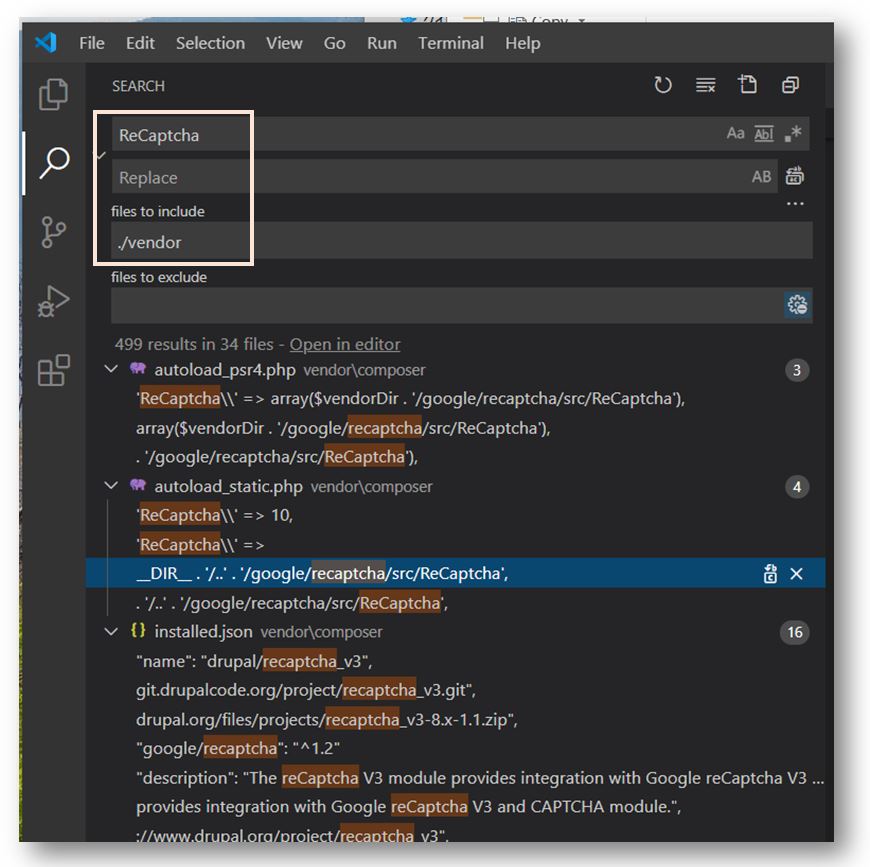
- ComposerでReCaptcha V3をインストールできないときに、上記関連付けはできないです。自分でReCaptchaとの関連付ける必要はあります
- ReCaptcha V3を実行したときに、まず依存するモジュールのクラス(ReCaptcha)を呼びだすエラーが発生します
デバッカーでクラス(ReCaptcha)呼び出す元を特定
- XDebugでReCaptchaを呼び出す元を簡単に確認できます
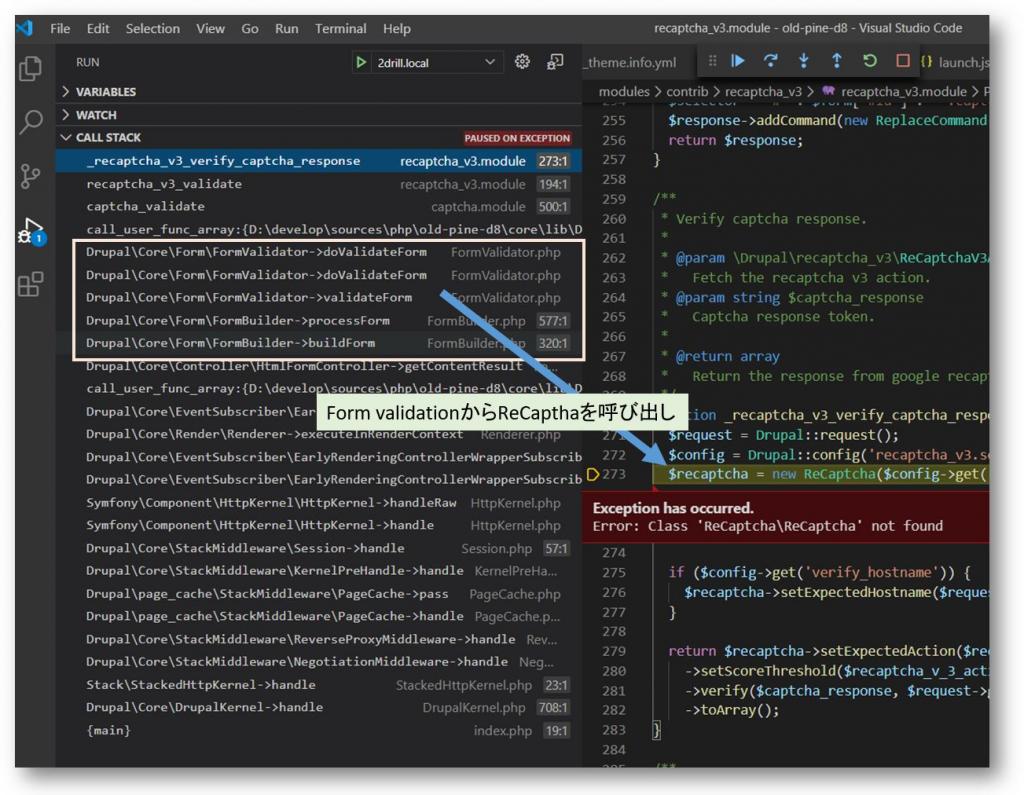
- 上記画面から見ると、クラス(ReCaptcha)を呼び出す元はFormのFormValidatorでした。
- クラス(ReCaptcha)を使用するために、ReCaptcha V3のファイルにパスを追加すればよいですが、今後のReCaptcha V3のバージョンアップ時に再度パスを入れないといけないです(おそらくその時に忘れるでしょう)
- 以下の自動クラスロードファイルを呼び出せればいろいろなクラスを自動的に関連づけるようになります
require_once DRUPAL_ROOT . '/modules/recaptcha/recaptcha-php/src/autoload.php';
- 以下の自動クラスロードファイルを呼び出せればいろいろなクラスを自動的に関連づけるようになります
- 解決はいろいろ方法を考えられますが、以下の二つは簡単だと思います
- sites/default/settings ファイルに上記記述を追加します
- カスタムモジュールを作成して、hook_form_alterで上記記述を追加
function module_helper_form_alter(&$form, \Drupal\Core\Form\FormStateInterface $form_state, $form_id){
 if ($form_id == 'user_login_form') {
    require_once DRUPAL_ROOT . '/modules/recaptcha/recaptcha-php/src/autoload.php';;
 }
}
モジュール(reCAPTCHA v3)が通常にインストール
- モジュール:reCAPTCHA v3 が説明通りにDrupal8にインストール、有効化します
- 依存しているモジュール: captcha もインストール、有効化します
- サイト設定(Home >> Administration >> Configuration >> People >> CAPTCHA settings)でReCaptchaを設定します
- まず、設定ページ上の「register for reCAPTCHA」リンクをクリックして、Googleの reCAPTCHA v3 (v2ではない)でSite Key/Secret Key を作成します
- 作成されたSite Key/Secret Keyをコピーして、ReCaptchaモジュールの設定画面にペストします
- 「reCAPTCHA v3 actions」タブで任意名前でreCAPTCHAアクションを作成します
- 「CAPTCHA settings」タブで、作成したreCAPTCHAアクションを「Default challenge type」に設定します
- 最後、「Form settings」タブで、必要なフォーム(例:ログインページ)にCAPTCHA を有効にします
- CAPTCHA が有効なページ(例:ログインページ)に遷移し、reCaptchaが動作していることを確認します
クラス(ReCaptcha)が見つからないエラーが発生
- reCAPTCHAのアクションが有効なページ(例:ログインページ)が動作(ログイン動作)時に、ReCaptchaクラスが見つからないエラーが発生しました。
The website encountered an unexpected error. Please try again later.
Error: Class 'ReCaptcha\ReCaptcha' not found in _recaptcha_v3_verify_captcha_response() (line 264 of modules/contrib/recaptcha_v3/recaptcha_v3.module).
- モジュール(reCaptcha v3)のソースコードを解析してみたら、どこもReCaptchaクラスを定義していないないです
- クラス(ReCaptcha)を読めるように「drupal8: モジュール(ReCaptha)のコードを変更せず、読み込む方法」をご参考ください
- モジュール(reCaptcha v3)のREADMEを読んでみたら、実はgoogle/reCaptchaライブラリを依存しています
・・・・・・・・・・・・・・・・・
・・・・・・・・・・・・・・・・・

REQUIREMENTS
------------

This module requires the following module:

 * Captcha (https://www.drupal.org/project/captcha)

This module requires the following library:

 * google/recaptacha (https://github.com/google/recaptcha)

RECOMMENDED MODULES
-------------------

 * reCAPTCHA (https://www.drupal.org/project/recaptcha):
   When enabled, reCAPTCHA v2 becomes available as fallback challenge.

INSTALLATION
------------

 * Install as you would normally install a contributed Drupal module. Visit
   https://www.drupal.org/documentation/install/modules-themes/modules-8
   for further information.

 * If not using Composer,
   install the google/recaptacha (https://github.com/google/recaptcha) library.
- READMEの説明通りに、githubでgoogle/recaptchaのPHPライブラリをダウンロードして、ライブラリの下に置き来ます
- sites/all/libraries/google.recaptcha
- もちろん、Librariesモジュールもインストール、有効化する必要があります
Drupal7の初期のモジュール管理画面ではでモジュールの検索、グルーピングはできません
- Drupal7では、モジュールの管理画面がシンプルで、検索、グルーピングなどの機能はありません
- モジュールが少ない時に問題はあまりないようで、かつ開発環境でなければ、モジュールに関する操作は少ないから、そのままで良いでしょう
- モジュールの数が多くなると、また開発環境で、頻繁にモジュールのインストール、有効化設定を行うと、やはりモジュールの検索、グルーピング機能が必要となります
モジュールを管理するモジュール(Module Filter)の導入より検索、グルーピング化が可能になる
- モジュール:Modu Filter7.x-2.0をダウンロード、インストール、有効化します
- 以下のようなモジュールグルーピング化され、モジュールの検索も可能となります
今回、画面でポップアップでデータ入力、ajaxでデータを更新することを試みたいですが、jQuery、Bootstrapなどのmodalライブラリで実現ができます。但しDrupalサイトでポップアップを作るとしたら、やはりctoolsのModal機能を利用してみたいです(ctools(Chaos tool suite)はDrualの開発によく利用されているAPI)。
やりたいこと:ポップアップを立ち上げて入力したデータをajaxでサーバーと交信
- ポップアップ(modal)の作成
- データ入力フォームの表示
- 入力されたデータをajaxでサーバーに送信、データ更新
ポップアップ作成の流れの基本:ctoolsのmodal.jsを利用します
- ポップアップを開くリンク/ボタンの作成
- ctoolsのmodal.js、modal.cssをこのページに入れる(ajaxで操作するため)
- ポップアップのリンク/ボタンがクリックされた、ポップアップが開く
- ポップアップのフォームにデータ入力、送信ボタンクリック
- 入力されたデータをサーバーにajaxで送信、データ更新される
- 入力されたデータをサーバーにajaxで送信、データ更新される
ctoolsのmodal利用の問題点
- ctoolsのmodal利用に関する紹介はウェブ上にたくさんあります。また、インストールされたctools(modules\ctools\ctools_ajax_sample\ctools_ajax_sample.module)にサンプルプログラムもあります
- 問題点1:ポップアップに表示されるフォームはjavascriptでhtmlコードとして吐き出されています(modules\ctools\ctools_ajax_sample\js\ctools-ajax-sample.js)
- 簡単なフォームに問題はないが、複雑なフォームに煩雑になります
- 問題点2:ポップアップウィンドウに関する設定はphpソースコード内で定義
- ロジックとUI設定を分離しべき、ポップアップに関する設定はcss、jsに任せるべき
ctoolsのmodal利用の改善
- 上記問題1は、DrupalのForm APIを利用して、フォーム作成を行います
- 上記問題2は、ポップアップの外観はサイト全体のテーマ(bootstrap)に統一し、背景、フォントサイズなどはcssファイルで個別に設定します
ポップアップの作成
- ポップアップを起動するリンク/ボタンの作成は省略します
- ポップアップとの通信URLをhook_menuで作成
$items['my-module/%ctools_js/add'] = array(
	'page callback' => 'my_module_callback',
	'page arguments' => array(1),
	'access callback' => TRUE,
	'type' => MENU_CALLBACK,
);
- URLの設定に「%ctools_js」部分があります。ここで、'nojs'の定数を入力する必要はあります。例:http://your-site/my-module/nojs/add
- ポップアップの起動リンク/ボタンのクラス属性: class="ctools-use-modal"をセットします(これがないと、Modalポップアップの起動はできないです)
- ページのコールバック関数(my_module_callback)の作成
function my_module_callback($ajax) { if ($ajax) { // ctoolsのajax、modalに関するjsファイルをクライアントへ ctools_include('ajax'); ctools_include('modal'); //フォーム作成に関する上方 $form_state = array( 'ajax' => TRUE, 'title' => t('New Group Creation'), ); //ポップアップフォームの作成 //フォームからの更新データを$form_stateにセットする $output = ctools_modal_form_wrapper('my_module_form', $form_state); //新規ポップアップにajaxが有効にする if (!empty($form_state['ajax_commands'])) { $output = $form_state['ajax_commands']; } //ポップアップの出力 print ajax_render($output); drupal_exit(); } else { return drupal_get_form('mymodule_form'); } } // ポップアップにある入力フォームの定義 function my_module_form($form, $form_state) { $form = array(); $form['new_link_text'] = array( '#type' => 'textfield', '#title' => t('Group Name'), ); $form['submit'] = array( '#type' => 'submit', '#value' => t('Submit'), ); return $form; } // データ更新 function my_module_form_submit(&$form, &$form_state) { // データの更新 // ロジックは省略 // ポップアップを閉じるコマンド $form_state['ajax_commands'][] = ctools_modal_command_dismiss(); } - 注目すべき関数の役割: ctools_modal_form_wrapper
- 定義されたフォーム(my_module_form)をレンダリング可能にする
- ajaxからのデータ送信情報を$form_stateに設定
- hook_form_submitなどの起動
やりたいこと:Drupalのプログラムレベルで簡単にajaxを利用してクライアント側でデータ交信をしたいです
- 環境:Drupal7.54
- DrupalのFormAPIで簡単にajaxの実装ができます(Drupalのフォーム(FromAPI)でのajaxの実装 )
- FormAPIだけではなく、Drupalをカスタマイズ時にいろいろなところでajaxを実装したいことがあります
ポイント1:Drupalでajaxに必要なライブラリをロードし、クライアント側にjquery.form.jsファイルをセット
- サーバー側でdrupal.ajaxのライブラリをロードする必要があります
- クライアント側にjquery.form.jsファイルを設置する必要があります
- この処理はajax処理するページをロード時に行えれば良いです。
- 例:hook_init()内で処理する
/**
 * Implements hook_init().
 */
function YOUR_MODULE_NAME_init()
{
  drupal_add_js('misc/jquery.form.js');
  drupal_add_library('system','drupal.ajax');
}
- 例:hook_init()内で処理する
- クライアント側のブラウザのプロパティでjquery.form.jsがセットされたことの確認ができます
ポイント2:クライアント側のajax起動リンク内にajax対応可否のパラメーター「nojs」とクラス属性「use-ajax」のセット
- ajaxの起動リンクの作成基本パターン:
<a href="text/ajax/nojs/1234" class="use-ajax">ajaxリンク</a>
- hrefにある「nojs」が決まりの文字
- hrefにある「1234」はサーバー側に転送したい必要なパラメーター
- class="use-ajax"はこのリンクがajax用に決める
- クライアント側のjsで使用しているブラウザがajax対応可能かを判断して、ajax起動リンクに「nojs」のパラメーターを書き換え(利用可能:nojs⇒ajax)てサーバー側に転送
- サーバー側がajax利用可否よりクライアント側にajax対応有無の結果を返します
- 上記例のプログラムは以下のようで
/**
 * Implements hook_init().
 */
function test_module_init()
{
  drupal_add_js('misc/jquery.form.js');
  drupal_add_library('system','drupal.ajax');
}

/**
 *  Implementation of hook_menu()
 */
function test_module_menu() {
  $items['test/ajax/%/%']=array(     // URLの2,3番目がクライアント側で生成
      'page callback' => 'ajax_node_response',
      'page arguments' => array(2,3),   // URLの2,3番目の引数をコールバック関数に渡す
      'access callback' => 'user_access',
      'access arguments' => array('access content'),
      'type' => MENU_CALLBACK,
  );
  return $items;
}

function ajax_node_response($type="ajax", $nid=0){
  $node = node_load( $nid, NULL, false );
  $vnode = node_view($node);
  $output = theme('node', $vnode);
  if( $type="ajax" ){
    $commands=array();
    $commands[]=ajax_command_replace( '#block-system-main','<section id="block-system-main">'.$output.'</section>' ) ;
    $page = array(
      '#type' => 'ajax',
      '#commands' => $commands,
    );
    ajax_deliver( $page ) ;   // ajax対応ブラウザの結果
  } else {
    $output = '<div id="content">'.$output.'</div>';  // ajax非対応ブラウザの結果
    return $output;
  }
}
ポイント3:クライアント側で実行させたい部分はajax_commandを使用します
- クライアント側で処理結果をどこに入り替えはajax_command_replaceで指定します
- 結果の挿入、入れ替え、削除、css処理などがいろいろあります。詳細は本家のajax_command一覧を参考してください
モジュール(ReCaptcha V3)がReCaptchaを呼び出せない
- 手動でReCaptcha V3をインストール時に、依存しているモジュール(ReCaptcha)を呼び出せない
- ReCaptcha V3の手動インストールは「Drupal8 : ReCaptcha V3 の使用時にクラス(ReCaptcha)が見つからないエラーおよび対処法」をご参考
- ReCaptcha V3が元々Composerによってインストールされることを設計されています。つまり、Drupalの通常インストール(モジュールのインストール管理画面)ではうまく作動しません
- ReCaptcha V3をComposerでインストールするときに、ほか(ReCaptcha)の依存関係をauto_loadなどのファイルに自動的に関連付けています
- ComposerでReCaptcha V3をインストールできないときに、上記関連付けはできないです。自分でReCaptchaとの関連付ける必要はあります
- ReCaptcha V3を実行したときに、まず依存するモジュールのクラス(ReCaptcha)を呼びだすエラーが発生します
デバッカーでクラス(ReCaptcha)呼び出す元を特定
- XDebugでReCaptchaを呼び出す元を簡単に確認できます
- 上記画面から見ると、クラス(ReCaptcha)を呼び出す元はFormのFormValidatorでした。
- クラス(ReCaptcha)を使用するために、ReCaptcha V3のファイルにパスを追加すればよいですが、今後のReCaptcha V3のバージョンアップ時に再度パスを入れないといけないです(おそらくその時に忘れるでしょう)
- 以下の自動クラスロードファイルを呼び出せればいろいろなクラスを自動的に関連づけるようになります
require_once DRUPAL_ROOT . '/modules/recaptcha/recaptcha-php/src/autoload.php';
- 以下の自動クラスロードファイルを呼び出せればいろいろなクラスを自動的に関連づけるようになります
- 解決はいろいろ方法を考えられますが、以下の二つは簡単だと思います
- sites/default/settings ファイルに上記記述を追加します
- カスタムモジュールを作成して、hook_form_alterで上記記述を追加
function module_helper_form_alter(&$form, \Drupal\Core\Form\FormStateInterface $form_state, $form_id){
 if ($form_id == 'user_login_form') {
    require_once DRUPAL_ROOT . '/modules/recaptcha/recaptcha-php/src/autoload.php';;
 }
}
モジュール(reCAPTCHA v3)が通常にインストール
- モジュール:reCAPTCHA v3 が説明通りにDrupal8にインストール、有効化します
- 依存しているモジュール: captcha もインストール、有効化します
- サイト設定(Home >> Administration >> Configuration >> People >> CAPTCHA settings)でReCaptchaを設定します
- まず、設定ページ上の「register for reCAPTCHA」リンクをクリックして、Googleの reCAPTCHA v3 (v2ではない)でSite Key/Secret Key を作成します
- 作成されたSite Key/Secret Keyをコピーして、ReCaptchaモジュールの設定画面にペストします
- 「reCAPTCHA v3 actions」タブで任意名前でreCAPTCHAアクションを作成します
- 「CAPTCHA settings」タブで、作成したreCAPTCHAアクションを「Default challenge type」に設定します
- 最後、「Form settings」タブで、必要なフォーム(例:ログインページ)にCAPTCHA を有効にします
- CAPTCHA が有効なページ(例:ログインページ)に遷移し、reCaptchaが動作していることを確認します
クラス(ReCaptcha)が見つからないエラーが発生
- reCAPTCHAのアクションが有効なページ(例:ログインページ)が動作(ログイン動作)時に、ReCaptchaクラスが見つからないエラーが発生しました。
The website encountered an unexpected error. Please try again later.
Error: Class 'ReCaptcha\ReCaptcha' not found in _recaptcha_v3_verify_captcha_response() (line 264 of modules/contrib/recaptcha_v3/recaptcha_v3.module).
- モジュール(reCaptcha v3)のソースコードを解析してみたら、どこもReCaptchaクラスを定義していないないです
- クラス(ReCaptcha)を読めるように「drupal8: モジュール(ReCaptha)のコードを変更せず、読み込む方法」をご参考ください
- モジュール(reCaptcha v3)のREADMEを読んでみたら、実はgoogle/reCaptchaライブラリを依存しています
・・・・・・・・・・・・・・・・・
・・・・・・・・・・・・・・・・・

REQUIREMENTS
------------

This module requires the following module:

 * Captcha (https://www.drupal.org/project/captcha)

This module requires the following library:

 * google/recaptacha (https://github.com/google/recaptcha)

RECOMMENDED MODULES
-------------------

 * reCAPTCHA (https://www.drupal.org/project/recaptcha):
   When enabled, reCAPTCHA v2 becomes available as fallback challenge.

INSTALLATION
------------

 * Install as you would normally install a contributed Drupal module. Visit
   https://www.drupal.org/documentation/install/modules-themes/modules-8
   for further information.

 * If not using Composer,
   install the google/recaptacha (https://github.com/google/recaptcha) library.
- READMEの説明通りに、githubでgoogle/recaptchaのPHPライブラリをダウンロードして、ライブラリの下に置き来ます
- sites/all/libraries/google.recaptcha
- もちろん、Librariesモジュールもインストール、有効化する必要があります
Drupal7の初期のモジュール管理画面ではでモジュールの検索、グルーピングはできません
- Drupal7では、モジュールの管理画面がシンプルで、検索、グルーピングなどの機能はありません
- モジュールが少ない時に問題はあまりないようで、かつ開発環境でなければ、モジュールに関する操作は少ないから、そのままで良いでしょう
- モジュールの数が多くなると、また開発環境で、頻繁にモジュールのインストール、有効化設定を行うと、やはりモジュールの検索、グルーピング機能が必要となります
モジュールを管理するモジュール(Module Filter)の導入より検索、グルーピング化が可能になる
- モジュール:Modu Filter7.x-2.0をダウンロード、インストール、有効化します
- 以下のようなモジュールグルーピング化され、モジュールの検索も可能となります
今回、画面でポップアップでデータ入力、ajaxでデータを更新することを試みたいですが、jQuery、Bootstrapなどのmodalライブラリで実現ができます。但しDrupalサイトでポップアップを作るとしたら、やはりctoolsのModal機能を利用してみたいです(ctools(Chaos tool suite)はDrualの開発によく利用されているAPI)。
やりたいこと:ポップアップを立ち上げて入力したデータをajaxでサーバーと交信
- ポップアップ(modal)の作成
- データ入力フォームの表示
- 入力されたデータをajaxでサーバーに送信、データ更新
ポップアップ作成の流れの基本:ctoolsのmodal.jsを利用します
- ポップアップを開くリンク/ボタンの作成
- ctoolsのmodal.js、modal.cssをこのページに入れる(ajaxで操作するため)
- ポップアップのリンク/ボタンがクリックされた、ポップアップが開く
- ポップアップのフォームにデータ入力、送信ボタンクリック
- 入力されたデータをサーバーにajaxで送信、データ更新される
- 入力されたデータをサーバーにajaxで送信、データ更新される
ctoolsのmodal利用の問題点
- ctoolsのmodal利用に関する紹介はウェブ上にたくさんあります。また、インストールされたctools(modules\ctools\ctools_ajax_sample\ctools_ajax_sample.module)にサンプルプログラムもあります
- 問題点1:ポップアップに表示されるフォームはjavascriptでhtmlコードとして吐き出されています(modules\ctools\ctools_ajax_sample\js\ctools-ajax-sample.js)
- 簡単なフォームに問題はないが、複雑なフォームに煩雑になります
- 問題点2:ポップアップウィンドウに関する設定はphpソースコード内で定義
- ロジックとUI設定を分離しべき、ポップアップに関する設定はcss、jsに任せるべき
ctoolsのmodal利用の改善
- 上記問題1は、DrupalのForm APIを利用して、フォーム作成を行います
- 上記問題2は、ポップアップの外観はサイト全体のテーマ(bootstrap)に統一し、背景、フォントサイズなどはcssファイルで個別に設定します
ポップアップの作成
- ポップアップを起動するリンク/ボタンの作成は省略します
- ポップアップとの通信URLをhook_menuで作成
$items['my-module/%ctools_js/add'] = array(
	'page callback' => 'my_module_callback',
	'page arguments' => array(1),
	'access callback' => TRUE,
	'type' => MENU_CALLBACK,
);
- URLの設定に「%ctools_js」部分があります。ここで、'nojs'の定数を入力する必要はあります。例:http://your-site/my-module/nojs/add
- ポップアップの起動リンク/ボタンのクラス属性: class="ctools-use-modal"をセットします(これがないと、Modalポップアップの起動はできないです)
- ページのコールバック関数(my_module_callback)の作成
function my_module_callback($ajax) { if ($ajax) { // ctoolsのajax、modalに関するjsファイルをクライアントへ ctools_include('ajax'); ctools_include('modal'); //フォーム作成に関する上方 $form_state = array( 'ajax' => TRUE, 'title' => t('New Group Creation'), ); //ポップアップフォームの作成 //フォームからの更新データを$form_stateにセットする $output = ctools_modal_form_wrapper('my_module_form', $form_state); //新規ポップアップにajaxが有効にする if (!empty($form_state['ajax_commands'])) { $output = $form_state['ajax_commands']; } //ポップアップの出力 print ajax_render($output); drupal_exit(); } else { return drupal_get_form('mymodule_form'); } } // ポップアップにある入力フォームの定義 function my_module_form($form, $form_state) { $form = array(); $form['new_link_text'] = array( '#type' => 'textfield', '#title' => t('Group Name'), ); $form['submit'] = array( '#type' => 'submit', '#value' => t('Submit'), ); return $form; } // データ更新 function my_module_form_submit(&$form, &$form_state) { // データの更新 // ロジックは省略 // ポップアップを閉じるコマンド $form_state['ajax_commands'][] = ctools_modal_command_dismiss(); } - 注目すべき関数の役割: ctools_modal_form_wrapper
- 定義されたフォーム(my_module_form)をレンダリング可能にする
- ajaxからのデータ送信情報を$form_stateに設定
- hook_form_submitなどの起動
やりたいこと:Drupalのプログラムレベルで簡単にajaxを利用してクライアント側でデータ交信をしたいです
- 環境:Drupal7.54
- DrupalのFormAPIで簡単にajaxの実装ができます(Drupalのフォーム(FromAPI)でのajaxの実装 )
- FormAPIだけではなく、Drupalをカスタマイズ時にいろいろなところでajaxを実装したいことがあります
ポイント1:Drupalでajaxに必要なライブラリをロードし、クライアント側にjquery.form.jsファイルをセット
- サーバー側でdrupal.ajaxのライブラリをロードする必要があります
- クライアント側にjquery.form.jsファイルを設置する必要があります
- この処理はajax処理するページをロード時に行えれば良いです。
- 例:hook_init()内で処理する
/**
 * Implements hook_init().
 */
function YOUR_MODULE_NAME_init()
{
  drupal_add_js('misc/jquery.form.js');
  drupal_add_library('system','drupal.ajax');
}
- 例:hook_init()内で処理する
- クライアント側のブラウザのプロパティでjquery.form.jsがセットされたことの確認ができます
ポイント2:クライアント側のajax起動リンク内にajax対応可否のパラメーター「nojs」とクラス属性「use-ajax」のセット
- ajaxの起動リンクの作成基本パターン:
<a href="text/ajax/nojs/1234" class="use-ajax">ajaxリンク</a>
- hrefにある「nojs」が決まりの文字
- hrefにある「1234」はサーバー側に転送したい必要なパラメーター
- class="use-ajax"はこのリンクがajax用に決める
- クライアント側のjsで使用しているブラウザがajax対応可能かを判断して、ajax起動リンクに「nojs」のパラメーターを書き換え(利用可能:nojs⇒ajax)てサーバー側に転送
- サーバー側がajax利用可否よりクライアント側にajax対応有無の結果を返します
- 上記例のプログラムは以下のようで
/**
 * Implements hook_init().
 */
function test_module_init()
{
  drupal_add_js('misc/jquery.form.js');
  drupal_add_library('system','drupal.ajax');
}

/**
 *  Implementation of hook_menu()
 */
function test_module_menu() {
  $items['test/ajax/%/%']=array(     // URLの2,3番目がクライアント側で生成
      'page callback' => 'ajax_node_response',
      'page arguments' => array(2,3),   // URLの2,3番目の引数をコールバック関数に渡す
      'access callback' => 'user_access',
      'access arguments' => array('access content'),
      'type' => MENU_CALLBACK,
  );
  return $items;
}

function ajax_node_response($type="ajax", $nid=0){
  $node = node_load( $nid, NULL, false );
  $vnode = node_view($node);
  $output = theme('node', $vnode);
  if( $type="ajax" ){
    $commands=array();
    $commands[]=ajax_command_replace( '#block-system-main','<section id="block-system-main">'.$output.'</section>' ) ;
    $page = array(
      '#type' => 'ajax',
      '#commands' => $commands,
    );
    ajax_deliver( $page ) ;   // ajax対応ブラウザの結果
  } else {
    $output = '<div id="content">'.$output.'</div>';  // ajax非対応ブラウザの結果
    return $output;
  }
}
ポイント3:クライアント側で実行させたい部分はajax_commandを使用します
- クライアント側で処理結果をどこに入り替えはajax_command_replaceで指定します
- 結果の挿入、入れ替え、削除、css処理などがいろいろあります。詳細は本家のajax_command一覧を参考してください
モジュール(ReCaptcha V3)がReCaptchaを呼び出せない
- 手動でReCaptcha V3をインストール時に、依存しているモジュール(ReCaptcha)を呼び出せない
- ReCaptcha V3の手動インストールは「Drupal8 : ReCaptcha V3 の使用時にクラス(ReCaptcha)が見つからないエラーおよび対処法」をご参考
- ReCaptcha V3が元々Composerによってインストールされることを設計されています。つまり、Drupalの通常インストール(モジュールのインストール管理画面)ではうまく作動しません
- ReCaptcha V3をComposerでインストールするときに、ほか(ReCaptcha)の依存関係をauto_loadなどのファイルに自動的に関連付けています
- ComposerでReCaptcha V3をインストールできないときに、上記関連付けはできないです。自分でReCaptchaとの関連付ける必要はあります
- ReCaptcha V3を実行したときに、まず依存するモジュールのクラス(ReCaptcha)を呼びだすエラーが発生します
デバッカーでクラス(ReCaptcha)呼び出す元を特定
- XDebugでReCaptchaを呼び出す元を簡単に確認できます
- 上記画面から見ると、クラス(ReCaptcha)を呼び出す元はFormのFormValidatorでした。
- クラス(ReCaptcha)を使用するために、ReCaptcha V3のファイルにパスを追加すればよいですが、今後のReCaptcha V3のバージョンアップ時に再度パスを入れないといけないです(おそらくその時に忘れるでしょう)
- 以下の自動クラスロードファイルを呼び出せればいろいろなクラスを自動的に関連づけるようになります
require_once DRUPAL_ROOT . '/modules/recaptcha/recaptcha-php/src/autoload.php';
- 以下の自動クラスロードファイルを呼び出せればいろいろなクラスを自動的に関連づけるようになります
- 解決はいろいろ方法を考えられますが、以下の二つは簡単だと思います
- sites/default/settings ファイルに上記記述を追加します
- カスタムモジュールを作成して、hook_form_alterで上記記述を追加
function module_helper_form_alter(&$form, \Drupal\Core\Form\FormStateInterface $form_state, $form_id){
 if ($form_id == 'user_login_form') {
    require_once DRUPAL_ROOT . '/modules/recaptcha/recaptcha-php/src/autoload.php';;
 }
}
モジュール(reCAPTCHA v3)が通常にインストール
- モジュール:reCAPTCHA v3 が説明通りにDrupal8にインストール、有効化します
- 依存しているモジュール: captcha もインストール、有効化します
- サイト設定(Home >> Administration >> Configuration >> People >> CAPTCHA settings)でReCaptchaを設定します
- まず、設定ページ上の「register for reCAPTCHA」リンクをクリックして、Googleの reCAPTCHA v3 (v2ではない)でSite Key/Secret Key を作成します
- 作成されたSite Key/Secret Keyをコピーして、ReCaptchaモジュールの設定画面にペストします
- 「reCAPTCHA v3 actions」タブで任意名前でreCAPTCHAアクションを作成します
- 「CAPTCHA settings」タブで、作成したreCAPTCHAアクションを「Default challenge type」に設定します
- 最後、「Form settings」タブで、必要なフォーム(例:ログインページ)にCAPTCHA を有効にします
- CAPTCHA が有効なページ(例:ログインページ)に遷移し、reCaptchaが動作していることを確認します
クラス(ReCaptcha)が見つからないエラーが発生
- reCAPTCHAのアクションが有効なページ(例:ログインページ)が動作(ログイン動作)時に、ReCaptchaクラスが見つからないエラーが発生しました。
The website encountered an unexpected error. Please try again later.
Error: Class 'ReCaptcha\ReCaptcha' not found in _recaptcha_v3_verify_captcha_response() (line 264 of modules/contrib/recaptcha_v3/recaptcha_v3.module).
- モジュール(reCaptcha v3)のソースコードを解析してみたら、どこもReCaptchaクラスを定義していないないです
- クラス(ReCaptcha)を読めるように「drupal8: モジュール(ReCaptha)のコードを変更せず、読み込む方法」をご参考ください
- モジュール(reCaptcha v3)のREADMEを読んでみたら、実はgoogle/reCaptchaライブラリを依存しています
・・・・・・・・・・・・・・・・・
・・・・・・・・・・・・・・・・・

REQUIREMENTS
------------

This module requires the following module:

 * Captcha (https://www.drupal.org/project/captcha)

This module requires the following library:

 * google/recaptacha (https://github.com/google/recaptcha)

RECOMMENDED MODULES
-------------------

 * reCAPTCHA (https://www.drupal.org/project/recaptcha):
   When enabled, reCAPTCHA v2 becomes available as fallback challenge.

INSTALLATION
------------

 * Install as you would normally install a contributed Drupal module. Visit
   https://www.drupal.org/documentation/install/modules-themes/modules-8
   for further information.

 * If not using Composer,
   install the google/recaptacha (https://github.com/google/recaptcha) library.
- READMEの説明通りに、githubでgoogle/recaptchaのPHPライブラリをダウンロードして、ライブラリの下に置き来ます
- sites/all/libraries/google.recaptcha
- もちろん、Librariesモジュールもインストール、有効化する必要があります
Drupal7の初期のモジュール管理画面ではでモジュールの検索、グルーピングはできません
- Drupal7では、モジュールの管理画面がシンプルで、検索、グルーピングなどの機能はありません
- モジュールが少ない時に問題はあまりないようで、かつ開発環境でなければ、モジュールに関する操作は少ないから、そのままで良いでしょう
- モジュールの数が多くなると、また開発環境で、頻繁にモジュールのインストール、有効化設定を行うと、やはりモジュールの検索、グルーピング機能が必要となります
モジュールを管理するモジュール(Module Filter)の導入より検索、グルーピング化が可能になる
- モジュール:Modu Filter7.x-2.0をダウンロード、インストール、有効化します
- 以下のようなモジュールグルーピング化され、モジュールの検索も可能となります
今回、画面でポップアップでデータ入力、ajaxでデータを更新することを試みたいですが、jQuery、Bootstrapなどのmodalライブラリで実現ができます。但しDrupalサイトでポップアップを作るとしたら、やはりctoolsのModal機能を利用してみたいです(ctools(Chaos tool suite)はDrualの開発によく利用されているAPI)。
やりたいこと:ポップアップを立ち上げて入力したデータをajaxでサーバーと交信
- ポップアップ(modal)の作成
- データ入力フォームの表示
- 入力されたデータをajaxでサーバーに送信、データ更新
ポップアップ作成の流れの基本:ctoolsのmodal.jsを利用します
- ポップアップを開くリンク/ボタンの作成
- ctoolsのmodal.js、modal.cssをこのページに入れる(ajaxで操作するため)
- ポップアップのリンク/ボタンがクリックされた、ポップアップが開く
- ポップアップのフォームにデータ入力、送信ボタンクリック
- 入力されたデータをサーバーにajaxで送信、データ更新される
- 入力されたデータをサーバーにajaxで送信、データ更新される
ctoolsのmodal利用の問題点
- ctoolsのmodal利用に関する紹介はウェブ上にたくさんあります。また、インストールされたctools(modules\ctools\ctools_ajax_sample\ctools_ajax_sample.module)にサンプルプログラムもあります
- 問題点1:ポップアップに表示されるフォームはjavascriptでhtmlコードとして吐き出されています(modules\ctools\ctools_ajax_sample\js\ctools-ajax-sample.js)
- 簡単なフォームに問題はないが、複雑なフォームに煩雑になります
- 問題点2:ポップアップウィンドウに関する設定はphpソースコード内で定義
- ロジックとUI設定を分離しべき、ポップアップに関する設定はcss、jsに任せるべき
ctoolsのmodal利用の改善
- 上記問題1は、DrupalのForm APIを利用して、フォーム作成を行います
- 上記問題2は、ポップアップの外観はサイト全体のテーマ(bootstrap)に統一し、背景、フォントサイズなどはcssファイルで個別に設定します
ポップアップの作成
- ポップアップを起動するリンク/ボタンの作成は省略します
- ポップアップとの通信URLをhook_menuで作成
$items['my-module/%ctools_js/add'] = array(
	'page callback' => 'my_module_callback',
	'page arguments' => array(1),
	'access callback' => TRUE,
	'type' => MENU_CALLBACK,
);
- URLの設定に「%ctools_js」部分があります。ここで、'nojs'の定数を入力する必要はあります。例:http://your-site/my-module/nojs/add
- ポップアップの起動リンク/ボタンのクラス属性: class="ctools-use-modal"をセットします(これがないと、Modalポップアップの起動はできないです)
- ページのコールバック関数(my_module_callback)の作成
function my_module_callback($ajax) { if ($ajax) { // ctoolsのajax、modalに関するjsファイルをクライアントへ ctools_include('ajax'); ctools_include('modal'); //フォーム作成に関する上方 $form_state = array( 'ajax' => TRUE, 'title' => t('New Group Creation'), ); //ポップアップフォームの作成 //フォームからの更新データを$form_stateにセットする $output = ctools_modal_form_wrapper('my_module_form', $form_state); //新規ポップアップにajaxが有効にする if (!empty($form_state['ajax_commands'])) { $output = $form_state['ajax_commands']; } //ポップアップの出力 print ajax_render($output); drupal_exit(); } else { return drupal_get_form('mymodule_form'); } } // ポップアップにある入力フォームの定義 function my_module_form($form, $form_state) { $form = array(); $form['new_link_text'] = array( '#type' => 'textfield', '#title' => t('Group Name'), ); $form['submit'] = array( '#type' => 'submit', '#value' => t('Submit'), ); return $form; } // データ更新 function my_module_form_submit(&$form, &$form_state) { // データの更新 // ロジックは省略 // ポップアップを閉じるコマンド $form_state['ajax_commands'][] = ctools_modal_command_dismiss(); } - 注目すべき関数の役割: ctools_modal_form_wrapper
- 定義されたフォーム(my_module_form)をレンダリング可能にする
- ajaxからのデータ送信情報を$form_stateに設定
- hook_form_submitなどの起動
やりたいこと:Drupalのプログラムレベルで簡単にajaxを利用してクライアント側でデータ交信をしたいです
- 環境:Drupal7.54
- DrupalのFormAPIで簡単にajaxの実装ができます(Drupalのフォーム(FromAPI)でのajaxの実装 )
- FormAPIだけではなく、Drupalをカスタマイズ時にいろいろなところでajaxを実装したいことがあります
ポイント1:Drupalでajaxに必要なライブラリをロードし、クライアント側にjquery.form.jsファイルをセット
- サーバー側でdrupal.ajaxのライブラリをロードする必要があります
- クライアント側にjquery.form.jsファイルを設置する必要があります
- この処理はajax処理するページをロード時に行えれば良いです。
- 例:hook_init()内で処理する
/**
 * Implements hook_init().
 */
function YOUR_MODULE_NAME_init()
{
  drupal_add_js('misc/jquery.form.js');
  drupal_add_library('system','drupal.ajax');
}
- 例:hook_init()内で処理する
- クライアント側のブラウザのプロパティでjquery.form.jsがセットされたことの確認ができます
ポイント2:クライアント側のajax起動リンク内にajax対応可否のパラメーター「nojs」とクラス属性「use-ajax」のセット
- ajaxの起動リンクの作成基本パターン:
<a href="text/ajax/nojs/1234" class="use-ajax">ajaxリンク</a>
- hrefにある「nojs」が決まりの文字
- hrefにある「1234」はサーバー側に転送したい必要なパラメーター
- class="use-ajax"はこのリンクがajax用に決める
- クライアント側のjsで使用しているブラウザがajax対応可能かを判断して、ajax起動リンクに「nojs」のパラメーターを書き換え(利用可能:nojs⇒ajax)てサーバー側に転送
- サーバー側がajax利用可否よりクライアント側にajax対応有無の結果を返します
- 上記例のプログラムは以下のようで
/**
 * Implements hook_init().
 */
function test_module_init()
{
  drupal_add_js('misc/jquery.form.js');
  drupal_add_library('system','drupal.ajax');
}

/**
 *  Implementation of hook_menu()
 */
function test_module_menu() {
  $items['test/ajax/%/%']=array(     // URLの2,3番目がクライアント側で生成
      'page callback' => 'ajax_node_response',
      'page arguments' => array(2,3),   // URLの2,3番目の引数をコールバック関数に渡す
      'access callback' => 'user_access',
      'access arguments' => array('access content'),
      'type' => MENU_CALLBACK,
  );
  return $items;
}

function ajax_node_response($type="ajax", $nid=0){
  $node = node_load( $nid, NULL, false );
  $vnode = node_view($node);
  $output = theme('node', $vnode);
  if( $type="ajax" ){
    $commands=array();
    $commands[]=ajax_command_replace( '#block-system-main','<section id="block-system-main">'.$output.'</section>' ) ;
    $page = array(
      '#type' => 'ajax',
      '#commands' => $commands,
    );
    ajax_deliver( $page ) ;   // ajax対応ブラウザの結果
  } else {
    $output = '<div id="content">'.$output.'</div>';  // ajax非対応ブラウザの結果
    return $output;
  }
}
ポイント3:クライアント側で実行させたい部分はajax_commandを使用します
- クライアント側で処理結果をどこに入り替えはajax_command_replaceで指定します
- 結果の挿入、入れ替え、削除、css処理などがいろいろあります。詳細は本家のajax_command一覧を参考してください
モジュール(ReCaptcha V3)がReCaptchaを呼び出せない
- 手動でReCaptcha V3をインストール時に、依存しているモジュール(ReCaptcha)を呼び出せない
- ReCaptcha V3の手動インストールは「Drupal8 : ReCaptcha V3 の使用時にクラス(ReCaptcha)が見つからないエラーおよび対処法」をご参考
- ReCaptcha V3が元々Composerによってインストールされることを設計されています。つまり、Drupalの通常インストール(モジュールのインストール管理画面)ではうまく作動しません
- ReCaptcha V3をComposerでインストールするときに、ほか(ReCaptcha)の依存関係をauto_loadなどのファイルに自動的に関連付けています
- ComposerでReCaptcha V3をインストールできないときに、上記関連付けはできないです。自分でReCaptchaとの関連付ける必要はあります
- ReCaptcha V3を実行したときに、まず依存するモジュールのクラス(ReCaptcha)を呼びだすエラーが発生します
デバッカーでクラス(ReCaptcha)呼び出す元を特定
- XDebugでReCaptchaを呼び出す元を簡単に確認できます
- 上記画面から見ると、クラス(ReCaptcha)を呼び出す元はFormのFormValidatorでした。
- クラス(ReCaptcha)を使用するために、ReCaptcha V3のファイルにパスを追加すればよいですが、今後のReCaptcha V3のバージョンアップ時に再度パスを入れないといけないです(おそらくその時に忘れるでしょう)
- 以下の自動クラスロードファイルを呼び出せればいろいろなクラスを自動的に関連づけるようになります
require_once DRUPAL_ROOT . '/modules/recaptcha/recaptcha-php/src/autoload.php';
- 以下の自動クラスロードファイルを呼び出せればいろいろなクラスを自動的に関連づけるようになります
- 解決はいろいろ方法を考えられますが、以下の二つは簡単だと思います
- sites/default/settings ファイルに上記記述を追加します
- カスタムモジュールを作成して、hook_form_alterで上記記述を追加
function module_helper_form_alter(&$form, \Drupal\Core\Form\FormStateInterface $form_state, $form_id){
 if ($form_id == 'user_login_form') {
    require_once DRUPAL_ROOT . '/modules/recaptcha/recaptcha-php/src/autoload.php';;
 }
}
モジュール(reCAPTCHA v3)が通常にインストール
- モジュール:reCAPTCHA v3 が説明通りにDrupal8にインストール、有効化します
- 依存しているモジュール: captcha もインストール、有効化します
- サイト設定(Home >> Administration >> Configuration >> People >> CAPTCHA settings)でReCaptchaを設定します
- まず、設定ページ上の「register for reCAPTCHA」リンクをクリックして、Googleの reCAPTCHA v3 (v2ではない)でSite Key/Secret Key を作成します
- 作成されたSite Key/Secret Keyをコピーして、ReCaptchaモジュールの設定画面にペストします
- 「reCAPTCHA v3 actions」タブで任意名前でreCAPTCHAアクションを作成します
- 「CAPTCHA settings」タブで、作成したreCAPTCHAアクションを「Default challenge type」に設定します
- 最後、「Form settings」タブで、必要なフォーム(例:ログインページ)にCAPTCHA を有効にします
- CAPTCHA が有効なページ(例:ログインページ)に遷移し、reCaptchaが動作していることを確認します
クラス(ReCaptcha)が見つからないエラーが発生
- reCAPTCHAのアクションが有効なページ(例:ログインページ)が動作(ログイン動作)時に、ReCaptchaクラスが見つからないエラーが発生しました。
The website encountered an unexpected error. Please try again later.
Error: Class 'ReCaptcha\ReCaptcha' not found in _recaptcha_v3_verify_captcha_response() (line 264 of modules/contrib/recaptcha_v3/recaptcha_v3.module).
- モジュール(reCaptcha v3)のソースコードを解析してみたら、どこもReCaptchaクラスを定義していないないです
- クラス(ReCaptcha)を読めるように「drupal8: モジュール(ReCaptha)のコードを変更せず、読み込む方法」をご参考ください
- モジュール(reCaptcha v3)のREADMEを読んでみたら、実はgoogle/reCaptchaライブラリを依存しています
・・・・・・・・・・・・・・・・・
・・・・・・・・・・・・・・・・・

REQUIREMENTS
------------

This module requires the following module:

 * Captcha (https://www.drupal.org/project/captcha)

This module requires the following library:

 * google/recaptacha (https://github.com/google/recaptcha)

RECOMMENDED MODULES
-------------------

 * reCAPTCHA (https://www.drupal.org/project/recaptcha):
   When enabled, reCAPTCHA v2 becomes available as fallback challenge.

INSTALLATION
------------

 * Install as you would normally install a contributed Drupal module. Visit
   https://www.drupal.org/documentation/install/modules-themes/modules-8
   for further information.

 * If not using Composer,
   install the google/recaptacha (https://github.com/google/recaptcha) library.
- READMEの説明通りに、githubでgoogle/recaptchaのPHPライブラリをダウンロードして、ライブラリの下に置き来ます
- sites/all/libraries/google.recaptcha
- もちろん、Librariesモジュールもインストール、有効化する必要があります
Drupal7の初期のモジュール管理画面ではでモジュールの検索、グルーピングはできません
- Drupal7では、モジュールの管理画面がシンプルで、検索、グルーピングなどの機能はありません
- モジュールが少ない時に問題はあまりないようで、かつ開発環境でなければ、モジュールに関する操作は少ないから、そのままで良いでしょう
- モジュールの数が多くなると、また開発環境で、頻繁にモジュールのインストール、有効化設定を行うと、やはりモジュールの検索、グルーピング機能が必要となります
モジュールを管理するモジュール(Module Filter)の導入より検索、グルーピング化が可能になる
- モジュール:Modu Filter7.x-2.0をダウンロード、インストール、有効化します
- 以下のようなモジュールグルーピング化され、モジュールの検索も可能となります
今回、画面でポップアップでデータ入力、ajaxでデータを更新することを試みたいですが、jQuery、Bootstrapなどのmodalライブラリで実現ができます。但しDrupalサイトでポップアップを作るとしたら、やはりctoolsのModal機能を利用してみたいです(ctools(Chaos tool suite)はDrualの開発によく利用されているAPI)。
やりたいこと:ポップアップを立ち上げて入力したデータをajaxでサーバーと交信
- ポップアップ(modal)の作成
- データ入力フォームの表示
- 入力されたデータをajaxでサーバーに送信、データ更新
ポップアップ作成の流れの基本:ctoolsのmodal.jsを利用します
- ポップアップを開くリンク/ボタンの作成
- ctoolsのmodal.js、modal.cssをこのページに入れる(ajaxで操作するため)
- ポップアップのリンク/ボタンがクリックされた、ポップアップが開く
- ポップアップのフォームにデータ入力、送信ボタンクリック
- 入力されたデータをサーバーにajaxで送信、データ更新される
- 入力されたデータをサーバーにajaxで送信、データ更新される
ctoolsのmodal利用の問題点
- ctoolsのmodal利用に関する紹介はウェブ上にたくさんあります。また、インストールされたctools(modules\ctools\ctools_ajax_sample\ctools_ajax_sample.module)にサンプルプログラムもあります
- 問題点1:ポップアップに表示されるフォームはjavascriptでhtmlコードとして吐き出されています(modules\ctools\ctools_ajax_sample\js\ctools-ajax-sample.js)
- 簡単なフォームに問題はないが、複雑なフォームに煩雑になります
- 問題点2:ポップアップウィンドウに関する設定はphpソースコード内で定義
- ロジックとUI設定を分離しべき、ポップアップに関する設定はcss、jsに任せるべき
ctoolsのmodal利用の改善
- 上記問題1は、DrupalのForm APIを利用して、フォーム作成を行います
- 上記問題2は、ポップアップの外観はサイト全体のテーマ(bootstrap)に統一し、背景、フォントサイズなどはcssファイルで個別に設定します
ポップアップの作成
- ポップアップを起動するリンク/ボタンの作成は省略します
- ポップアップとの通信URLをhook_menuで作成
$items['my-module/%ctools_js/add'] = array(
	'page callback' => 'my_module_callback',
	'page arguments' => array(1),
	'access callback' => TRUE,
	'type' => MENU_CALLBACK,
);
- URLの設定に「%ctools_js」部分があります。ここで、'nojs'の定数を入力する必要はあります。例:http://your-site/my-module/nojs/add
- ポップアップの起動リンク/ボタンのクラス属性: class="ctools-use-modal"をセットします(これがないと、Modalポップアップの起動はできないです)
- ページのコールバック関数(my_module_callback)の作成
function my_module_callback($ajax) { if ($ajax) { // ctoolsのajax、modalに関するjsファイルをクライアントへ ctools_include('ajax'); ctools_include('modal'); //フォーム作成に関する上方 $form_state = array( 'ajax' => TRUE, 'title' => t('New Group Creation'), ); //ポップアップフォームの作成 //フォームからの更新データを$form_stateにセットする $output = ctools_modal_form_wrapper('my_module_form', $form_state); //新規ポップアップにajaxが有効にする if (!empty($form_state['ajax_commands'])) { $output = $form_state['ajax_commands']; } //ポップアップの出力 print ajax_render($output); drupal_exit(); } else { return drupal_get_form('mymodule_form'); } } // ポップアップにある入力フォームの定義 function my_module_form($form, $form_state) { $form = array(); $form['new_link_text'] = array( '#type' => 'textfield', '#title' => t('Group Name'), ); $form['submit'] = array( '#type' => 'submit', '#value' => t('Submit'), ); return $form; } // データ更新 function my_module_form_submit(&$form, &$form_state) { // データの更新 // ロジックは省略 // ポップアップを閉じるコマンド $form_state['ajax_commands'][] = ctools_modal_command_dismiss(); } - 注目すべき関数の役割: ctools_modal_form_wrapper
- 定義されたフォーム(my_module_form)をレンダリング可能にする
- ajaxからのデータ送信情報を$form_stateに設定
- hook_form_submitなどの起動
やりたいこと:Drupalのプログラムレベルで簡単にajaxを利用してクライアント側でデータ交信をしたいです
- 環境:Drupal7.54
- DrupalのFormAPIで簡単にajaxの実装ができます(Drupalのフォーム(FromAPI)でのajaxの実装 )
- FormAPIだけではなく、Drupalをカスタマイズ時にいろいろなところでajaxを実装したいことがあります
ポイント1:Drupalでajaxに必要なライブラリをロードし、クライアント側にjquery.form.jsファイルをセット
- サーバー側でdrupal.ajaxのライブラリをロードする必要があります
- クライアント側にjquery.form.jsファイルを設置する必要があります
- この処理はajax処理するページをロード時に行えれば良いです。
- 例:hook_init()内で処理する
/**
 * Implements hook_init().
 */
function YOUR_MODULE_NAME_init()
{
  drupal_add_js('misc/jquery.form.js');
  drupal_add_library('system','drupal.ajax');
}
- 例:hook_init()内で処理する
- クライアント側のブラウザのプロパティでjquery.form.jsがセットされたことの確認ができます
ポイント2:クライアント側のajax起動リンク内にajax対応可否のパラメーター「nojs」とクラス属性「use-ajax」のセット
- ajaxの起動リンクの作成基本パターン:
<a href="text/ajax/nojs/1234" class="use-ajax">ajaxリンク</a>
- hrefにある「nojs」が決まりの文字
- hrefにある「1234」はサーバー側に転送したい必要なパラメーター
- class="use-ajax"はこのリンクがajax用に決める
- クライアント側のjsで使用しているブラウザがajax対応可能かを判断して、ajax起動リンクに「nojs」のパラメーターを書き換え(利用可能:nojs⇒ajax)てサーバー側に転送
- サーバー側がajax利用可否よりクライアント側にajax対応有無の結果を返します
- 上記例のプログラムは以下のようで
/**
 * Implements hook_init().
 */
function test_module_init()
{
  drupal_add_js('misc/jquery.form.js');
  drupal_add_library('system','drupal.ajax');
}

/**
 *  Implementation of hook_menu()
 */
function test_module_menu() {
  $items['test/ajax/%/%']=array(     // URLの2,3番目がクライアント側で生成
      'page callback' => 'ajax_node_response',
      'page arguments' => array(2,3),   // URLの2,3番目の引数をコールバック関数に渡す
      'access callback' => 'user_access',
      'access arguments' => array('access content'),
      'type' => MENU_CALLBACK,
  );
  return $items;
}

function ajax_node_response($type="ajax", $nid=0){
  $node = node_load( $nid, NULL, false );
  $vnode = node_view($node);
  $output = theme('node', $vnode);
  if( $type="ajax" ){
    $commands=array();
    $commands[]=ajax_command_replace( '#block-system-main','<section id="block-system-main">'.$output.'</section>' ) ;
    $page = array(
      '#type' => 'ajax',
      '#commands' => $commands,
    );
    ajax_deliver( $page ) ;   // ajax対応ブラウザの結果
  } else {
    $output = '<div id="content">'.$output.'</div>';  // ajax非対応ブラウザの結果
    return $output;
  }
}
ポイント3:クライアント側で実行させたい部分はajax_commandを使用します
- クライアント側で処理結果をどこに入り替えはajax_command_replaceで指定します
- 結果の挿入、入れ替え、削除、css処理などがいろいろあります。詳細は本家のajax_command一覧を参考してください
モジュール(ReCaptcha V3)がReCaptchaを呼び出せない
- 手動でReCaptcha V3をインストール時に、依存しているモジュール(ReCaptcha)を呼び出せない
- ReCaptcha V3の手動インストールは「Drupal8 : ReCaptcha V3 の使用時にクラス(ReCaptcha)が見つからないエラーおよび対処法」をご参考
- ReCaptcha V3が元々Composerによってインストールされることを設計されています。つまり、Drupalの通常インストール(モジュールのインストール管理画面)ではうまく作動しません
- ReCaptcha V3をComposerでインストールするときに、ほか(ReCaptcha)の依存関係をauto_loadなどのファイルに自動的に関連付けています
- ComposerでReCaptcha V3をインストールできないときに、上記関連付けはできないです。自分でReCaptchaとの関連付ける必要はあります
- ReCaptcha V3を実行したときに、まず依存するモジュールのクラス(ReCaptcha)を呼びだすエラーが発生します
デバッカーでクラス(ReCaptcha)呼び出す元を特定
- XDebugでReCaptchaを呼び出す元を簡単に確認できます
- 上記画面から見ると、クラス(ReCaptcha)を呼び出す元はFormのFormValidatorでした。
- クラス(ReCaptcha)を使用するために、ReCaptcha V3のファイルにパスを追加すればよいですが、今後のReCaptcha V3のバージョンアップ時に再度パスを入れないといけないです(おそらくその時に忘れるでしょう)
- 以下の自動クラスロードファイルを呼び出せればいろいろなクラスを自動的に関連づけるようになります
require_once DRUPAL_ROOT . '/modules/recaptcha/recaptcha-php/src/autoload.php';
- 以下の自動クラスロードファイルを呼び出せればいろいろなクラスを自動的に関連づけるようになります
- 解決はいろいろ方法を考えられますが、以下の二つは簡単だと思います
- sites/default/settings ファイルに上記記述を追加します
- カスタムモジュールを作成して、hook_form_alterで上記記述を追加
function module_helper_form_alter(&$form, \Drupal\Core\Form\FormStateInterface $form_state, $form_id){
 if ($form_id == 'user_login_form') {
    require_once DRUPAL_ROOT . '/modules/recaptcha/recaptcha-php/src/autoload.php';;
 }
}
モジュール(reCAPTCHA v3)が通常にインストール
- モジュール:reCAPTCHA v3 が説明通りにDrupal8にインストール、有効化します
- 依存しているモジュール: captcha もインストール、有効化します
- サイト設定(Home >> Administration >> Configuration >> People >> CAPTCHA settings)でReCaptchaを設定します
- まず、設定ページ上の「register for reCAPTCHA」リンクをクリックして、Googleの reCAPTCHA v3 (v2ではない)でSite Key/Secret Key を作成します
- 作成されたSite Key/Secret Keyをコピーして、ReCaptchaモジュールの設定画面にペストします
- 「reCAPTCHA v3 actions」タブで任意名前でreCAPTCHAアクションを作成します
- 「CAPTCHA settings」タブで、作成したreCAPTCHAアクションを「Default challenge type」に設定します
- 最後、「Form settings」タブで、必要なフォーム(例:ログインページ)にCAPTCHA を有効にします
- CAPTCHA が有効なページ(例:ログインページ)に遷移し、reCaptchaが動作していることを確認します
クラス(ReCaptcha)が見つからないエラーが発生
- reCAPTCHAのアクションが有効なページ(例:ログインページ)が動作(ログイン動作)時に、ReCaptchaクラスが見つからないエラーが発生しました。
The website encountered an unexpected error. Please try again later.
Error: Class 'ReCaptcha\ReCaptcha' not found in _recaptcha_v3_verify_captcha_response() (line 264 of modules/contrib/recaptcha_v3/recaptcha_v3.module).
- モジュール(reCaptcha v3)のソースコードを解析してみたら、どこもReCaptchaクラスを定義していないないです
- クラス(ReCaptcha)を読めるように「drupal8: モジュール(ReCaptha)のコードを変更せず、読み込む方法」をご参考ください
- モジュール(reCaptcha v3)のREADMEを読んでみたら、実はgoogle/reCaptchaライブラリを依存しています
・・・・・・・・・・・・・・・・・
・・・・・・・・・・・・・・・・・

REQUIREMENTS
------------

This module requires the following module:

 * Captcha (https://www.drupal.org/project/captcha)

This module requires the following library:

 * google/recaptacha (https://github.com/google/recaptcha)

RECOMMENDED MODULES
-------------------

 * reCAPTCHA (https://www.drupal.org/project/recaptcha):
   When enabled, reCAPTCHA v2 becomes available as fallback challenge.

INSTALLATION
------------

 * Install as you would normally install a contributed Drupal module. Visit
   https://www.drupal.org/documentation/install/modules-themes/modules-8
   for further information.

 * If not using Composer,
   install the google/recaptacha (https://github.com/google/recaptcha) library.
- READMEの説明通りに、githubでgoogle/recaptchaのPHPライブラリをダウンロードして、ライブラリの下に置き来ます
- sites/all/libraries/google.recaptcha
- もちろん、Librariesモジュールもインストール、有効化する必要があります
Drupal7の初期のモジュール管理画面ではでモジュールの検索、グルーピングはできません
- Drupal7では、モジュールの管理画面がシンプルで、検索、グルーピングなどの機能はありません
- モジュールが少ない時に問題はあまりないようで、かつ開発環境でなければ、モジュールに関する操作は少ないから、そのままで良いでしょう
- モジュールの数が多くなると、また開発環境で、頻繁にモジュールのインストール、有効化設定を行うと、やはりモジュールの検索、グルーピング機能が必要となります
モジュールを管理するモジュール(Module Filter)の導入より検索、グルーピング化が可能になる
- モジュール:Modu Filter7.x-2.0をダウンロード、インストール、有効化します
- 以下のようなモジュールグルーピング化され、モジュールの検索も可能となります
今回、画面でポップアップでデータ入力、ajaxでデータを更新することを試みたいですが、jQuery、Bootstrapなどのmodalライブラリで実現ができます。但しDrupalサイトでポップアップを作るとしたら、やはりctoolsのModal機能を利用してみたいです(ctools(Chaos tool suite)はDrualの開発によく利用されているAPI)。
やりたいこと:ポップアップを立ち上げて入力したデータをajaxでサーバーと交信
- ポップアップ(modal)の作成
- データ入力フォームの表示
- 入力されたデータをajaxでサーバーに送信、データ更新
ポップアップ作成の流れの基本:ctoolsのmodal.jsを利用します
- ポップアップを開くリンク/ボタンの作成
- ctoolsのmodal.js、modal.cssをこのページに入れる(ajaxで操作するため)
- ポップアップのリンク/ボタンがクリックされた、ポップアップが開く
- ポップアップのフォームにデータ入力、送信ボタンクリック
- 入力されたデータをサーバーにajaxで送信、データ更新される
- 入力されたデータをサーバーにajaxで送信、データ更新される
ctoolsのmodal利用の問題点
- ctoolsのmodal利用に関する紹介はウェブ上にたくさんあります。また、インストールされたctools(modules\ctools\ctools_ajax_sample\ctools_ajax_sample.module)にサンプルプログラムもあります
- 問題点1:ポップアップに表示されるフォームはjavascriptでhtmlコードとして吐き出されています(modules\ctools\ctools_ajax_sample\js\ctools-ajax-sample.js)
- 簡単なフォームに問題はないが、複雑なフォームに煩雑になります
- 問題点2:ポップアップウィンドウに関する設定はphpソースコード内で定義
- ロジックとUI設定を分離しべき、ポップアップに関する設定はcss、jsに任せるべき
ctoolsのmodal利用の改善
- 上記問題1は、DrupalのForm APIを利用して、フォーム作成を行います
- 上記問題2は、ポップアップの外観はサイト全体のテーマ(bootstrap)に統一し、背景、フォントサイズなどはcssファイルで個別に設定します
ポップアップの作成
- ポップアップを起動するリンク/ボタンの作成は省略します
- ポップアップとの通信URLをhook_menuで作成
$items['my-module/%ctools_js/add'] = array(
	'page callback' => 'my_module_callback',
	'page arguments' => array(1),
	'access callback' => TRUE,
	'type' => MENU_CALLBACK,
);
- URLの設定に「%ctools_js」部分があります。ここで、'nojs'の定数を入力する必要はあります。例:http://your-site/my-module/nojs/add
- ポップアップの起動リンク/ボタンのクラス属性: class="ctools-use-modal"をセットします(これがないと、Modalポップアップの起動はできないです)
- ページのコールバック関数(my_module_callback)の作成
function my_module_callback($ajax) { if ($ajax) { // ctoolsのajax、modalに関するjsファイルをクライアントへ ctools_include('ajax'); ctools_include('modal'); //フォーム作成に関する上方 $form_state = array( 'ajax' => TRUE, 'title' => t('New Group Creation'), ); //ポップアップフォームの作成 //フォームからの更新データを$form_stateにセットする $output = ctools_modal_form_wrapper('my_module_form', $form_state); //新規ポップアップにajaxが有効にする if (!empty($form_state['ajax_commands'])) { $output = $form_state['ajax_commands']; } //ポップアップの出力 print ajax_render($output); drupal_exit(); } else { return drupal_get_form('mymodule_form'); } } // ポップアップにある入力フォームの定義 function my_module_form($form, $form_state) { $form = array(); $form['new_link_text'] = array( '#type' => 'textfield', '#title' => t('Group Name'), ); $form['submit'] = array( '#type' => 'submit', '#value' => t('Submit'), ); return $form; } // データ更新 function my_module_form_submit(&$form, &$form_state) { // データの更新 // ロジックは省略 // ポップアップを閉じるコマンド $form_state['ajax_commands'][] = ctools_modal_command_dismiss(); } - 注目すべき関数の役割: ctools_modal_form_wrapper
- 定義されたフォーム(my_module_form)をレンダリング可能にする
- ajaxからのデータ送信情報を$form_stateに設定
- hook_form_submitなどの起動
やりたいこと:Drupalのプログラムレベルで簡単にajaxを利用してクライアント側でデータ交信をしたいです
- 環境:Drupal7.54
- DrupalのFormAPIで簡単にajaxの実装ができます(Drupalのフォーム(FromAPI)でのajaxの実装 )
- FormAPIだけではなく、Drupalをカスタマイズ時にいろいろなところでajaxを実装したいことがあります
ポイント1:Drupalでajaxに必要なライブラリをロードし、クライアント側にjquery.form.jsファイルをセット
- サーバー側でdrupal.ajaxのライブラリをロードする必要があります
- クライアント側にjquery.form.jsファイルを設置する必要があります
- この処理はajax処理するページをロード時に行えれば良いです。
- 例:hook_init()内で処理する
/**
 * Implements hook_init().
 */
function YOUR_MODULE_NAME_init()
{
  drupal_add_js('misc/jquery.form.js');
  drupal_add_library('system','drupal.ajax');
}
- 例:hook_init()内で処理する
- クライアント側のブラウザのプロパティでjquery.form.jsがセットされたことの確認ができます
ポイント2:クライアント側のajax起動リンク内にajax対応可否のパラメーター「nojs」とクラス属性「use-ajax」のセット
- ajaxの起動リンクの作成基本パターン:
<a href="text/ajax/nojs/1234" class="use-ajax">ajaxリンク</a>
- hrefにある「nojs」が決まりの文字
- hrefにある「1234」はサーバー側に転送したい必要なパラメーター
- class="use-ajax"はこのリンクがajax用に決める
- クライアント側のjsで使用しているブラウザがajax対応可能かを判断して、ajax起動リンクに「nojs」のパラメーターを書き換え(利用可能:nojs⇒ajax)てサーバー側に転送
- サーバー側がajax利用可否よりクライアント側にajax対応有無の結果を返します
- 上記例のプログラムは以下のようで
/**
 * Implements hook_init().
 */
function test_module_init()
{
  drupal_add_js('misc/jquery.form.js');
  drupal_add_library('system','drupal.ajax');
}

/**
 *  Implementation of hook_menu()
 */
function test_module_menu() {
  $items['test/ajax/%/%']=array(     // URLの2,3番目がクライアント側で生成
      'page callback' => 'ajax_node_response',
      'page arguments' => array(2,3),   // URLの2,3番目の引数をコールバック関数に渡す
      'access callback' => 'user_access',
      'access arguments' => array('access content'),
      'type' => MENU_CALLBACK,
  );
  return $items;
}

function ajax_node_response($type="ajax", $nid=0){
  $node = node_load( $nid, NULL, false );
  $vnode = node_view($node);
  $output = theme('node', $vnode);
  if( $type="ajax" ){
    $commands=array();
    $commands[]=ajax_command_replace( '#block-system-main','<section id="block-system-main">'.$output.'</section>' ) ;
    $page = array(
      '#type' => 'ajax',
      '#commands' => $commands,
    );
    ajax_deliver( $page ) ;   // ajax対応ブラウザの結果
  } else {
    $output = '<div id="content">'.$output.'</div>';  // ajax非対応ブラウザの結果
    return $output;
  }
}
ポイント3:クライアント側で実行させたい部分はajax_commandを使用します
- クライアント側で処理結果をどこに入り替えはajax_command_replaceで指定します
- 結果の挿入、入れ替え、削除、css処理などがいろいろあります。詳細は本家のajax_command一覧を参考してください
モジュール(ReCaptcha V3)がReCaptchaを呼び出せない
- 手動でReCaptcha V3をインストール時に、依存しているモジュール(ReCaptcha)を呼び出せない
- ReCaptcha V3の手動インストールは「Drupal8 : ReCaptcha V3 の使用時にクラス(ReCaptcha)が見つからないエラーおよび対処法」をご参考
- ReCaptcha V3が元々Composerによってインストールされることを設計されています。つまり、Drupalの通常インストール(モジュールのインストール管理画面)ではうまく作動しません
- ReCaptcha V3をComposerでインストールするときに、ほか(ReCaptcha)の依存関係をauto_loadなどのファイルに自動的に関連付けています
- ComposerでReCaptcha V3をインストールできないときに、上記関連付けはできないです。自分でReCaptchaとの関連付ける必要はあります
- ReCaptcha V3を実行したときに、まず依存するモジュールのクラス(ReCaptcha)を呼びだすエラーが発生します
デバッカーでクラス(ReCaptcha)呼び出す元を特定
- XDebugでReCaptchaを呼び出す元を簡単に確認できます
- 上記画面から見ると、クラス(ReCaptcha)を呼び出す元はFormのFormValidatorでした。
- クラス(ReCaptcha)を使用するために、ReCaptcha V3のファイルにパスを追加すればよいですが、今後のReCaptcha V3のバージョンアップ時に再度パスを入れないといけないです(おそらくその時に忘れるでしょう)
- 以下の自動クラスロードファイルを呼び出せればいろいろなクラスを自動的に関連づけるようになります
require_once DRUPAL_ROOT . '/modules/recaptcha/recaptcha-php/src/autoload.php';
- 以下の自動クラスロードファイルを呼び出せればいろいろなクラスを自動的に関連づけるようになります
- 解決はいろいろ方法を考えられますが、以下の二つは簡単だと思います
- sites/default/settings ファイルに上記記述を追加します
- カスタムモジュールを作成して、hook_form_alterで上記記述を追加
function module_helper_form_alter(&$form, \Drupal\Core\Form\FormStateInterface $form_state, $form_id){
 if ($form_id == 'user_login_form') {
    require_once DRUPAL_ROOT . '/modules/recaptcha/recaptcha-php/src/autoload.php';;
 }
}
モジュール(reCAPTCHA v3)が通常にインストール
- モジュール:reCAPTCHA v3 が説明通りにDrupal8にインストール、有効化します
- 依存しているモジュール: captcha もインストール、有効化します
- サイト設定(Home >> Administration >> Configuration >> People >> CAPTCHA settings)でReCaptchaを設定します
- まず、設定ページ上の「register for reCAPTCHA」リンクをクリックして、Googleの reCAPTCHA v3 (v2ではない)でSite Key/Secret Key を作成します
- 作成されたSite Key/Secret Keyをコピーして、ReCaptchaモジュールの設定画面にペストします
- 「reCAPTCHA v3 actions」タブで任意名前でreCAPTCHAアクションを作成します
- 「CAPTCHA settings」タブで、作成したreCAPTCHAアクションを「Default challenge type」に設定します
- 最後、「Form settings」タブで、必要なフォーム(例:ログインページ)にCAPTCHA を有効にします
- CAPTCHA が有効なページ(例:ログインページ)に遷移し、reCaptchaが動作していることを確認します
クラス(ReCaptcha)が見つからないエラーが発生
- reCAPTCHAのアクションが有効なページ(例:ログインページ)が動作(ログイン動作)時に、ReCaptchaクラスが見つからないエラーが発生しました。
The website encountered an unexpected error. Please try again later.
Error: Class 'ReCaptcha\ReCaptcha' not found in _recaptcha_v3_verify_captcha_response() (line 264 of modules/contrib/recaptcha_v3/recaptcha_v3.module).
- モジュール(reCaptcha v3)のソースコードを解析してみたら、どこもReCaptchaクラスを定義していないないです
- クラス(ReCaptcha)を読めるように「drupal8: モジュール(ReCaptha)のコードを変更せず、読み込む方法」をご参考ください
- モジュール(reCaptcha v3)のREADMEを読んでみたら、実はgoogle/reCaptchaライブラリを依存しています
・・・・・・・・・・・・・・・・・
・・・・・・・・・・・・・・・・・

REQUIREMENTS
------------

This module requires the following module:

 * Captcha (https://www.drupal.org/project/captcha)

This module requires the following library:

 * google/recaptacha (https://github.com/google/recaptcha)

RECOMMENDED MODULES
-------------------

 * reCAPTCHA (https://www.drupal.org/project/recaptcha):
   When enabled, reCAPTCHA v2 becomes available as fallback challenge.

INSTALLATION
------------

 * Install as you would normally install a contributed Drupal module. Visit
   https://www.drupal.org/documentation/install/modules-themes/modules-8
   for further information.

 * If not using Composer,
   install the google/recaptacha (https://github.com/google/recaptcha) library.
- READMEの説明通りに、githubでgoogle/recaptchaのPHPライブラリをダウンロードして、ライブラリの下に置き来ます
- sites/all/libraries/google.recaptcha
- もちろん、Librariesモジュールもインストール、有効化する必要があります
Drupal7の初期のモジュール管理画面ではでモジュールの検索、グルーピングはできません
- Drupal7では、モジュールの管理画面がシンプルで、検索、グルーピングなどの機能はありません
- モジュールが少ない時に問題はあまりないようで、かつ開発環境でなければ、モジュールに関する操作は少ないから、そのままで良いでしょう
- モジュールの数が多くなると、また開発環境で、頻繁にモジュールのインストール、有効化設定を行うと、やはりモジュールの検索、グルーピング機能が必要となります
モジュールを管理するモジュール(Module Filter)の導入より検索、グルーピング化が可能になる
- モジュール:Modu Filter7.x-2.0をダウンロード、インストール、有効化します
- 以下のようなモジュールグルーピング化され、モジュールの検索も可能となります
今回、画面でポップアップでデータ入力、ajaxでデータを更新することを試みたいですが、jQuery、Bootstrapなどのmodalライブラリで実現ができます。但しDrupalサイトでポップアップを作るとしたら、やはりctoolsのModal機能を利用してみたいです(ctools(Chaos tool suite)はDrualの開発によく利用されているAPI)。
やりたいこと:ポップアップを立ち上げて入力したデータをajaxでサーバーと交信
- ポップアップ(modal)の作成
- データ入力フォームの表示
- 入力されたデータをajaxでサーバーに送信、データ更新
ポップアップ作成の流れの基本:ctoolsのmodal.jsを利用します
- ポップアップを開くリンク/ボタンの作成
- ctoolsのmodal.js、modal.cssをこのページに入れる(ajaxで操作するため)
- ポップアップのリンク/ボタンがクリックされた、ポップアップが開く
- ポップアップのフォームにデータ入力、送信ボタンクリック
- 入力されたデータをサーバーにajaxで送信、データ更新される
- 入力されたデータをサーバーにajaxで送信、データ更新される
ctoolsのmodal利用の問題点
- ctoolsのmodal利用に関する紹介はウェブ上にたくさんあります。また、インストールされたctools(modules\ctools\ctools_ajax_sample\ctools_ajax_sample.module)にサンプルプログラムもあります
- 問題点1:ポップアップに表示されるフォームはjavascriptでhtmlコードとして吐き出されています(modules\ctools\ctools_ajax_sample\js\ctools-ajax-sample.js)
- 簡単なフォームに問題はないが、複雑なフォームに煩雑になります
- 問題点2:ポップアップウィンドウに関する設定はphpソースコード内で定義
- ロジックとUI設定を分離しべき、ポップアップに関する設定はcss、jsに任せるべき
ctoolsのmodal利用の改善
- 上記問題1は、DrupalのForm APIを利用して、フォーム作成を行います
- 上記問題2は、ポップアップの外観はサイト全体のテーマ(bootstrap)に統一し、背景、フォントサイズなどはcssファイルで個別に設定します
ポップアップの作成
- ポップアップを起動するリンク/ボタンの作成は省略します
- ポップアップとの通信URLをhook_menuで作成
$items['my-module/%ctools_js/add'] = array(
	'page callback' => 'my_module_callback',
	'page arguments' => array(1),
	'access callback' => TRUE,
	'type' => MENU_CALLBACK,
);
- URLの設定に「%ctools_js」部分があります。ここで、'nojs'の定数を入力する必要はあります。例:http://your-site/my-module/nojs/add
- ポップアップの起動リンク/ボタンのクラス属性: class="ctools-use-modal"をセットします(これがないと、Modalポップアップの起動はできないです)
- ページのコールバック関数(my_module_callback)の作成
function my_module_callback($ajax) { if ($ajax) { // ctoolsのajax、modalに関するjsファイルをクライアントへ ctools_include('ajax'); ctools_include('modal'); //フォーム作成に関する上方 $form_state = array( 'ajax' => TRUE, 'title' => t('New Group Creation'), ); //ポップアップフォームの作成 //フォームからの更新データを$form_stateにセットする $output = ctools_modal_form_wrapper('my_module_form', $form_state); //新規ポップアップにajaxが有効にする if (!empty($form_state['ajax_commands'])) { $output = $form_state['ajax_commands']; } //ポップアップの出力 print ajax_render($output); drupal_exit(); } else { return drupal_get_form('mymodule_form'); } } // ポップアップにある入力フォームの定義 function my_module_form($form, $form_state) { $form = array(); $form['new_link_text'] = array( '#type' => 'textfield', '#title' => t('Group Name'), ); $form['submit'] = array( '#type' => 'submit', '#value' => t('Submit'), ); return $form; } // データ更新 function my_module_form_submit(&$form, &$form_state) { // データの更新 // ロジックは省略 // ポップアップを閉じるコマンド $form_state['ajax_commands'][] = ctools_modal_command_dismiss(); } - 注目すべき関数の役割: ctools_modal_form_wrapper
- 定義されたフォーム(my_module_form)をレンダリング可能にする
- ajaxからのデータ送信情報を$form_stateに設定
- hook_form_submitなどの起動
やりたいこと:Drupalのプログラムレベルで簡単にajaxを利用してクライアント側でデータ交信をしたいです
- 環境:Drupal7.54
- DrupalのFormAPIで簡単にajaxの実装ができます(Drupalのフォーム(FromAPI)でのajaxの実装 )
- FormAPIだけではなく、Drupalをカスタマイズ時にいろいろなところでajaxを実装したいことがあります
ポイント1:Drupalでajaxに必要なライブラリをロードし、クライアント側にjquery.form.jsファイルをセット
- サーバー側でdrupal.ajaxのライブラリをロードする必要があります
- クライアント側にjquery.form.jsファイルを設置する必要があります
- この処理はajax処理するページをロード時に行えれば良いです。
- 例:hook_init()内で処理する
/**
 * Implements hook_init().
 */
function YOUR_MODULE_NAME_init()
{
  drupal_add_js('misc/jquery.form.js');
  drupal_add_library('system','drupal.ajax');
}
- 例:hook_init()内で処理する
- クライアント側のブラウザのプロパティでjquery.form.jsがセットされたことの確認ができます
ポイント2:クライアント側のajax起動リンク内にajax対応可否のパラメーター「nojs」とクラス属性「use-ajax」のセット
- ajaxの起動リンクの作成基本パターン:
<a href="text/ajax/nojs/1234" class="use-ajax">ajaxリンク</a>
- hrefにある「nojs」が決まりの文字
- hrefにある「1234」はサーバー側に転送したい必要なパラメーター
- class="use-ajax"はこのリンクがajax用に決める
- クライアント側のjsで使用しているブラウザがajax対応可能かを判断して、ajax起動リンクに「nojs」のパラメーターを書き換え(利用可能:nojs⇒ajax)てサーバー側に転送
- サーバー側がajax利用可否よりクライアント側にajax対応有無の結果を返します
- 上記例のプログラムは以下のようで
/**
 * Implements hook_init().
 */
function test_module_init()
{
  drupal_add_js('misc/jquery.form.js');
  drupal_add_library('system','drupal.ajax');
}

/**
 *  Implementation of hook_menu()
 */
function test_module_menu() {
  $items['test/ajax/%/%']=array(     // URLの2,3番目がクライアント側で生成
      'page callback' => 'ajax_node_response',
      'page arguments' => array(2,3),   // URLの2,3番目の引数をコールバック関数に渡す
      'access callback' => 'user_access',
      'access arguments' => array('access content'),
      'type' => MENU_CALLBACK,
  );
  return $items;
}

function ajax_node_response($type="ajax", $nid=0){
  $node = node_load( $nid, NULL, false );
  $vnode = node_view($node);
  $output = theme('node', $vnode);
  if( $type="ajax" ){
    $commands=array();
    $commands[]=ajax_command_replace( '#block-system-main','<section id="block-system-main">'.$output.'</section>' ) ;
    $page = array(
      '#type' => 'ajax',
      '#commands' => $commands,
    );
    ajax_deliver( $page ) ;   // ajax対応ブラウザの結果
  } else {
    $output = '<div id="content">'.$output.'</div>';  // ajax非対応ブラウザの結果
    return $output;
  }
}
ポイント3:クライアント側で実行させたい部分はajax_commandを使用します
- クライアント側で処理結果をどこに入り替えはajax_command_replaceで指定します
- 結果の挿入、入れ替え、削除、css処理などがいろいろあります。詳細は本家のajax_command一覧を参考してください
モジュール(ReCaptcha V3)がReCaptchaを呼び出せない
- 手動でReCaptcha V3をインストール時に、依存しているモジュール(ReCaptcha)を呼び出せない
- ReCaptcha V3の手動インストールは「Drupal8 : ReCaptcha V3 の使用時にクラス(ReCaptcha)が見つからないエラーおよび対処法」をご参考
- ReCaptcha V3が元々Composerによってインストールされることを設計されています。つまり、Drupalの通常インストール(モジュールのインストール管理画面)ではうまく作動しません
- ReCaptcha V3をComposerでインストールするときに、ほか(ReCaptcha)の依存関係をauto_loadなどのファイルに自動的に関連付けています
- ComposerでReCaptcha V3をインストールできないときに、上記関連付けはできないです。自分でReCaptchaとの関連付ける必要はあります
- ReCaptcha V3を実行したときに、まず依存するモジュールのクラス(ReCaptcha)を呼びだすエラーが発生します
デバッカーでクラス(ReCaptcha)呼び出す元を特定
- XDebugでReCaptchaを呼び出す元を簡単に確認できます
- 上記画面から見ると、クラス(ReCaptcha)を呼び出す元はFormのFormValidatorでした。
- クラス(ReCaptcha)を使用するために、ReCaptcha V3のファイルにパスを追加すればよいですが、今後のReCaptcha V3のバージョンアップ時に再度パスを入れないといけないです(おそらくその時に忘れるでしょう)
- 以下の自動クラスロードファイルを呼び出せればいろいろなクラスを自動的に関連づけるようになります
require_once DRUPAL_ROOT . '/modules/recaptcha/recaptcha-php/src/autoload.php';
- 以下の自動クラスロードファイルを呼び出せればいろいろなクラスを自動的に関連づけるようになります
- 解決はいろいろ方法を考えられますが、以下の二つは簡単だと思います
- sites/default/settings ファイルに上記記述を追加します
- カスタムモジュールを作成して、hook_form_alterで上記記述を追加
function module_helper_form_alter(&$form, \Drupal\Core\Form\FormStateInterface $form_state, $form_id){
 if ($form_id == 'user_login_form') {
    require_once DRUPAL_ROOT . '/modules/recaptcha/recaptcha-php/src/autoload.php';;
 }
}
モジュール(reCAPTCHA v3)が通常にインストール
- モジュール:reCAPTCHA v3 が説明通りにDrupal8にインストール、有効化します
- 依存しているモジュール: captcha もインストール、有効化します
- サイト設定(Home >> Administration >> Configuration >> People >> CAPTCHA settings)でReCaptchaを設定します
- まず、設定ページ上の「register for reCAPTCHA」リンクをクリックして、Googleの reCAPTCHA v3 (v2ではない)でSite Key/Secret Key を作成します
- 作成されたSite Key/Secret Keyをコピーして、ReCaptchaモジュールの設定画面にペストします
- 「reCAPTCHA v3 actions」タブで任意名前でreCAPTCHAアクションを作成します
- 「CAPTCHA settings」タブで、作成したreCAPTCHAアクションを「Default challenge type」に設定します
- 最後、「Form settings」タブで、必要なフォーム(例:ログインページ)にCAPTCHA を有効にします
- CAPTCHA が有効なページ(例:ログインページ)に遷移し、reCaptchaが動作していることを確認します
クラス(ReCaptcha)が見つからないエラーが発生
- reCAPTCHAのアクションが有効なページ(例:ログインページ)が動作(ログイン動作)時に、ReCaptchaクラスが見つからないエラーが発生しました。
The website encountered an unexpected error. Please try again later.
Error: Class 'ReCaptcha\ReCaptcha' not found in _recaptcha_v3_verify_captcha_response() (line 264 of modules/contrib/recaptcha_v3/recaptcha_v3.module).
- モジュール(reCaptcha v3)のソースコードを解析してみたら、どこもReCaptchaクラスを定義していないないです
- クラス(ReCaptcha)を読めるように「drupal8: モジュール(ReCaptha)のコードを変更せず、読み込む方法」をご参考ください
- モジュール(reCaptcha v3)のREADMEを読んでみたら、実はgoogle/reCaptchaライブラリを依存しています
・・・・・・・・・・・・・・・・・
・・・・・・・・・・・・・・・・・

REQUIREMENTS
------------

This module requires the following module:

 * Captcha (https://www.drupal.org/project/captcha)

This module requires the following library:

 * google/recaptacha (https://github.com/google/recaptcha)

RECOMMENDED MODULES
-------------------

 * reCAPTCHA (https://www.drupal.org/project/recaptcha):
   When enabled, reCAPTCHA v2 becomes available as fallback challenge.

INSTALLATION
------------

 * Install as you would normally install a contributed Drupal module. Visit
   https://www.drupal.org/documentation/install/modules-themes/modules-8
   for further information.

 * If not using Composer,
   install the google/recaptacha (https://github.com/google/recaptcha) library.
- READMEの説明通りに、githubでgoogle/recaptchaのPHPライブラリをダウンロードして、ライブラリの下に置き来ます
- sites/all/libraries/google.recaptcha
- もちろん、Librariesモジュールもインストール、有効化する必要があります
Drupal7の初期のモジュール管理画面ではでモジュールの検索、グルーピングはできません
- Drupal7では、モジュールの管理画面がシンプルで、検索、グルーピングなどの機能はありません
- モジュールが少ない時に問題はあまりないようで、かつ開発環境でなければ、モジュールに関する操作は少ないから、そのままで良いでしょう
- モジュールの数が多くなると、また開発環境で、頻繁にモジュールのインストール、有効化設定を行うと、やはりモジュールの検索、グルーピング機能が必要となります
モジュールを管理するモジュール(Module Filter)の導入より検索、グルーピング化が可能になる
- モジュール:Modu Filter7.x-2.0をダウンロード、インストール、有効化します
- 以下のようなモジュールグルーピング化され、モジュールの検索も可能となります
今回、画面でポップアップでデータ入力、ajaxでデータを更新することを試みたいですが、jQuery、Bootstrapなどのmodalライブラリで実現ができます。但しDrupalサイトでポップアップを作るとしたら、やはりctoolsのModal機能を利用してみたいです(ctools(Chaos tool suite)はDrualの開発によく利用されているAPI)。
やりたいこと:ポップアップを立ち上げて入力したデータをajaxでサーバーと交信
- ポップアップ(modal)の作成
- データ入力フォームの表示
- 入力されたデータをajaxでサーバーに送信、データ更新
ポップアップ作成の流れの基本:ctoolsのmodal.jsを利用します
- ポップアップを開くリンク/ボタンの作成
- ctoolsのmodal.js、modal.cssをこのページに入れる(ajaxで操作するため)
- ポップアップのリンク/ボタンがクリックされた、ポップアップが開く
- ポップアップのフォームにデータ入力、送信ボタンクリック
- 入力されたデータをサーバーにajaxで送信、データ更新される
- 入力されたデータをサーバーにajaxで送信、データ更新される
ctoolsのmodal利用の問題点
- ctoolsのmodal利用に関する紹介はウェブ上にたくさんあります。また、インストールされたctools(modules\ctools\ctools_ajax_sample\ctools_ajax_sample.module)にサンプルプログラムもあります
- 問題点1:ポップアップに表示されるフォームはjavascriptでhtmlコードとして吐き出されています(modules\ctools\ctools_ajax_sample\js\ctools-ajax-sample.js)
- 簡単なフォームに問題はないが、複雑なフォームに煩雑になります
- 問題点2:ポップアップウィンドウに関する設定はphpソースコード内で定義
- ロジックとUI設定を分離しべき、ポップアップに関する設定はcss、jsに任せるべき
ctoolsのmodal利用の改善
- 上記問題1は、DrupalのForm APIを利用して、フォーム作成を行います
- 上記問題2は、ポップアップの外観はサイト全体のテーマ(bootstrap)に統一し、背景、フォントサイズなどはcssファイルで個別に設定します
ポップアップの作成
- ポップアップを起動するリンク/ボタンの作成は省略します
- ポップアップとの通信URLをhook_menuで作成
$items['my-module/%ctools_js/add'] = array(
	'page callback' => 'my_module_callback',
	'page arguments' => array(1),
	'access callback' => TRUE,
	'type' => MENU_CALLBACK,
);
- URLの設定に「%ctools_js」部分があります。ここで、'nojs'の定数を入力する必要はあります。例:http://your-site/my-module/nojs/add
- ポップアップの起動リンク/ボタンのクラス属性: class="ctools-use-modal"をセットします(これがないと、Modalポップアップの起動はできないです)
- ページのコールバック関数(my_module_callback)の作成
function my_module_callback($ajax) { if ($ajax) { // ctoolsのajax、modalに関するjsファイルをクライアントへ ctools_include('ajax'); ctools_include('modal'); //フォーム作成に関する上方 $form_state = array( 'ajax' => TRUE, 'title' => t('New Group Creation'), ); //ポップアップフォームの作成 //フォームからの更新データを$form_stateにセットする $output = ctools_modal_form_wrapper('my_module_form', $form_state); //新規ポップアップにajaxが有効にする if (!empty($form_state['ajax_commands'])) { $output = $form_state['ajax_commands']; } //ポップアップの出力 print ajax_render($output); drupal_exit(); } else { return drupal_get_form('mymodule_form'); } } // ポップアップにある入力フォームの定義 function my_module_form($form, $form_state) { $form = array(); $form['new_link_text'] = array( '#type' => 'textfield', '#title' => t('Group Name'), ); $form['submit'] = array( '#type' => 'submit', '#value' => t('Submit'), ); return $form; } // データ更新 function my_module_form_submit(&$form, &$form_state) { // データの更新 // ロジックは省略 // ポップアップを閉じるコマンド $form_state['ajax_commands'][] = ctools_modal_command_dismiss(); } - 注目すべき関数の役割: ctools_modal_form_wrapper
- 定義されたフォーム(my_module_form)をレンダリング可能にする
- ajaxからのデータ送信情報を$form_stateに設定
- hook_form_submitなどの起動
やりたいこと:Drupalのプログラムレベルで簡単にajaxを利用してクライアント側でデータ交信をしたいです
- 環境:Drupal7.54
- DrupalのFormAPIで簡単にajaxの実装ができます(Drupalのフォーム(FromAPI)でのajaxの実装 )
- FormAPIだけではなく、Drupalをカスタマイズ時にいろいろなところでajaxを実装したいことがあります
ポイント1:Drupalでajaxに必要なライブラリをロードし、クライアント側にjquery.form.jsファイルをセット
- サーバー側でdrupal.ajaxのライブラリをロードする必要があります
- クライアント側にjquery.form.jsファイルを設置する必要があります
- この処理はajax処理するページをロード時に行えれば良いです。
- 例:hook_init()内で処理する
/**
 * Implements hook_init().
 */
function YOUR_MODULE_NAME_init()
{
  drupal_add_js('misc/jquery.form.js');
  drupal_add_library('system','drupal.ajax');
}
- 例:hook_init()内で処理する
- クライアント側のブラウザのプロパティでjquery.form.jsがセットされたことの確認ができます
ポイント2:クライアント側のajax起動リンク内にajax対応可否のパラメーター「nojs」とクラス属性「use-ajax」のセット
- ajaxの起動リンクの作成基本パターン:
<a href="text/ajax/nojs/1234" class="use-ajax">ajaxリンク</a>
- hrefにある「nojs」が決まりの文字
- hrefにある「1234」はサーバー側に転送したい必要なパラメーター
- class="use-ajax"はこのリンクがajax用に決める
- クライアント側のjsで使用しているブラウザがajax対応可能かを判断して、ajax起動リンクに「nojs」のパラメーターを書き換え(利用可能:nojs⇒ajax)てサーバー側に転送
- サーバー側がajax利用可否よりクライアント側にajax対応有無の結果を返します
- 上記例のプログラムは以下のようで
/**
 * Implements hook_init().
 */
function test_module_init()
{
  drupal_add_js('misc/jquery.form.js');
  drupal_add_library('system','drupal.ajax');
}

/**
 *  Implementation of hook_menu()
 */
function test_module_menu() {
  $items['test/ajax/%/%']=array(     // URLの2,3番目がクライアント側で生成
      'page callback' => 'ajax_node_response',
      'page arguments' => array(2,3),   // URLの2,3番目の引数をコールバック関数に渡す
      'access callback' => 'user_access',
      'access arguments' => array('access content'),
      'type' => MENU_CALLBACK,
  );
  return $items;
}

function ajax_node_response($type="ajax", $nid=0){
  $node = node_load( $nid, NULL, false );
  $vnode = node_view($node);
  $output = theme('node', $vnode);
  if( $type="ajax" ){
    $commands=array();
    $commands[]=ajax_command_replace( '#block-system-main','<section id="block-system-main">'.$output.'</section>' ) ;
    $page = array(
      '#type' => 'ajax',
      '#commands' => $commands,
    );
    ajax_deliver( $page ) ;   // ajax対応ブラウザの結果
  } else {
    $output = '<div id="content">'.$output.'</div>';  // ajax非対応ブラウザの結果
    return $output;
  }
}
ポイント3:クライアント側で実行させたい部分はajax_commandを使用します
- クライアント側で処理結果をどこに入り替えはajax_command_replaceで指定します
- 結果の挿入、入れ替え、削除、css処理などがいろいろあります。詳細は本家のajax_command一覧を参考してください
モジュール(ReCaptcha V3)がReCaptchaを呼び出せない
- 手動でReCaptcha V3をインストール時に、依存しているモジュール(ReCaptcha)を呼び出せない
- ReCaptcha V3の手動インストールは「Drupal8 : ReCaptcha V3 の使用時にクラス(ReCaptcha)が見つからないエラーおよび対処法」をご参考
- ReCaptcha V3が元々Composerによってインストールされることを設計されています。つまり、Drupalの通常インストール(モジュールのインストール管理画面)ではうまく作動しません
- ReCaptcha V3をComposerでインストールするときに、ほか(ReCaptcha)の依存関係をauto_loadなどのファイルに自動的に関連付けています
- ComposerでReCaptcha V3をインストールできないときに、上記関連付けはできないです。自分でReCaptchaとの関連付ける必要はあります
- ReCaptcha V3を実行したときに、まず依存するモジュールのクラス(ReCaptcha)を呼びだすエラーが発生します
デバッカーでクラス(ReCaptcha)呼び出す元を特定
- XDebugでReCaptchaを呼び出す元を簡単に確認できます
- 上記画面から見ると、クラス(ReCaptcha)を呼び出す元はFormのFormValidatorでした。
- クラス(ReCaptcha)を使用するために、ReCaptcha V3のファイルにパスを追加すればよいですが、今後のReCaptcha V3のバージョンアップ時に再度パスを入れないといけないです(おそらくその時に忘れるでしょう)
- 以下の自動クラスロードファイルを呼び出せればいろいろなクラスを自動的に関連づけるようになります
require_once DRUPAL_ROOT . '/modules/recaptcha/recaptcha-php/src/autoload.php';
- 以下の自動クラスロードファイルを呼び出せればいろいろなクラスを自動的に関連づけるようになります
- 解決はいろいろ方法を考えられますが、以下の二つは簡単だと思います
- sites/default/settings ファイルに上記記述を追加します
- カスタムモジュールを作成して、hook_form_alterで上記記述を追加
function module_helper_form_alter(&$form, \Drupal\Core\Form\FormStateInterface $form_state, $form_id){
 if ($form_id == 'user_login_form') {
    require_once DRUPAL_ROOT . '/modules/recaptcha/recaptcha-php/src/autoload.php';;
 }
}
モジュール(reCAPTCHA v3)が通常にインストール
- モジュール:reCAPTCHA v3 が説明通りにDrupal8にインストール、有効化します
- 依存しているモジュール: captcha もインストール、有効化します
- サイト設定(Home >> Administration >> Configuration >> People >> CAPTCHA settings)でReCaptchaを設定します
- まず、設定ページ上の「register for reCAPTCHA」リンクをクリックして、Googleの reCAPTCHA v3 (v2ではない)でSite Key/Secret Key を作成します
- 作成されたSite Key/Secret Keyをコピーして、ReCaptchaモジュールの設定画面にペストします
- 「reCAPTCHA v3 actions」タブで任意名前でreCAPTCHAアクションを作成します
- 「CAPTCHA settings」タブで、作成したreCAPTCHAアクションを「Default challenge type」に設定します
- 最後、「Form settings」タブで、必要なフォーム(例:ログインページ)にCAPTCHA を有効にします
- CAPTCHA が有効なページ(例:ログインページ)に遷移し、reCaptchaが動作していることを確認します
クラス(ReCaptcha)が見つからないエラーが発生
- reCAPTCHAのアクションが有効なページ(例:ログインページ)が動作(ログイン動作)時に、ReCaptchaクラスが見つからないエラーが発生しました。
The website encountered an unexpected error. Please try again later.
Error: Class 'ReCaptcha\ReCaptcha' not found in _recaptcha_v3_verify_captcha_response() (line 264 of modules/contrib/recaptcha_v3/recaptcha_v3.module).
- モジュール(reCaptcha v3)のソースコードを解析してみたら、どこもReCaptchaクラスを定義していないないです
- クラス(ReCaptcha)を読めるように「drupal8: モジュール(ReCaptha)のコードを変更せず、読み込む方法」をご参考ください
- モジュール(reCaptcha v3)のREADMEを読んでみたら、実はgoogle/reCaptchaライブラリを依存しています
・・・・・・・・・・・・・・・・・
・・・・・・・・・・・・・・・・・

REQUIREMENTS
------------

This module requires the following module:

 * Captcha (https://www.drupal.org/project/captcha)

This module requires the following library:

 * google/recaptacha (https://github.com/google/recaptcha)

RECOMMENDED MODULES
-------------------

 * reCAPTCHA (https://www.drupal.org/project/recaptcha):
   When enabled, reCAPTCHA v2 becomes available as fallback challenge.

INSTALLATION
------------

 * Install as you would normally install a contributed Drupal module. Visit
   https://www.drupal.org/documentation/install/modules-themes/modules-8
   for further information.

 * If not using Composer,
   install the google/recaptacha (https://github.com/google/recaptcha) library.
- READMEの説明通りに、githubでgoogle/recaptchaのPHPライブラリをダウンロードして、ライブラリの下に置き来ます
- sites/all/libraries/google.recaptcha
- もちろん、Librariesモジュールもインストール、有効化する必要があります
Drupal7の初期のモジュール管理画面ではでモジュールの検索、グルーピングはできません
- Drupal7では、モジュールの管理画面がシンプルで、検索、グルーピングなどの機能はありません
- モジュールが少ない時に問題はあまりないようで、かつ開発環境でなければ、モジュールに関する操作は少ないから、そのままで良いでしょう
- モジュールの数が多くなると、また開発環境で、頻繁にモジュールのインストール、有効化設定を行うと、やはりモジュールの検索、グルーピング機能が必要となります
モジュールを管理するモジュール(Module Filter)の導入より検索、グルーピング化が可能になる
- モジュール:Modu Filter7.x-2.0をダウンロード、インストール、有効化します
- 以下のようなモジュールグルーピング化され、モジュールの検索も可能となります
今回、画面でポップアップでデータ入力、ajaxでデータを更新することを試みたいですが、jQuery、Bootstrapなどのmodalライブラリで実現ができます。但しDrupalサイトでポップアップを作るとしたら、やはりctoolsのModal機能を利用してみたいです(ctools(Chaos tool suite)はDrualの開発によく利用されているAPI)。
やりたいこと:ポップアップを立ち上げて入力したデータをajaxでサーバーと交信
- ポップアップ(modal)の作成
- データ入力フォームの表示
- 入力されたデータをajaxでサーバーに送信、データ更新
ポップアップ作成の流れの基本:ctoolsのmodal.jsを利用します
- ポップアップを開くリンク/ボタンの作成
- ctoolsのmodal.js、modal.cssをこのページに入れる(ajaxで操作するため)
- ポップアップのリンク/ボタンがクリックされた、ポップアップが開く
- ポップアップのフォームにデータ入力、送信ボタンクリック
- 入力されたデータをサーバーにajaxで送信、データ更新される
- 入力されたデータをサーバーにajaxで送信、データ更新される
ctoolsのmodal利用の問題点
- ctoolsのmodal利用に関する紹介はウェブ上にたくさんあります。また、インストールされたctools(modules\ctools\ctools_ajax_sample\ctools_ajax_sample.module)にサンプルプログラムもあります
- 問題点1:ポップアップに表示されるフォームはjavascriptでhtmlコードとして吐き出されています(modules\ctools\ctools_ajax_sample\js\ctools-ajax-sample.js)
- 簡単なフォームに問題はないが、複雑なフォームに煩雑になります
- 問題点2:ポップアップウィンドウに関する設定はphpソースコード内で定義
- ロジックとUI設定を分離しべき、ポップアップに関する設定はcss、jsに任せるべき
ctoolsのmodal利用の改善
- 上記問題1は、DrupalのForm APIを利用して、フォーム作成を行います
- 上記問題2は、ポップアップの外観はサイト全体のテーマ(bootstrap)に統一し、背景、フォントサイズなどはcssファイルで個別に設定します
ポップアップの作成
- ポップアップを起動するリンク/ボタンの作成は省略します
- ポップアップとの通信URLをhook_menuで作成
$items['my-module/%ctools_js/add'] = array(
	'page callback' => 'my_module_callback',
	'page arguments' => array(1),
	'access callback' => TRUE,
	'type' => MENU_CALLBACK,
);
- URLの設定に「%ctools_js」部分があります。ここで、'nojs'の定数を入力する必要はあります。例:http://your-site/my-module/nojs/add
- ポップアップの起動リンク/ボタンのクラス属性: class="ctools-use-modal"をセットします(これがないと、Modalポップアップの起動はできないです)
- ページのコールバック関数(my_module_callback)の作成
function my_module_callback($ajax) { if ($ajax) { // ctoolsのajax、modalに関するjsファイルをクライアントへ ctools_include('ajax'); ctools_include('modal'); //フォーム作成に関する上方 $form_state = array( 'ajax' => TRUE, 'title' => t('New Group Creation'), ); //ポップアップフォームの作成 //フォームからの更新データを$form_stateにセットする $output = ctools_modal_form_wrapper('my_module_form', $form_state); //新規ポップアップにajaxが有効にする if (!empty($form_state['ajax_commands'])) { $output = $form_state['ajax_commands']; } //ポップアップの出力 print ajax_render($output); drupal_exit(); } else { return drupal_get_form('mymodule_form'); } } // ポップアップにある入力フォームの定義 function my_module_form($form, $form_state) { $form = array(); $form['new_link_text'] = array( '#type' => 'textfield', '#title' => t('Group Name'), ); $form['submit'] = array( '#type' => 'submit', '#value' => t('Submit'), ); return $form; } // データ更新 function my_module_form_submit(&$form, &$form_state) { // データの更新 // ロジックは省略 // ポップアップを閉じるコマンド $form_state['ajax_commands'][] = ctools_modal_command_dismiss(); } - 注目すべき関数の役割: ctools_modal_form_wrapper
- 定義されたフォーム(my_module_form)をレンダリング可能にする
- ajaxからのデータ送信情報を$form_stateに設定
- hook_form_submitなどの起動
やりたいこと:Drupalのプログラムレベルで簡単にajaxを利用してクライアント側でデータ交信をしたいです
- 環境:Drupal7.54
- DrupalのFormAPIで簡単にajaxの実装ができます(Drupalのフォーム(FromAPI)でのajaxの実装 )
- FormAPIだけではなく、Drupalをカスタマイズ時にいろいろなところでajaxを実装したいことがあります
ポイント1:Drupalでajaxに必要なライブラリをロードし、クライアント側にjquery.form.jsファイルをセット
- サーバー側でdrupal.ajaxのライブラリをロードする必要があります
- クライアント側にjquery.form.jsファイルを設置する必要があります
- この処理はajax処理するページをロード時に行えれば良いです。
- 例:hook_init()内で処理する
/**
 * Implements hook_init().
 */
function YOUR_MODULE_NAME_init()
{
  drupal_add_js('misc/jquery.form.js');
  drupal_add_library('system','drupal.ajax');
}
- 例:hook_init()内で処理する
- クライアント側のブラウザのプロパティでjquery.form.jsがセットされたことの確認ができます
ポイント2:クライアント側のajax起動リンク内にajax対応可否のパラメーター「nojs」とクラス属性「use-ajax」のセット
- ajaxの起動リンクの作成基本パターン:
<a href="text/ajax/nojs/1234" class="use-ajax">ajaxリンク</a>
- hrefにある「nojs」が決まりの文字
- hrefにある「1234」はサーバー側に転送したい必要なパラメーター
- class="use-ajax"はこのリンクがajax用に決める
- クライアント側のjsで使用しているブラウザがajax対応可能かを判断して、ajax起動リンクに「nojs」のパラメーターを書き換え(利用可能:nojs⇒ajax)てサーバー側に転送
- サーバー側がajax利用可否よりクライアント側にajax対応有無の結果を返します
- 上記例のプログラムは以下のようで
/**
 * Implements hook_init().
 */
function test_module_init()
{
  drupal_add_js('misc/jquery.form.js');
  drupal_add_library('system','drupal.ajax');
}

/**
 *  Implementation of hook_menu()
 */
function test_module_menu() {
  $items['test/ajax/%/%']=array(     // URLの2,3番目がクライアント側で生成
      'page callback' => 'ajax_node_response',
      'page arguments' => array(2,3),   // URLの2,3番目の引数をコールバック関数に渡す
      'access callback' => 'user_access',
      'access arguments' => array('access content'),
      'type' => MENU_CALLBACK,
  );
  return $items;
}

function ajax_node_response($type="ajax", $nid=0){
  $node = node_load( $nid, NULL, false );
  $vnode = node_view($node);
  $output = theme('node', $vnode);
  if( $type="ajax" ){
    $commands=array();
    $commands[]=ajax_command_replace( '#block-system-main','<section id="block-system-main">'.$output.'</section>' ) ;
    $page = array(
      '#type' => 'ajax',
      '#commands' => $commands,
    );
    ajax_deliver( $page ) ;   // ajax対応ブラウザの結果
  } else {
    $output = '<div id="content">'.$output.'</div>';  // ajax非対応ブラウザの結果
    return $output;
  }
}
ポイント3:クライアント側で実行させたい部分はajax_commandを使用します
- クライアント側で処理結果をどこに入り替えはajax_command_replaceで指定します
- 結果の挿入、入れ替え、削除、css処理などがいろいろあります。詳細は本家のajax_command一覧を参考してください
モジュール(ReCaptcha V3)がReCaptchaを呼び出せない
- 手動でReCaptcha V3をインストール時に、依存しているモジュール(ReCaptcha)を呼び出せない
- ReCaptcha V3の手動インストールは「Drupal8 : ReCaptcha V3 の使用時にクラス(ReCaptcha)が見つからないエラーおよび対処法」をご参考
- ReCaptcha V3が元々Composerによってインストールされることを設計されています。つまり、Drupalの通常インストール(モジュールのインストール管理画面)ではうまく作動しません
- ReCaptcha V3をComposerでインストールするときに、ほか(ReCaptcha)の依存関係をauto_loadなどのファイルに自動的に関連付けています
- ComposerでReCaptcha V3をインストールできないときに、上記関連付けはできないです。自分でReCaptchaとの関連付ける必要はあります
- ReCaptcha V3を実行したときに、まず依存するモジュールのクラス(ReCaptcha)を呼びだすエラーが発生します
デバッカーでクラス(ReCaptcha)呼び出す元を特定
- XDebugでReCaptchaを呼び出す元を簡単に確認できます
- 上記画面から見ると、クラス(ReCaptcha)を呼び出す元はFormのFormValidatorでした。
- クラス(ReCaptcha)を使用するために、ReCaptcha V3のファイルにパスを追加すればよいですが、今後のReCaptcha V3のバージョンアップ時に再度パスを入れないといけないです(おそらくその時に忘れるでしょう)
- 以下の自動クラスロードファイルを呼び出せればいろいろなクラスを自動的に関連づけるようになります
require_once DRUPAL_ROOT . '/modules/recaptcha/recaptcha-php/src/autoload.php';
- 以下の自動クラスロードファイルを呼び出せればいろいろなクラスを自動的に関連づけるようになります
- 解決はいろいろ方法を考えられますが、以下の二つは簡単だと思います
- sites/default/settings ファイルに上記記述を追加します
- カスタムモジュールを作成して、hook_form_alterで上記記述を追加
function module_helper_form_alter(&$form, \Drupal\Core\Form\FormStateInterface $form_state, $form_id){
 if ($form_id == 'user_login_form') {
    require_once DRUPAL_ROOT . '/modules/recaptcha/recaptcha-php/src/autoload.php';;
 }
}
モジュール(reCAPTCHA v3)が通常にインストール
- モジュール:reCAPTCHA v3 が説明通りにDrupal8にインストール、有効化します
- 依存しているモジュール: captcha もインストール、有効化します
- サイト設定(Home >> Administration >> Configuration >> People >> CAPTCHA settings)でReCaptchaを設定します
- まず、設定ページ上の「register for reCAPTCHA」リンクをクリックして、Googleの reCAPTCHA v3 (v2ではない)でSite Key/Secret Key を作成します
- 作成されたSite Key/Secret Keyをコピーして、ReCaptchaモジュールの設定画面にペストします
- 「reCAPTCHA v3 actions」タブで任意名前でreCAPTCHAアクションを作成します
- 「CAPTCHA settings」タブで、作成したreCAPTCHAアクションを「Default challenge type」に設定します
- 最後、「Form settings」タブで、必要なフォーム(例:ログインページ)にCAPTCHA を有効にします
- CAPTCHA が有効なページ(例:ログインページ)に遷移し、reCaptchaが動作していることを確認します
クラス(ReCaptcha)が見つからないエラーが発生
- reCAPTCHAのアクションが有効なページ(例:ログインページ)が動作(ログイン動作)時に、ReCaptchaクラスが見つからないエラーが発生しました。
The website encountered an unexpected error. Please try again later.
Error: Class 'ReCaptcha\ReCaptcha' not found in _recaptcha_v3_verify_captcha_response() (line 264 of modules/contrib/recaptcha_v3/recaptcha_v3.module).
- モジュール(reCaptcha v3)のソースコードを解析してみたら、どこもReCaptchaクラスを定義していないないです
- クラス(ReCaptcha)を読めるように「drupal8: モジュール(ReCaptha)のコードを変更せず、読み込む方法」をご参考ください
- モジュール(reCaptcha v3)のREADMEを読んでみたら、実はgoogle/reCaptchaライブラリを依存しています
・・・・・・・・・・・・・・・・・
・・・・・・・・・・・・・・・・・

REQUIREMENTS
------------

This module requires the following module:

 * Captcha (https://www.drupal.org/project/captcha)

This module requires the following library:

 * google/recaptacha (https://github.com/google/recaptcha)

RECOMMENDED MODULES
-------------------

 * reCAPTCHA (https://www.drupal.org/project/recaptcha):
   When enabled, reCAPTCHA v2 becomes available as fallback challenge.

INSTALLATION
------------

 * Install as you would normally install a contributed Drupal module. Visit
   https://www.drupal.org/documentation/install/modules-themes/modules-8
   for further information.

 * If not using Composer,
   install the google/recaptacha (https://github.com/google/recaptcha) library.
- READMEの説明通りに、githubでgoogle/recaptchaのPHPライブラリをダウンロードして、ライブラリの下に置き来ます
- sites/all/libraries/google.recaptcha
- もちろん、Librariesモジュールもインストール、有効化する必要があります
Drupal7の初期のモジュール管理画面ではでモジュールの検索、グルーピングはできません
- Drupal7では、モジュールの管理画面がシンプルで、検索、グルーピングなどの機能はありません
- モジュールが少ない時に問題はあまりないようで、かつ開発環境でなければ、モジュールに関する操作は少ないから、そのままで良いでしょう
- モジュールの数が多くなると、また開発環境で、頻繁にモジュールのインストール、有効化設定を行うと、やはりモジュールの検索、グルーピング機能が必要となります
モジュールを管理するモジュール(Module Filter)の導入より検索、グルーピング化が可能になる
- モジュール:Modu Filter7.x-2.0をダウンロード、インストール、有効化します
- 以下のようなモジュールグルーピング化され、モジュールの検索も可能となります
今回、画面でポップアップでデータ入力、ajaxでデータを更新することを試みたいですが、jQuery、Bootstrapなどのmodalライブラリで実現ができます。但しDrupalサイトでポップアップを作るとしたら、やはりctoolsのModal機能を利用してみたいです(ctools(Chaos tool suite)はDrualの開発によく利用されているAPI)。
やりたいこと:ポップアップを立ち上げて入力したデータをajaxでサーバーと交信
- ポップアップ(modal)の作成
- データ入力フォームの表示
- 入力されたデータをajaxでサーバーに送信、データ更新
ポップアップ作成の流れの基本:ctoolsのmodal.jsを利用します
- ポップアップを開くリンク/ボタンの作成
- ctoolsのmodal.js、modal.cssをこのページに入れる(ajaxで操作するため)
- ポップアップのリンク/ボタンがクリックされた、ポップアップが開く
- ポップアップのフォームにデータ入力、送信ボタンクリック
- 入力されたデータをサーバーにajaxで送信、データ更新される
- 入力されたデータをサーバーにajaxで送信、データ更新される
ctoolsのmodal利用の問題点
- ctoolsのmodal利用に関する紹介はウェブ上にたくさんあります。また、インストールされたctools(modules\ctools\ctools_ajax_sample\ctools_ajax_sample.module)にサンプルプログラムもあります
- 問題点1:ポップアップに表示されるフォームはjavascriptでhtmlコードとして吐き出されています(modules\ctools\ctools_ajax_sample\js\ctools-ajax-sample.js)
- 簡単なフォームに問題はないが、複雑なフォームに煩雑になります
- 問題点2:ポップアップウィンドウに関する設定はphpソースコード内で定義
- ロジックとUI設定を分離しべき、ポップアップに関する設定はcss、jsに任せるべき
ctoolsのmodal利用の改善
- 上記問題1は、DrupalのForm APIを利用して、フォーム作成を行います
- 上記問題2は、ポップアップの外観はサイト全体のテーマ(bootstrap)に統一し、背景、フォントサイズなどはcssファイルで個別に設定します
ポップアップの作成
- ポップアップを起動するリンク/ボタンの作成は省略します
- ポップアップとの通信URLをhook_menuで作成
$items['my-module/%ctools_js/add'] = array(
	'page callback' => 'my_module_callback',
	'page arguments' => array(1),
	'access callback' => TRUE,
	'type' => MENU_CALLBACK,
);
- URLの設定に「%ctools_js」部分があります。ここで、'nojs'の定数を入力する必要はあります。例:http://your-site/my-module/nojs/add
- ポップアップの起動リンク/ボタンのクラス属性: class="ctools-use-modal"をセットします(これがないと、Modalポップアップの起動はできないです)
- ページのコールバック関数(my_module_callback)の作成
function my_module_callback($ajax) { if ($ajax) { // ctoolsのajax、modalに関するjsファイルをクライアントへ ctools_include('ajax'); ctools_include('modal'); //フォーム作成に関する上方 $form_state = array( 'ajax' => TRUE, 'title' => t('New Group Creation'), ); //ポップアップフォームの作成 //フォームからの更新データを$form_stateにセットする $output = ctools_modal_form_wrapper('my_module_form', $form_state); //新規ポップアップにajaxが有効にする if (!empty($form_state['ajax_commands'])) { $output = $form_state['ajax_commands']; } //ポップアップの出力 print ajax_render($output); drupal_exit(); } else { return drupal_get_form('mymodule_form'); } } // ポップアップにある入力フォームの定義 function my_module_form($form, $form_state) { $form = array(); $form['new_link_text'] = array( '#type' => 'textfield', '#title' => t('Group Name'), ); $form['submit'] = array( '#type' => 'submit', '#value' => t('Submit'), ); return $form; } // データ更新 function my_module_form_submit(&$form, &$form_state) { // データの更新 // ロジックは省略 // ポップアップを閉じるコマンド $form_state['ajax_commands'][] = ctools_modal_command_dismiss(); } - 注目すべき関数の役割: ctools_modal_form_wrapper
- 定義されたフォーム(my_module_form)をレンダリング可能にする
- ajaxからのデータ送信情報を$form_stateに設定
- hook_form_submitなどの起動
やりたいこと:Drupalのプログラムレベルで簡単にajaxを利用してクライアント側でデータ交信をしたいです
- 環境:Drupal7.54
- DrupalのFormAPIで簡単にajaxの実装ができます(Drupalのフォーム(FromAPI)でのajaxの実装 )
- FormAPIだけではなく、Drupalをカスタマイズ時にいろいろなところでajaxを実装したいことがあります
ポイント1:Drupalでajaxに必要なライブラリをロードし、クライアント側にjquery.form.jsファイルをセット
- サーバー側でdrupal.ajaxのライブラリをロードする必要があります
- クライアント側にjquery.form.jsファイルを設置する必要があります
- この処理はajax処理するページをロード時に行えれば良いです。
- 例:hook_init()内で処理する
/**
 * Implements hook_init().
 */
function YOUR_MODULE_NAME_init()
{
  drupal_add_js('misc/jquery.form.js');
  drupal_add_library('system','drupal.ajax');
}
- 例:hook_init()内で処理する
- クライアント側のブラウザのプロパティでjquery.form.jsがセットされたことの確認ができます
ポイント2:クライアント側のajax起動リンク内にajax対応可否のパラメーター「nojs」とクラス属性「use-ajax」のセット
- ajaxの起動リンクの作成基本パターン:
<a href="text/ajax/nojs/1234" class="use-ajax">ajaxリンク</a>
- hrefにある「nojs」が決まりの文字
- hrefにある「1234」はサーバー側に転送したい必要なパラメーター
- class="use-ajax"はこのリンクがajax用に決める
- クライアント側のjsで使用しているブラウザがajax対応可能かを判断して、ajax起動リンクに「nojs」のパラメーターを書き換え(利用可能:nojs⇒ajax)てサーバー側に転送
- サーバー側がajax利用可否よりクライアント側にajax対応有無の結果を返します
- 上記例のプログラムは以下のようで
/**
 * Implements hook_init().
 */
function test_module_init()
{
  drupal_add_js('misc/jquery.form.js');
  drupal_add_library('system','drupal.ajax');
}

/**
 *  Implementation of hook_menu()
 */
function test_module_menu() {
  $items['test/ajax/%/%']=array(     // URLの2,3番目がクライアント側で生成
      'page callback' => 'ajax_node_response',
      'page arguments' => array(2,3),   // URLの2,3番目の引数をコールバック関数に渡す
      'access callback' => 'user_access',
      'access arguments' => array('access content'),
      'type' => MENU_CALLBACK,
  );
  return $items;
}

function ajax_node_response($type="ajax", $nid=0){
  $node = node_load( $nid, NULL, false );
  $vnode = node_view($node);
  $output = theme('node', $vnode);
  if( $type="ajax" ){
    $commands=array();
    $commands[]=ajax_command_replace( '#block-system-main','<section id="block-system-main">'.$output.'</section>' ) ;
    $page = array(
      '#type' => 'ajax',
      '#commands' => $commands,
    );
    ajax_deliver( $page ) ;   // ajax対応ブラウザの結果
  } else {
    $output = '<div id="content">'.$output.'</div>';  // ajax非対応ブラウザの結果
    return $output;
  }
}
ポイント3:クライアント側で実行させたい部分はajax_commandを使用します
- クライアント側で処理結果をどこに入り替えはajax_command_replaceで指定します
- 結果の挿入、入れ替え、削除、css処理などがいろいろあります。詳細は本家のajax_command一覧を参考してください
モジュール(ReCaptcha V3)がReCaptchaを呼び出せない
- 手動でReCaptcha V3をインストール時に、依存しているモジュール(ReCaptcha)を呼び出せない
- ReCaptcha V3の手動インストールは「Drupal8 : ReCaptcha V3 の使用時にクラス(ReCaptcha)が見つからないエラーおよび対処法」をご参考
- ReCaptcha V3が元々Composerによってインストールされることを設計されています。つまり、Drupalの通常インストール(モジュールのインストール管理画面)ではうまく作動しません
- ReCaptcha V3をComposerでインストールするときに、ほか(ReCaptcha)の依存関係をauto_loadなどのファイルに自動的に関連付けています
- ComposerでReCaptcha V3をインストールできないときに、上記関連付けはできないです。自分でReCaptchaとの関連付ける必要はあります
- ReCaptcha V3を実行したときに、まず依存するモジュールのクラス(ReCaptcha)を呼びだすエラーが発生します
デバッカーでクラス(ReCaptcha)呼び出す元を特定
- XDebugでReCaptchaを呼び出す元を簡単に確認できます
- 上記画面から見ると、クラス(ReCaptcha)を呼び出す元はFormのFormValidatorでした。
- クラス(ReCaptcha)を使用するために、ReCaptcha V3のファイルにパスを追加すればよいですが、今後のReCaptcha V3のバージョンアップ時に再度パスを入れないといけないです(おそらくその時に忘れるでしょう)
- 以下の自動クラスロードファイルを呼び出せればいろいろなクラスを自動的に関連づけるようになります
require_once DRUPAL_ROOT . '/modules/recaptcha/recaptcha-php/src/autoload.php';
- 以下の自動クラスロードファイルを呼び出せればいろいろなクラスを自動的に関連づけるようになります
- 解決はいろいろ方法を考えられますが、以下の二つは簡単だと思います
- sites/default/settings ファイルに上記記述を追加します
- カスタムモジュールを作成して、hook_form_alterで上記記述を追加
function module_helper_form_alter(&$form, \Drupal\Core\Form\FormStateInterface $form_state, $form_id){
 if ($form_id == 'user_login_form') {
    require_once DRUPAL_ROOT . '/modules/recaptcha/recaptcha-php/src/autoload.php';;
 }
}
モジュール(reCAPTCHA v3)が通常にインストール
- モジュール:reCAPTCHA v3 が説明通りにDrupal8にインストール、有効化します
- 依存しているモジュール: captcha もインストール、有効化します
- サイト設定(Home >> Administration >> Configuration >> People >> CAPTCHA settings)でReCaptchaを設定します
- まず、設定ページ上の「register for reCAPTCHA」リンクをクリックして、Googleの reCAPTCHA v3 (v2ではない)でSite Key/Secret Key を作成します
- 作成されたSite Key/Secret Keyをコピーして、ReCaptchaモジュールの設定画面にペストします
- 「reCAPTCHA v3 actions」タブで任意名前でreCAPTCHAアクションを作成します
- 「CAPTCHA settings」タブで、作成したreCAPTCHAアクションを「Default challenge type」に設定します
- 最後、「Form settings」タブで、必要なフォーム(例:ログインページ)にCAPTCHA を有効にします
- CAPTCHA が有効なページ(例:ログインページ)に遷移し、reCaptchaが動作していることを確認します
クラス(ReCaptcha)が見つからないエラーが発生
- reCAPTCHAのアクションが有効なページ(例:ログインページ)が動作(ログイン動作)時に、ReCaptchaクラスが見つからないエラーが発生しました。
The website encountered an unexpected error. Please try again later.
Error: Class 'ReCaptcha\ReCaptcha' not found in _recaptcha_v3_verify_captcha_response() (line 264 of modules/contrib/recaptcha_v3/recaptcha_v3.module).
- モジュール(reCaptcha v3)のソースコードを解析してみたら、どこもReCaptchaクラスを定義していないないです
- クラス(ReCaptcha)を読めるように「drupal8: モジュール(ReCaptha)のコードを変更せず、読み込む方法」をご参考ください
- モジュール(reCaptcha v3)のREADMEを読んでみたら、実はgoogle/reCaptchaライブラリを依存しています
・・・・・・・・・・・・・・・・・
・・・・・・・・・・・・・・・・・

REQUIREMENTS
------------

This module requires the following module:

 * Captcha (https://www.drupal.org/project/captcha)

This module requires the following library:

 * google/recaptacha (https://github.com/google/recaptcha)

RECOMMENDED MODULES
-------------------

 * reCAPTCHA (https://www.drupal.org/project/recaptcha):
   When enabled, reCAPTCHA v2 becomes available as fallback challenge.

INSTALLATION
------------

 * Install as you would normally install a contributed Drupal module. Visit
   https://www.drupal.org/documentation/install/modules-themes/modules-8
   for further information.

 * If not using Composer,
   install the google/recaptacha (https://github.com/google/recaptcha) library.
- READMEの説明通りに、githubでgoogle/recaptchaのPHPライブラリをダウンロードして、ライブラリの下に置き来ます
- sites/all/libraries/google.recaptcha
- もちろん、Librariesモジュールもインストール、有効化する必要があります
Drupal7の初期のモジュール管理画面ではでモジュールの検索、グルーピングはできません
- Drupal7では、モジュールの管理画面がシンプルで、検索、グルーピングなどの機能はありません
- モジュールが少ない時に問題はあまりないようで、かつ開発環境でなければ、モジュールに関する操作は少ないから、そのままで良いでしょう
- モジュールの数が多くなると、また開発環境で、頻繁にモジュールのインストール、有効化設定を行うと、やはりモジュールの検索、グルーピング機能が必要となります
モジュールを管理するモジュール(Module Filter)の導入より検索、グルーピング化が可能になる
- モジュール:Modu Filter7.x-2.0をダウンロード、インストール、有効化します
- 以下のようなモジュールグルーピング化され、モジュールの検索も可能となります
今回、画面でポップアップでデータ入力、ajaxでデータを更新することを試みたいですが、jQuery、Bootstrapなどのmodalライブラリで実現ができます。但しDrupalサイトでポップアップを作るとしたら、やはりctoolsのModal機能を利用してみたいです(ctools(Chaos tool suite)はDrualの開発によく利用されているAPI)。
やりたいこと:ポップアップを立ち上げて入力したデータをajaxでサーバーと交信
- ポップアップ(modal)の作成
- データ入力フォームの表示
- 入力されたデータをajaxでサーバーに送信、データ更新
ポップアップ作成の流れの基本:ctoolsのmodal.jsを利用します
- ポップアップを開くリンク/ボタンの作成
- ctoolsのmodal.js、modal.cssをこのページに入れる(ajaxで操作するため)
- ポップアップのリンク/ボタンがクリックされた、ポップアップが開く
- ポップアップのフォームにデータ入力、送信ボタンクリック
- 入力されたデータをサーバーにajaxで送信、データ更新される
- 入力されたデータをサーバーにajaxで送信、データ更新される
ctoolsのmodal利用の問題点
- ctoolsのmodal利用に関する紹介はウェブ上にたくさんあります。また、インストールされたctools(modules\ctools\ctools_ajax_sample\ctools_ajax_sample.module)にサンプルプログラムもあります
- 問題点1:ポップアップに表示されるフォームはjavascriptでhtmlコードとして吐き出されています(modules\ctools\ctools_ajax_sample\js\ctools-ajax-sample.js)
- 簡単なフォームに問題はないが、複雑なフォームに煩雑になります
- 問題点2:ポップアップウィンドウに関する設定はphpソースコード内で定義
- ロジックとUI設定を分離しべき、ポップアップに関する設定はcss、jsに任せるべき
ctoolsのmodal利用の改善
- 上記問題1は、DrupalのForm APIを利用して、フォーム作成を行います
- 上記問題2は、ポップアップの外観はサイト全体のテーマ(bootstrap)に統一し、背景、フォントサイズなどはcssファイルで個別に設定します
ポップアップの作成
- ポップアップを起動するリンク/ボタンの作成は省略します
- ポップアップとの通信URLをhook_menuで作成
$items['my-module/%ctools_js/add'] = array(
	'page callback' => 'my_module_callback',
	'page arguments' => array(1),
	'access callback' => TRUE,
	'type' => MENU_CALLBACK,
);
- URLの設定に「%ctools_js」部分があります。ここで、'nojs'の定数を入力する必要はあります。例:http://your-site/my-module/nojs/add
- ポップアップの起動リンク/ボタンのクラス属性: class="ctools-use-modal"をセットします(これがないと、Modalポップアップの起動はできないです)
- ページのコールバック関数(my_module_callback)の作成
function my_module_callback($ajax) { if ($ajax) { // ctoolsのajax、modalに関するjsファイルをクライアントへ ctools_include('ajax'); ctools_include('modal'); //フォーム作成に関する上方 $form_state = array( 'ajax' => TRUE, 'title' => t('New Group Creation'), ); //ポップアップフォームの作成 //フォームからの更新データを$form_stateにセットする $output = ctools_modal_form_wrapper('my_module_form', $form_state); //新規ポップアップにajaxが有効にする if (!empty($form_state['ajax_commands'])) { $output = $form_state['ajax_commands']; } //ポップアップの出力 print ajax_render($output); drupal_exit(); } else { return drupal_get_form('mymodule_form'); } } // ポップアップにある入力フォームの定義 function my_module_form($form, $form_state) { $form = array(); $form['new_link_text'] = array( '#type' => 'textfield', '#title' => t('Group Name'), ); $form['submit'] = array( '#type' => 'submit', '#value' => t('Submit'), ); return $form; } // データ更新 function my_module_form_submit(&$form, &$form_state) { // データの更新 // ロジックは省略 // ポップアップを閉じるコマンド $form_state['ajax_commands'][] = ctools_modal_command_dismiss(); } - 注目すべき関数の役割: ctools_modal_form_wrapper
- 定義されたフォーム(my_module_form)をレンダリング可能にする
- ajaxからのデータ送信情報を$form_stateに設定
- hook_form_submitなどの起動
やりたいこと:Drupalのプログラムレベルで簡単にajaxを利用してクライアント側でデータ交信をしたいです
- 環境:Drupal7.54
- DrupalのFormAPIで簡単にajaxの実装ができます(Drupalのフォーム(FromAPI)でのajaxの実装 )
- FormAPIだけではなく、Drupalをカスタマイズ時にいろいろなところでajaxを実装したいことがあります
ポイント1:Drupalでajaxに必要なライブラリをロードし、クライアント側にjquery.form.jsファイルをセット
- サーバー側でdrupal.ajaxのライブラリをロードする必要があります
- クライアント側にjquery.form.jsファイルを設置する必要があります
- この処理はajax処理するページをロード時に行えれば良いです。
- 例:hook_init()内で処理する
/**
 * Implements hook_init().
 */
function YOUR_MODULE_NAME_init()
{
  drupal_add_js('misc/jquery.form.js');
  drupal_add_library('system','drupal.ajax');
}
- 例:hook_init()内で処理する
- クライアント側のブラウザのプロパティでjquery.form.jsがセットされたことの確認ができます
ポイント2:クライアント側のajax起動リンク内にajax対応可否のパラメーター「nojs」とクラス属性「use-ajax」のセット
- ajaxの起動リンクの作成基本パターン:
<a href="text/ajax/nojs/1234" class="use-ajax">ajaxリンク</a>
- hrefにある「nojs」が決まりの文字
- hrefにある「1234」はサーバー側に転送したい必要なパラメーター
- class="use-ajax"はこのリンクがajax用に決める
- クライアント側のjsで使用しているブラウザがajax対応可能かを判断して、ajax起動リンクに「nojs」のパラメーターを書き換え(利用可能:nojs⇒ajax)てサーバー側に転送
- サーバー側がajax利用可否よりクライアント側にajax対応有無の結果を返します
- 上記例のプログラムは以下のようで
/**
 * Implements hook_init().
 */
function test_module_init()
{
  drupal_add_js('misc/jquery.form.js');
  drupal_add_library('system','drupal.ajax');
}

/**
 *  Implementation of hook_menu()
 */
function test_module_menu() {
  $items['test/ajax/%/%']=array(     // URLの2,3番目がクライアント側で生成
      'page callback' => 'ajax_node_response',
      'page arguments' => array(2,3),   // URLの2,3番目の引数をコールバック関数に渡す
      'access callback' => 'user_access',
      'access arguments' => array('access content'),
      'type' => MENU_CALLBACK,
  );
  return $items;
}

function ajax_node_response($type="ajax", $nid=0){
  $node = node_load( $nid, NULL, false );
  $vnode = node_view($node);
  $output = theme('node', $vnode);
  if( $type="ajax" ){
    $commands=array();
    $commands[]=ajax_command_replace( '#block-system-main','<section id="block-system-main">'.$output.'</section>' ) ;
    $page = array(
      '#type' => 'ajax',
      '#commands' => $commands,
    );
    ajax_deliver( $page ) ;   // ajax対応ブラウザの結果
  } else {
    $output = '<div id="content">'.$output.'</div>';  // ajax非対応ブラウザの結果
    return $output;
  }
}
ポイント3:クライアント側で実行させたい部分はajax_commandを使用します
- クライアント側で処理結果をどこに入り替えはajax_command_replaceで指定します
- 結果の挿入、入れ替え、削除、css処理などがいろいろあります。詳細は本家のajax_command一覧を参考してください
モジュール(ReCaptcha V3)がReCaptchaを呼び出せない
- 手動でReCaptcha V3をインストール時に、依存しているモジュール(ReCaptcha)を呼び出せない
- ReCaptcha V3の手動インストールは「Drupal8 : ReCaptcha V3 の使用時にクラス(ReCaptcha)が見つからないエラーおよび対処法」をご参考
- ReCaptcha V3が元々Composerによってインストールされることを設計されています。つまり、Drupalの通常インストール(モジュールのインストール管理画面)ではうまく作動しません
- ReCaptcha V3をComposerでインストールするときに、ほか(ReCaptcha)の依存関係をauto_loadなどのファイルに自動的に関連付けています
- ComposerでReCaptcha V3をインストールできないときに、上記関連付けはできないです。自分でReCaptchaとの関連付ける必要はあります
- ReCaptcha V3を実行したときに、まず依存するモジュールのクラス(ReCaptcha)を呼びだすエラーが発生します
デバッカーでクラス(ReCaptcha)呼び出す元を特定
- XDebugでReCaptchaを呼び出す元を簡単に確認できます
- 上記画面から見ると、クラス(ReCaptcha)を呼び出す元はFormのFormValidatorでした。
- クラス(ReCaptcha)を使用するために、ReCaptcha V3のファイルにパスを追加すればよいですが、今後のReCaptcha V3のバージョンアップ時に再度パスを入れないといけないです(おそらくその時に忘れるでしょう)
- 以下の自動クラスロードファイルを呼び出せればいろいろなクラスを自動的に関連づけるようになります
require_once DRUPAL_ROOT . '/modules/recaptcha/recaptcha-php/src/autoload.php';
- 以下の自動クラスロードファイルを呼び出せればいろいろなクラスを自動的に関連づけるようになります
- 解決はいろいろ方法を考えられますが、以下の二つは簡単だと思います
- sites/default/settings ファイルに上記記述を追加します
- カスタムモジュールを作成して、hook_form_alterで上記記述を追加
function module_helper_form_alter(&$form, \Drupal\Core\Form\FormStateInterface $form_state, $form_id){
 if ($form_id == 'user_login_form') {
    require_once DRUPAL_ROOT . '/modules/recaptcha/recaptcha-php/src/autoload.php';;
 }
}
モジュール(reCAPTCHA v3)が通常にインストール
- モジュール:reCAPTCHA v3 が説明通りにDrupal8にインストール、有効化します
- 依存しているモジュール: captcha もインストール、有効化します
- サイト設定(Home >> Administration >> Configuration >> People >> CAPTCHA settings)でReCaptchaを設定します
- まず、設定ページ上の「register for reCAPTCHA」リンクをクリックして、Googleの reCAPTCHA v3 (v2ではない)でSite Key/Secret Key を作成します
- 作成されたSite Key/Secret Keyをコピーして、ReCaptchaモジュールの設定画面にペストします
- 「reCAPTCHA v3 actions」タブで任意名前でreCAPTCHAアクションを作成します
- 「CAPTCHA settings」タブで、作成したreCAPTCHAアクションを「Default challenge type」に設定します
- 最後、「Form settings」タブで、必要なフォーム(例:ログインページ)にCAPTCHA を有効にします
- CAPTCHA が有効なページ(例:ログインページ)に遷移し、reCaptchaが動作していることを確認します
クラス(ReCaptcha)が見つからないエラーが発生
- reCAPTCHAのアクションが有効なページ(例:ログインページ)が動作(ログイン動作)時に、ReCaptchaクラスが見つからないエラーが発生しました。
The website encountered an unexpected error. Please try again later.
Error: Class 'ReCaptcha\ReCaptcha' not found in _recaptcha_v3_verify_captcha_response() (line 264 of modules/contrib/recaptcha_v3/recaptcha_v3.module).
- モジュール(reCaptcha v3)のソースコードを解析してみたら、どこもReCaptchaクラスを定義していないないです
- クラス(ReCaptcha)を読めるように「drupal8: モジュール(ReCaptha)のコードを変更せず、読み込む方法」をご参考ください
- モジュール(reCaptcha v3)のREADMEを読んでみたら、実はgoogle/reCaptchaライブラリを依存しています
・・・・・・・・・・・・・・・・・
・・・・・・・・・・・・・・・・・

REQUIREMENTS
------------

This module requires the following module:

 * Captcha (https://www.drupal.org/project/captcha)

This module requires the following library:

 * google/recaptacha (https://github.com/google/recaptcha)

RECOMMENDED MODULES
-------------------

 * reCAPTCHA (https://www.drupal.org/project/recaptcha):
   When enabled, reCAPTCHA v2 becomes available as fallback challenge.

INSTALLATION
------------

 * Install as you would normally install a contributed Drupal module. Visit
   https://www.drupal.org/documentation/install/modules-themes/modules-8
   for further information.

 * If not using Composer,
   install the google/recaptacha (https://github.com/google/recaptcha) library.
- READMEの説明通りに、githubでgoogle/recaptchaのPHPライブラリをダウンロードして、ライブラリの下に置き来ます
- sites/all/libraries/google.recaptcha
- もちろん、Librariesモジュールもインストール、有効化する必要があります
Drupal7の初期のモジュール管理画面ではでモジュールの検索、グルーピングはできません
- Drupal7では、モジュールの管理画面がシンプルで、検索、グルーピングなどの機能はありません
- モジュールが少ない時に問題はあまりないようで、かつ開発環境でなければ、モジュールに関する操作は少ないから、そのままで良いでしょう
- モジュールの数が多くなると、また開発環境で、頻繁にモジュールのインストール、有効化設定を行うと、やはりモジュールの検索、グルーピング機能が必要となります
モジュールを管理するモジュール(Module Filter)の導入より検索、グルーピング化が可能になる
- モジュール:Modu Filter7.x-2.0をダウンロード、インストール、有効化します
- 以下のようなモジュールグルーピング化され、モジュールの検索も可能となります
今回、画面でポップアップでデータ入力、ajaxでデータを更新することを試みたいですが、jQuery、Bootstrapなどのmodalライブラリで実現ができます。但しDrupalサイトでポップアップを作るとしたら、やはりctoolsのModal機能を利用してみたいです(ctools(Chaos tool suite)はDrualの開発によく利用されているAPI)。
やりたいこと:ポップアップを立ち上げて入力したデータをajaxでサーバーと交信
- ポップアップ(modal)の作成
- データ入力フォームの表示
- 入力されたデータをajaxでサーバーに送信、データ更新
ポップアップ作成の流れの基本:ctoolsのmodal.jsを利用します
- ポップアップを開くリンク/ボタンの作成
- ctoolsのmodal.js、modal.cssをこのページに入れる(ajaxで操作するため)
- ポップアップのリンク/ボタンがクリックされた、ポップアップが開く
- ポップアップのフォームにデータ入力、送信ボタンクリック
- 入力されたデータをサーバーにajaxで送信、データ更新される
- 入力されたデータをサーバーにajaxで送信、データ更新される
ctoolsのmodal利用の問題点
- ctoolsのmodal利用に関する紹介はウェブ上にたくさんあります。また、インストールされたctools(modules\ctools\ctools_ajax_sample\ctools_ajax_sample.module)にサンプルプログラムもあります
- 問題点1:ポップアップに表示されるフォームはjavascriptでhtmlコードとして吐き出されています(modules\ctools\ctools_ajax_sample\js\ctools-ajax-sample.js)
- 簡単なフォームに問題はないが、複雑なフォームに煩雑になります
- 問題点2:ポップアップウィンドウに関する設定はphpソースコード内で定義
- ロジックとUI設定を分離しべき、ポップアップに関する設定はcss、jsに任せるべき
ctoolsのmodal利用の改善
- 上記問題1は、DrupalのForm APIを利用して、フォーム作成を行います
- 上記問題2は、ポップアップの外観はサイト全体のテーマ(bootstrap)に統一し、背景、フォントサイズなどはcssファイルで個別に設定します
ポップアップの作成
- ポップアップを起動するリンク/ボタンの作成は省略します
- ポップアップとの通信URLをhook_menuで作成
$items['my-module/%ctools_js/add'] = array(
	'page callback' => 'my_module_callback',
	'page arguments' => array(1),
	'access callback' => TRUE,
	'type' => MENU_CALLBACK,
);
- URLの設定に「%ctools_js」部分があります。ここで、'nojs'の定数を入力する必要はあります。例:http://your-site/my-module/nojs/add
- ポップアップの起動リンク/ボタンのクラス属性: class="ctools-use-modal"をセットします(これがないと、Modalポップアップの起動はできないです)
- ページのコールバック関数(my_module_callback)の作成
function my_module_callback($ajax) { if ($ajax) { // ctoolsのajax、modalに関するjsファイルをクライアントへ ctools_include('ajax'); ctools_include('modal'); //フォーム作成に関する上方 $form_state = array( 'ajax' => TRUE, 'title' => t('New Group Creation'), ); //ポップアップフォームの作成 //フォームからの更新データを$form_stateにセットする $output = ctools_modal_form_wrapper('my_module_form', $form_state); //新規ポップアップにajaxが有効にする if (!empty($form_state['ajax_commands'])) { $output = $form_state['ajax_commands']; } //ポップアップの出力 print ajax_render($output); drupal_exit(); } else { return drupal_get_form('mymodule_form'); } } // ポップアップにある入力フォームの定義 function my_module_form($form, $form_state) { $form = array(); $form['new_link_text'] = array( '#type' => 'textfield', '#title' => t('Group Name'), ); $form['submit'] = array( '#type' => 'submit', '#value' => t('Submit'), ); return $form; } // データ更新 function my_module_form_submit(&$form, &$form_state) { // データの更新 // ロジックは省略 // ポップアップを閉じるコマンド $form_state['ajax_commands'][] = ctools_modal_command_dismiss(); } - 注目すべき関数の役割: ctools_modal_form_wrapper
- 定義されたフォーム(my_module_form)をレンダリング可能にする
- ajaxからのデータ送信情報を$form_stateに設定
- hook_form_submitなどの起動
やりたいこと:Drupalのプログラムレベルで簡単にajaxを利用してクライアント側でデータ交信をしたいです
- 環境:Drupal7.54
- DrupalのFormAPIで簡単にajaxの実装ができます(Drupalのフォーム(FromAPI)でのajaxの実装 )
- FormAPIだけではなく、Drupalをカスタマイズ時にいろいろなところでajaxを実装したいことがあります
ポイント1:Drupalでajaxに必要なライブラリをロードし、クライアント側にjquery.form.jsファイルをセット
- サーバー側でdrupal.ajaxのライブラリをロードする必要があります
- クライアント側にjquery.form.jsファイルを設置する必要があります
- この処理はajax処理するページをロード時に行えれば良いです。
- 例:hook_init()内で処理する
/**
 * Implements hook_init().
 */
function YOUR_MODULE_NAME_init()
{
  drupal_add_js('misc/jquery.form.js');
  drupal_add_library('system','drupal.ajax');
}
- 例:hook_init()内で処理する
- クライアント側のブラウザのプロパティでjquery.form.jsがセットされたことの確認ができます
ポイント2:クライアント側のajax起動リンク内にajax対応可否のパラメーター「nojs」とクラス属性「use-ajax」のセット
- ajaxの起動リンクの作成基本パターン:
<a href="text/ajax/nojs/1234" class="use-ajax">ajaxリンク</a>
- hrefにある「nojs」が決まりの文字
- hrefにある「1234」はサーバー側に転送したい必要なパラメーター
- class="use-ajax"はこのリンクがajax用に決める
- クライアント側のjsで使用しているブラウザがajax対応可能かを判断して、ajax起動リンクに「nojs」のパラメーターを書き換え(利用可能:nojs⇒ajax)てサーバー側に転送
- サーバー側がajax利用可否よりクライアント側にajax対応有無の結果を返します
- 上記例のプログラムは以下のようで
/**
 * Implements hook_init().
 */
function test_module_init()
{
  drupal_add_js('misc/jquery.form.js');
  drupal_add_library('system','drupal.ajax');
}

/**
 *  Implementation of hook_menu()
 */
function test_module_menu() {
  $items['test/ajax/%/%']=array(     // URLの2,3番目がクライアント側で生成
      'page callback' => 'ajax_node_response',
      'page arguments' => array(2,3),   // URLの2,3番目の引数をコールバック関数に渡す
      'access callback' => 'user_access',
      'access arguments' => array('access content'),
      'type' => MENU_CALLBACK,
  );
  return $items;
}

function ajax_node_response($type="ajax", $nid=0){
  $node = node_load( $nid, NULL, false );
  $vnode = node_view($node);
  $output = theme('node', $vnode);
  if( $type="ajax" ){
    $commands=array();
    $commands[]=ajax_command_replace( '#block-system-main','<section id="block-system-main">'.$output.'</section>' ) ;
    $page = array(
      '#type' => 'ajax',
      '#commands' => $commands,
    );
    ajax_deliver( $page ) ;   // ajax対応ブラウザの結果
  } else {
    $output = '<div id="content">'.$output.'</div>';  // ajax非対応ブラウザの結果
    return $output;
  }
}
ポイント3:クライアント側で実行させたい部分はajax_commandを使用します
- クライアント側で処理結果をどこに入り替えはajax_command_replaceで指定します
- 結果の挿入、入れ替え、削除、css処理などがいろいろあります。詳細は本家のajax_command一覧を参考してください
モジュール(ReCaptcha V3)がReCaptchaを呼び出せない
- 手動でReCaptcha V3をインストール時に、依存しているモジュール(ReCaptcha)を呼び出せない
- ReCaptcha V3の手動インストールは「Drupal8 : ReCaptcha V3 の使用時にクラス(ReCaptcha)が見つからないエラーおよび対処法」をご参考
- ReCaptcha V3が元々Composerによってインストールされることを設計されています。つまり、Drupalの通常インストール(モジュールのインストール管理画面)ではうまく作動しません
- ReCaptcha V3をComposerでインストールするときに、ほか(ReCaptcha)の依存関係をauto_loadなどのファイルに自動的に関連付けています
- ComposerでReCaptcha V3をインストールできないときに、上記関連付けはできないです。自分でReCaptchaとの関連付ける必要はあります
- ReCaptcha V3を実行したときに、まず依存するモジュールのクラス(ReCaptcha)を呼びだすエラーが発生します
デバッカーでクラス(ReCaptcha)呼び出す元を特定
- XDebugでReCaptchaを呼び出す元を簡単に確認できます
- 上記画面から見ると、クラス(ReCaptcha)を呼び出す元はFormのFormValidatorでした。
- クラス(ReCaptcha)を使用するために、ReCaptcha V3のファイルにパスを追加すればよいですが、今後のReCaptcha V3のバージョンアップ時に再度パスを入れないといけないです(おそらくその時に忘れるでしょう)
- 以下の自動クラスロードファイルを呼び出せればいろいろなクラスを自動的に関連づけるようになります
require_once DRUPAL_ROOT . '/modules/recaptcha/recaptcha-php/src/autoload.php';
- 以下の自動クラスロードファイルを呼び出せればいろいろなクラスを自動的に関連づけるようになります
- 解決はいろいろ方法を考えられますが、以下の二つは簡単だと思います
- sites/default/settings ファイルに上記記述を追加します
- カスタムモジュールを作成して、hook_form_alterで上記記述を追加
function module_helper_form_alter(&$form, \Drupal\Core\Form\FormStateInterface $form_state, $form_id){
 if ($form_id == 'user_login_form') {
    require_once DRUPAL_ROOT . '/modules/recaptcha/recaptcha-php/src/autoload.php';;
 }
}
モジュール(reCAPTCHA v3)が通常にインストール
- モジュール:reCAPTCHA v3 が説明通りにDrupal8にインストール、有効化します
- 依存しているモジュール: captcha もインストール、有効化します
- サイト設定(Home >> Administration >> Configuration >> People >> CAPTCHA settings)でReCaptchaを設定します
- まず、設定ページ上の「register for reCAPTCHA」リンクをクリックして、Googleの reCAPTCHA v3 (v2ではない)でSite Key/Secret Key を作成します
- 作成されたSite Key/Secret Keyをコピーして、ReCaptchaモジュールの設定画面にペストします
- 「reCAPTCHA v3 actions」タブで任意名前でreCAPTCHAアクションを作成します
- 「CAPTCHA settings」タブで、作成したreCAPTCHAアクションを「Default challenge type」に設定します
- 最後、「Form settings」タブで、必要なフォーム(例:ログインページ)にCAPTCHA を有効にします
- CAPTCHA が有効なページ(例:ログインページ)に遷移し、reCaptchaが動作していることを確認します
クラス(ReCaptcha)が見つからないエラーが発生
- reCAPTCHAのアクションが有効なページ(例:ログインページ)が動作(ログイン動作)時に、ReCaptchaクラスが見つからないエラーが発生しました。
The website encountered an unexpected error. Please try again later.
Error: Class 'ReCaptcha\ReCaptcha' not found in _recaptcha_v3_verify_captcha_response() (line 264 of modules/contrib/recaptcha_v3/recaptcha_v3.module).
- モジュール(reCaptcha v3)のソースコードを解析してみたら、どこもReCaptchaクラスを定義していないないです
- クラス(ReCaptcha)を読めるように「drupal8: モジュール(ReCaptha)のコードを変更せず、読み込む方法」をご参考ください
- モジュール(reCaptcha v3)のREADMEを読んでみたら、実はgoogle/reCaptchaライブラリを依存しています
・・・・・・・・・・・・・・・・・
・・・・・・・・・・・・・・・・・

REQUIREMENTS
------------

This module requires the following module:

 * Captcha (https://www.drupal.org/project/captcha)

This module requires the following library:

 * google/recaptacha (https://github.com/google/recaptcha)

RECOMMENDED MODULES
-------------------

 * reCAPTCHA (https://www.drupal.org/project/recaptcha):
   When enabled, reCAPTCHA v2 becomes available as fallback challenge.

INSTALLATION
------------

 * Install as you would normally install a contributed Drupal module. Visit
   https://www.drupal.org/documentation/install/modules-themes/modules-8
   for further information.

 * If not using Composer,
   install the google/recaptacha (https://github.com/google/recaptcha) library.
- READMEの説明通りに、githubでgoogle/recaptchaのPHPライブラリをダウンロードして、ライブラリの下に置き来ます
- sites/all/libraries/google.recaptcha
- もちろん、Librariesモジュールもインストール、有効化する必要があります
Drupal7の初期のモジュール管理画面ではでモジュールの検索、グルーピングはできません
- Drupal7では、モジュールの管理画面がシンプルで、検索、グルーピングなどの機能はありません
- モジュールが少ない時に問題はあまりないようで、かつ開発環境でなければ、モジュールに関する操作は少ないから、そのままで良いでしょう
- モジュールの数が多くなると、また開発環境で、頻繁にモジュールのインストール、有効化設定を行うと、やはりモジュールの検索、グルーピング機能が必要となります
モジュールを管理するモジュール(Module Filter)の導入より検索、グルーピング化が可能になる
- モジュール:Modu Filter7.x-2.0をダウンロード、インストール、有効化します
- 以下のようなモジュールグルーピング化され、モジュールの検索も可能となります
今回、画面でポップアップでデータ入力、ajaxでデータを更新することを試みたいですが、jQuery、Bootstrapなどのmodalライブラリで実現ができます。但しDrupalサイトでポップアップを作るとしたら、やはりctoolsのModal機能を利用してみたいです(ctools(Chaos tool suite)はDrualの開発によく利用されているAPI)。
やりたいこと:ポップアップを立ち上げて入力したデータをajaxでサーバーと交信
- ポップアップ(modal)の作成
- データ入力フォームの表示
- 入力されたデータをajaxでサーバーに送信、データ更新
ポップアップ作成の流れの基本:ctoolsのmodal.jsを利用します
- ポップアップを開くリンク/ボタンの作成
- ctoolsのmodal.js、modal.cssをこのページに入れる(ajaxで操作するため)
- ポップアップのリンク/ボタンがクリックされた、ポップアップが開く
- ポップアップのフォームにデータ入力、送信ボタンクリック
- 入力されたデータをサーバーにajaxで送信、データ更新される
- 入力されたデータをサーバーにajaxで送信、データ更新される
ctoolsのmodal利用の問題点
- ctoolsのmodal利用に関する紹介はウェブ上にたくさんあります。また、インストールされたctools(modules\ctools\ctools_ajax_sample\ctools_ajax_sample.module)にサンプルプログラムもあります
- 問題点1:ポップアップに表示されるフォームはjavascriptでhtmlコードとして吐き出されています(modules\ctools\ctools_ajax_sample\js\ctools-ajax-sample.js)
- 簡単なフォームに問題はないが、複雑なフォームに煩雑になります
- 問題点2:ポップアップウィンドウに関する設定はphpソースコード内で定義
- ロジックとUI設定を分離しべき、ポップアップに関する設定はcss、jsに任せるべき
ctoolsのmodal利用の改善
- 上記問題1は、DrupalのForm APIを利用して、フォーム作成を行います
- 上記問題2は、ポップアップの外観はサイト全体のテーマ(bootstrap)に統一し、背景、フォントサイズなどはcssファイルで個別に設定します
ポップアップの作成
- ポップアップを起動するリンク/ボタンの作成は省略します
- ポップアップとの通信URLをhook_menuで作成
$items['my-module/%ctools_js/add'] = array(
	'page callback' => 'my_module_callback',
	'page arguments' => array(1),
	'access callback' => TRUE,
	'type' => MENU_CALLBACK,
);
- URLの設定に「%ctools_js」部分があります。ここで、'nojs'の定数を入力する必要はあります。例:http://your-site/my-module/nojs/add
- ポップアップの起動リンク/ボタンのクラス属性: class="ctools-use-modal"をセットします(これがないと、Modalポップアップの起動はできないです)
- ページのコールバック関数(my_module_callback)の作成
function my_module_callback($ajax) { if ($ajax) { // ctoolsのajax、modalに関するjsファイルをクライアントへ ctools_include('ajax'); ctools_include('modal'); //フォーム作成に関する上方 $form_state = array( 'ajax' => TRUE, 'title' => t('New Group Creation'), ); //ポップアップフォームの作成 //フォームからの更新データを$form_stateにセットする $output = ctools_modal_form_wrapper('my_module_form', $form_state); //新規ポップアップにajaxが有効にする if (!empty($form_state['ajax_commands'])) { $output = $form_state['ajax_commands']; } //ポップアップの出力 print ajax_render($output); drupal_exit(); } else { return drupal_get_form('mymodule_form'); } } // ポップアップにある入力フォームの定義 function my_module_form($form, $form_state) { $form = array(); $form['new_link_text'] = array( '#type' => 'textfield', '#title' => t('Group Name'), ); $form['submit'] = array( '#type' => 'submit', '#value' => t('Submit'), ); return $form; } // データ更新 function my_module_form_submit(&$form, &$form_state) { // データの更新 // ロジックは省略 // ポップアップを閉じるコマンド $form_state['ajax_commands'][] = ctools_modal_command_dismiss(); } - 注目すべき関数の役割: ctools_modal_form_wrapper
- 定義されたフォーム(my_module_form)をレンダリング可能にする
- ajaxからのデータ送信情報を$form_stateに設定
- hook_form_submitなどの起動
やりたいこと:Drupalのプログラムレベルで簡単にajaxを利用してクライアント側でデータ交信をしたいです
- 環境:Drupal7.54
- DrupalのFormAPIで簡単にajaxの実装ができます(Drupalのフォーム(FromAPI)でのajaxの実装 )
- FormAPIだけではなく、Drupalをカスタマイズ時にいろいろなところでajaxを実装したいことがあります
ポイント1:Drupalでajaxに必要なライブラリをロードし、クライアント側にjquery.form.jsファイルをセット
- サーバー側でdrupal.ajaxのライブラリをロードする必要があります
- クライアント側にjquery.form.jsファイルを設置する必要があります
- この処理はajax処理するページをロード時に行えれば良いです。
- 例:hook_init()内で処理する
/**
 * Implements hook_init().
 */
function YOUR_MODULE_NAME_init()
{
  drupal_add_js('misc/jquery.form.js');
  drupal_add_library('system','drupal.ajax');
}
- 例:hook_init()内で処理する
- クライアント側のブラウザのプロパティでjquery.form.jsがセットされたことの確認ができます
ポイント2:クライアント側のajax起動リンク内にajax対応可否のパラメーター「nojs」とクラス属性「use-ajax」のセット
- ajaxの起動リンクの作成基本パターン:
<a href="text/ajax/nojs/1234" class="use-ajax">ajaxリンク</a>
- hrefにある「nojs」が決まりの文字
- hrefにある「1234」はサーバー側に転送したい必要なパラメーター
- class="use-ajax"はこのリンクがajax用に決める
- クライアント側のjsで使用しているブラウザがajax対応可能かを判断して、ajax起動リンクに「nojs」のパラメーターを書き換え(利用可能:nojs⇒ajax)てサーバー側に転送
- サーバー側がajax利用可否よりクライアント側にajax対応有無の結果を返します
- 上記例のプログラムは以下のようで
/**
 * Implements hook_init().
 */
function test_module_init()
{
  drupal_add_js('misc/jquery.form.js');
  drupal_add_library('system','drupal.ajax');
}

/**
 *  Implementation of hook_menu()
 */
function test_module_menu() {
  $items['test/ajax/%/%']=array(     // URLの2,3番目がクライアント側で生成
      'page callback' => 'ajax_node_response',
      'page arguments' => array(2,3),   // URLの2,3番目の引数をコールバック関数に渡す
      'access callback' => 'user_access',
      'access arguments' => array('access content'),
      'type' => MENU_CALLBACK,
  );
  return $items;
}

function ajax_node_response($type="ajax", $nid=0){
  $node = node_load( $nid, NULL, false );
  $vnode = node_view($node);
  $output = theme('node', $vnode);
  if( $type="ajax" ){
    $commands=array();
    $commands[]=ajax_command_replace( '#block-system-main','<section id="block-system-main">'.$output.'</section>' ) ;
    $page = array(
      '#type' => 'ajax',
      '#commands' => $commands,
    );
    ajax_deliver( $page ) ;   // ajax対応ブラウザの結果
  } else {
    $output = '<div id="content">'.$output.'</div>';  // ajax非対応ブラウザの結果
    return $output;
  }
}
ポイント3:クライアント側で実行させたい部分はajax_commandを使用します
- クライアント側で処理結果をどこに入り替えはajax_command_replaceで指定します
- 結果の挿入、入れ替え、削除、css処理などがいろいろあります。詳細は本家のajax_command一覧を参考してください
モジュール(ReCaptcha V3)がReCaptchaを呼び出せない
- 手動でReCaptcha V3をインストール時に、依存しているモジュール(ReCaptcha)を呼び出せない
- ReCaptcha V3の手動インストールは「Drupal8 : ReCaptcha V3 の使用時にクラス(ReCaptcha)が見つからないエラーおよび対処法」をご参考
- ReCaptcha V3が元々Composerによってインストールされることを設計されています。つまり、Drupalの通常インストール(モジュールのインストール管理画面)ではうまく作動しません
- ReCaptcha V3をComposerでインストールするときに、ほか(ReCaptcha)の依存関係をauto_loadなどのファイルに自動的に関連付けています
- ComposerでReCaptcha V3をインストールできないときに、上記関連付けはできないです。自分でReCaptchaとの関連付ける必要はあります
- ReCaptcha V3を実行したときに、まず依存するモジュールのクラス(ReCaptcha)を呼びだすエラーが発生します
デバッカーでクラス(ReCaptcha)呼び出す元を特定
- XDebugでReCaptchaを呼び出す元を簡単に確認できます
- 上記画面から見ると、クラス(ReCaptcha)を呼び出す元はFormのFormValidatorでした。
- クラス(ReCaptcha)を使用するために、ReCaptcha V3のファイルにパスを追加すればよいですが、今後のReCaptcha V3のバージョンアップ時に再度パスを入れないといけないです(おそらくその時に忘れるでしょう)
- 以下の自動クラスロードファイルを呼び出せればいろいろなクラスを自動的に関連づけるようになります
require_once DRUPAL_ROOT . '/modules/recaptcha/recaptcha-php/src/autoload.php';
- 以下の自動クラスロードファイルを呼び出せればいろいろなクラスを自動的に関連づけるようになります
- 解決はいろいろ方法を考えられますが、以下の二つは簡単だと思います
- sites/default/settings ファイルに上記記述を追加します
- カスタムモジュールを作成して、hook_form_alterで上記記述を追加
function module_helper_form_alter(&$form, \Drupal\Core\Form\FormStateInterface $form_state, $form_id){
 if ($form_id == 'user_login_form') {
    require_once DRUPAL_ROOT . '/modules/recaptcha/recaptcha-php/src/autoload.php';;
 }
}
モジュール(reCAPTCHA v3)が通常にインストール
- モジュール:reCAPTCHA v3 が説明通りにDrupal8にインストール、有効化します
- 依存しているモジュール: captcha もインストール、有効化します
- サイト設定(Home >> Administration >> Configuration >> People >> CAPTCHA settings)でReCaptchaを設定します
- まず、設定ページ上の「register for reCAPTCHA」リンクをクリックして、Googleの reCAPTCHA v3 (v2ではない)でSite Key/Secret Key を作成します
- 作成されたSite Key/Secret Keyをコピーして、ReCaptchaモジュールの設定画面にペストします
- 「reCAPTCHA v3 actions」タブで任意名前でreCAPTCHAアクションを作成します
- 「CAPTCHA settings」タブで、作成したreCAPTCHAアクションを「Default challenge type」に設定します
- 最後、「Form settings」タブで、必要なフォーム(例:ログインページ)にCAPTCHA を有効にします
- CAPTCHA が有効なページ(例:ログインページ)に遷移し、reCaptchaが動作していることを確認します
クラス(ReCaptcha)が見つからないエラーが発生
- reCAPTCHAのアクションが有効なページ(例:ログインページ)が動作(ログイン動作)時に、ReCaptchaクラスが見つからないエラーが発生しました。
The website encountered an unexpected error. Please try again later.
Error: Class 'ReCaptcha\ReCaptcha' not found in _recaptcha_v3_verify_captcha_response() (line 264 of modules/contrib/recaptcha_v3/recaptcha_v3.module).
- モジュール(reCaptcha v3)のソースコードを解析してみたら、どこもReCaptchaクラスを定義していないないです
- クラス(ReCaptcha)を読めるように「drupal8: モジュール(ReCaptha)のコードを変更せず、読み込む方法」をご参考ください
- モジュール(reCaptcha v3)のREADMEを読んでみたら、実はgoogle/reCaptchaライブラリを依存しています
・・・・・・・・・・・・・・・・・
・・・・・・・・・・・・・・・・・

REQUIREMENTS
------------

This module requires the following module:

 * Captcha (https://www.drupal.org/project/captcha)

This module requires the following library:

 * google/recaptacha (https://github.com/google/recaptcha)

RECOMMENDED MODULES
-------------------

 * reCAPTCHA (https://www.drupal.org/project/recaptcha):
   When enabled, reCAPTCHA v2 becomes available as fallback challenge.

INSTALLATION
------------

 * Install as you would normally install a contributed Drupal module. Visit
   https://www.drupal.org/documentation/install/modules-themes/modules-8
   for further information.

 * If not using Composer,
   install the google/recaptacha (https://github.com/google/recaptcha) library.
- READMEの説明通りに、githubでgoogle/recaptchaのPHPライブラリをダウンロードして、ライブラリの下に置き来ます
- sites/all/libraries/google.recaptcha
- もちろん、Librariesモジュールもインストール、有効化する必要があります
Drupal7の初期のモジュール管理画面ではでモジュールの検索、グルーピングはできません
- Drupal7では、モジュールの管理画面がシンプルで、検索、グルーピングなどの機能はありません
- モジュールが少ない時に問題はあまりないようで、かつ開発環境でなければ、モジュールに関する操作は少ないから、そのままで良いでしょう
- モジュールの数が多くなると、また開発環境で、頻繁にモジュールのインストール、有効化設定を行うと、やはりモジュールの検索、グルーピング機能が必要となります
モジュールを管理するモジュール(Module Filter)の導入より検索、グルーピング化が可能になる
- モジュール:Modu Filter7.x-2.0をダウンロード、インストール、有効化します
- 以下のようなモジュールグルーピング化され、モジュールの検索も可能となります
今回、画面でポップアップでデータ入力、ajaxでデータを更新することを試みたいですが、jQuery、Bootstrapなどのmodalライブラリで実現ができます。但しDrupalサイトでポップアップを作るとしたら、やはりctoolsのModal機能を利用してみたいです(ctools(Chaos tool suite)はDrualの開発によく利用されているAPI)。
やりたいこと:ポップアップを立ち上げて入力したデータをajaxでサーバーと交信
- ポップアップ(modal)の作成
- データ入力フォームの表示
- 入力されたデータをajaxでサーバーに送信、データ更新
ポップアップ作成の流れの基本:ctoolsのmodal.jsを利用します
- ポップアップを開くリンク/ボタンの作成
- ctoolsのmodal.js、modal.cssをこのページに入れる(ajaxで操作するため)
- ポップアップのリンク/ボタンがクリックされた、ポップアップが開く
- ポップアップのフォームにデータ入力、送信ボタンクリック
- 入力されたデータをサーバーにajaxで送信、データ更新される
- 入力されたデータをサーバーにajaxで送信、データ更新される
ctoolsのmodal利用の問題点
- ctoolsのmodal利用に関する紹介はウェブ上にたくさんあります。また、インストールされたctools(modules\ctools\ctools_ajax_sample\ctools_ajax_sample.module)にサンプルプログラムもあります
- 問題点1:ポップアップに表示されるフォームはjavascriptでhtmlコードとして吐き出されています(modules\ctools\ctools_ajax_sample\js\ctools-ajax-sample.js)
- 簡単なフォームに問題はないが、複雑なフォームに煩雑になります
- 問題点2:ポップアップウィンドウに関する設定はphpソースコード内で定義
- ロジックとUI設定を分離しべき、ポップアップに関する設定はcss、jsに任せるべき
ctoolsのmodal利用の改善
- 上記問題1は、DrupalのForm APIを利用して、フォーム作成を行います
- 上記問題2は、ポップアップの外観はサイト全体のテーマ(bootstrap)に統一し、背景、フォントサイズなどはcssファイルで個別に設定します
ポップアップの作成
- ポップアップを起動するリンク/ボタンの作成は省略します
- ポップアップとの通信URLをhook_menuで作成
$items['my-module/%ctools_js/add'] = array(
	'page callback' => 'my_module_callback',
	'page arguments' => array(1),
	'access callback' => TRUE,
	'type' => MENU_CALLBACK,
);
- URLの設定に「%ctools_js」部分があります。ここで、'nojs'の定数を入力する必要はあります。例:http://your-site/my-module/nojs/add
- ポップアップの起動リンク/ボタンのクラス属性: class="ctools-use-modal"をセットします(これがないと、Modalポップアップの起動はできないです)
- ページのコールバック関数(my_module_callback)の作成
function my_module_callback($ajax) { if ($ajax) { // ctoolsのajax、modalに関するjsファイルをクライアントへ ctools_include('ajax'); ctools_include('modal'); //フォーム作成に関する上方 $form_state = array( 'ajax' => TRUE, 'title' => t('New Group Creation'), ); //ポップアップフォームの作成 //フォームからの更新データを$form_stateにセットする $output = ctools_modal_form_wrapper('my_module_form', $form_state); //新規ポップアップにajaxが有効にする if (!empty($form_state['ajax_commands'])) { $output = $form_state['ajax_commands']; } //ポップアップの出力 print ajax_render($output); drupal_exit(); } else { return drupal_get_form('mymodule_form'); } } // ポップアップにある入力フォームの定義 function my_module_form($form, $form_state) { $form = array(); $form['new_link_text'] = array( '#type' => 'textfield', '#title' => t('Group Name'), ); $form['submit'] = array( '#type' => 'submit', '#value' => t('Submit'), ); return $form; } // データ更新 function my_module_form_submit(&$form, &$form_state) { // データの更新 // ロジックは省略 // ポップアップを閉じるコマンド $form_state['ajax_commands'][] = ctools_modal_command_dismiss(); } - 注目すべき関数の役割: ctools_modal_form_wrapper
- 定義されたフォーム(my_module_form)をレンダリング可能にする
- ajaxからのデータ送信情報を$form_stateに設定
- hook_form_submitなどの起動
やりたいこと:Drupalのプログラムレベルで簡単にajaxを利用してクライアント側でデータ交信をしたいです
- 環境:Drupal7.54
- DrupalのFormAPIで簡単にajaxの実装ができます(Drupalのフォーム(FromAPI)でのajaxの実装 )
- FormAPIだけではなく、Drupalをカスタマイズ時にいろいろなところでajaxを実装したいことがあります
ポイント1:Drupalでajaxに必要なライブラリをロードし、クライアント側にjquery.form.jsファイルをセット
- サーバー側でdrupal.ajaxのライブラリをロードする必要があります
- クライアント側にjquery.form.jsファイルを設置する必要があります
- この処理はajax処理するページをロード時に行えれば良いです。
- 例:hook_init()内で処理する
/**
 * Implements hook_init().
 */
function YOUR_MODULE_NAME_init()
{
  drupal_add_js('misc/jquery.form.js');
  drupal_add_library('system','drupal.ajax');
}
- 例:hook_init()内で処理する
- クライアント側のブラウザのプロパティでjquery.form.jsがセットされたことの確認ができます
ポイント2:クライアント側のajax起動リンク内にajax対応可否のパラメーター「nojs」とクラス属性「use-ajax」のセット
- ajaxの起動リンクの作成基本パターン:
<a href="text/ajax/nojs/1234" class="use-ajax">ajaxリンク</a>
- hrefにある「nojs」が決まりの文字
- hrefにある「1234」はサーバー側に転送したい必要なパラメーター
- class="use-ajax"はこのリンクがajax用に決める
- クライアント側のjsで使用しているブラウザがajax対応可能かを判断して、ajax起動リンクに「nojs」のパラメーターを書き換え(利用可能:nojs⇒ajax)てサーバー側に転送
- サーバー側がajax利用可否よりクライアント側にajax対応有無の結果を返します
- 上記例のプログラムは以下のようで
/**
 * Implements hook_init().
 */
function test_module_init()
{
  drupal_add_js('misc/jquery.form.js');
  drupal_add_library('system','drupal.ajax');
}

/**
 *  Implementation of hook_menu()
 */
function test_module_menu() {
  $items['test/ajax/%/%']=array(     // URLの2,3番目がクライアント側で生成
      'page callback' => 'ajax_node_response',
      'page arguments' => array(2,3),   // URLの2,3番目の引数をコールバック関数に渡す
      'access callback' => 'user_access',
      'access arguments' => array('access content'),
      'type' => MENU_CALLBACK,
  );
  return $items;
}

function ajax_node_response($type="ajax", $nid=0){
  $node = node_load( $nid, NULL, false );
  $vnode = node_view($node);
  $output = theme('node', $vnode);
  if( $type="ajax" ){
    $commands=array();
    $commands[]=ajax_command_replace( '#block-system-main','<section id="block-system-main">'.$output.'</section>' ) ;
    $page = array(
      '#type' => 'ajax',
      '#commands' => $commands,
    );
    ajax_deliver( $page ) ;   // ajax対応ブラウザの結果
  } else {
    $output = '<div id="content">'.$output.'</div>';  // ajax非対応ブラウザの結果
    return $output;
  }
}
ポイント3:クライアント側で実行させたい部分はajax_commandを使用します
- クライアント側で処理結果をどこに入り替えはajax_command_replaceで指定します
- 結果の挿入、入れ替え、削除、css処理などがいろいろあります。詳細は本家のajax_command一覧を参考してください
モジュール(ReCaptcha V3)がReCaptchaを呼び出せない
- 手動でReCaptcha V3をインストール時に、依存しているモジュール(ReCaptcha)を呼び出せない
- ReCaptcha V3の手動インストールは「Drupal8 : ReCaptcha V3 の使用時にクラス(ReCaptcha)が見つからないエラーおよび対処法」をご参考
- ReCaptcha V3が元々Composerによってインストールされることを設計されています。つまり、Drupalの通常インストール(モジュールのインストール管理画面)ではうまく作動しません
- ReCaptcha V3をComposerでインストールするときに、ほか(ReCaptcha)の依存関係をauto_loadなどのファイルに自動的に関連付けています
- ComposerでReCaptcha V3をインストールできないときに、上記関連付けはできないです。自分でReCaptchaとの関連付ける必要はあります
- ReCaptcha V3を実行したときに、まず依存するモジュールのクラス(ReCaptcha)を呼びだすエラーが発生します
デバッカーでクラス(ReCaptcha)呼び出す元を特定
- XDebugでReCaptchaを呼び出す元を簡単に確認できます
- 上記画面から見ると、クラス(ReCaptcha)を呼び出す元はFormのFormValidatorでした。
- クラス(ReCaptcha)を使用するために、ReCaptcha V3のファイルにパスを追加すればよいですが、今後のReCaptcha V3のバージョンアップ時に再度パスを入れないといけないです(おそらくその時に忘れるでしょう)
- 以下の自動クラスロードファイルを呼び出せればいろいろなクラスを自動的に関連づけるようになります
require_once DRUPAL_ROOT . '/modules/recaptcha/recaptcha-php/src/autoload.php';
- 以下の自動クラスロードファイルを呼び出せればいろいろなクラスを自動的に関連づけるようになります
- 解決はいろいろ方法を考えられますが、以下の二つは簡単だと思います
- sites/default/settings ファイルに上記記述を追加します
- カスタムモジュールを作成して、hook_form_alterで上記記述を追加
function module_helper_form_alter(&$form, \Drupal\Core\Form\FormStateInterface $form_state, $form_id){
 if ($form_id == 'user_login_form') {
    require_once DRUPAL_ROOT . '/modules/recaptcha/recaptcha-php/src/autoload.php';;
 }
}
モジュール(reCAPTCHA v3)が通常にインストール
- モジュール:reCAPTCHA v3 が説明通りにDrupal8にインストール、有効化します
- 依存しているモジュール: captcha もインストール、有効化します
- サイト設定(Home >> Administration >> Configuration >> People >> CAPTCHA settings)でReCaptchaを設定します
- まず、設定ページ上の「register for reCAPTCHA」リンクをクリックして、Googleの reCAPTCHA v3 (v2ではない)でSite Key/Secret Key を作成します
- 作成されたSite Key/Secret Keyをコピーして、ReCaptchaモジュールの設定画面にペストします
- 「reCAPTCHA v3 actions」タブで任意名前でreCAPTCHAアクションを作成します
- 「CAPTCHA settings」タブで、作成したreCAPTCHAアクションを「Default challenge type」に設定します
- 最後、「Form settings」タブで、必要なフォーム(例:ログインページ)にCAPTCHA を有効にします
- CAPTCHA が有効なページ(例:ログインページ)に遷移し、reCaptchaが動作していることを確認します
クラス(ReCaptcha)が見つからないエラーが発生
- reCAPTCHAのアクションが有効なページ(例:ログインページ)が動作(ログイン動作)時に、ReCaptchaクラスが見つからないエラーが発生しました。
The website encountered an unexpected error. Please try again later.
Error: Class 'ReCaptcha\ReCaptcha' not found in _recaptcha_v3_verify_captcha_response() (line 264 of modules/contrib/recaptcha_v3/recaptcha_v3.module).
- モジュール(reCaptcha v3)のソースコードを解析してみたら、どこもReCaptchaクラスを定義していないないです
- クラス(ReCaptcha)を読めるように「drupal8: モジュール(ReCaptha)のコードを変更せず、読み込む方法」をご参考ください
- モジュール(reCaptcha v3)のREADMEを読んでみたら、実はgoogle/reCaptchaライブラリを依存しています
・・・・・・・・・・・・・・・・・
・・・・・・・・・・・・・・・・・

REQUIREMENTS
------------

This module requires the following module:

 * Captcha (https://www.drupal.org/project/captcha)

This module requires the following library:

 * google/recaptacha (https://github.com/google/recaptcha)

RECOMMENDED MODULES
-------------------

 * reCAPTCHA (https://www.drupal.org/project/recaptcha):
   When enabled, reCAPTCHA v2 becomes available as fallback challenge.

INSTALLATION
------------

 * Install as you would normally install a contributed Drupal module. Visit
   https://www.drupal.org/documentation/install/modules-themes/modules-8
   for further information.

 * If not using Composer,
   install the google/recaptacha (https://github.com/google/recaptcha) library.
- READMEの説明通りに、githubでgoogle/recaptchaのPHPライブラリをダウンロードして、ライブラリの下に置き来ます
- sites/all/libraries/google.recaptcha
- もちろん、Librariesモジュールもインストール、有効化する必要があります
Drupal7の初期のモジュール管理画面ではでモジュールの検索、グルーピングはできません
- Drupal7では、モジュールの管理画面がシンプルで、検索、グルーピングなどの機能はありません
- モジュールが少ない時に問題はあまりないようで、かつ開発環境でなければ、モジュールに関する操作は少ないから、そのままで良いでしょう
- モジュールの数が多くなると、また開発環境で、頻繁にモジュールのインストール、有効化設定を行うと、やはりモジュールの検索、グルーピング機能が必要となります
モジュールを管理するモジュール(Module Filter)の導入より検索、グルーピング化が可能になる
- モジュール:Modu Filter7.x-2.0をダウンロード、インストール、有効化します
- 以下のようなモジュールグルーピング化され、モジュールの検索も可能となります
今回、画面でポップアップでデータ入力、ajaxでデータを更新することを試みたいですが、jQuery、Bootstrapなどのmodalライブラリで実現ができます。但しDrupalサイトでポップアップを作るとしたら、やはりctoolsのModal機能を利用してみたいです(ctools(Chaos tool suite)はDrualの開発によく利用されているAPI)。
やりたいこと:ポップアップを立ち上げて入力したデータをajaxでサーバーと交信
- ポップアップ(modal)の作成
- データ入力フォームの表示
- 入力されたデータをajaxでサーバーに送信、データ更新
ポップアップ作成の流れの基本:ctoolsのmodal.jsを利用します
- ポップアップを開くリンク/ボタンの作成
- ctoolsのmodal.js、modal.cssをこのページに入れる(ajaxで操作するため)
- ポップアップのリンク/ボタンがクリックされた、ポップアップが開く
- ポップアップのフォームにデータ入力、送信ボタンクリック
- 入力されたデータをサーバーにajaxで送信、データ更新される
- 入力されたデータをサーバーにajaxで送信、データ更新される
ctoolsのmodal利用の問題点
- ctoolsのmodal利用に関する紹介はウェブ上にたくさんあります。また、インストールされたctools(modules\ctools\ctools_ajax_sample\ctools_ajax_sample.module)にサンプルプログラムもあります
- 問題点1:ポップアップに表示されるフォームはjavascriptでhtmlコードとして吐き出されています(modules\ctools\ctools_ajax_sample\js\ctools-ajax-sample.js)
- 簡単なフォームに問題はないが、複雑なフォームに煩雑になります
- 問題点2:ポップアップウィンドウに関する設定はphpソースコード内で定義
- ロジックとUI設定を分離しべき、ポップアップに関する設定はcss、jsに任せるべき
ctoolsのmodal利用の改善
- 上記問題1は、DrupalのForm APIを利用して、フォーム作成を行います
- 上記問題2は、ポップアップの外観はサイト全体のテーマ(bootstrap)に統一し、背景、フォントサイズなどはcssファイルで個別に設定します
ポップアップの作成
- ポップアップを起動するリンク/ボタンの作成は省略します
- ポップアップとの通信URLをhook_menuで作成
$items['my-module/%ctools_js/add'] = array(
	'page callback' => 'my_module_callback',
	'page arguments' => array(1),
	'access callback' => TRUE,
	'type' => MENU_CALLBACK,
);
- URLの設定に「%ctools_js」部分があります。ここで、'nojs'の定数を入力する必要はあります。例:http://your-site/my-module/nojs/add
- ポップアップの起動リンク/ボタンのクラス属性: class="ctools-use-modal"をセットします(これがないと、Modalポップアップの起動はできないです)
- ページのコールバック関数(my_module_callback)の作成
function my_module_callback($ajax) { if ($ajax) { // ctoolsのajax、modalに関するjsファイルをクライアントへ ctools_include('ajax'); ctools_include('modal'); //フォーム作成に関する上方 $form_state = array( 'ajax' => TRUE, 'title' => t('New Group Creation'), ); //ポップアップフォームの作成 //フォームからの更新データを$form_stateにセットする $output = ctools_modal_form_wrapper('my_module_form', $form_state); //新規ポップアップにajaxが有効にする if (!empty($form_state['ajax_commands'])) { $output = $form_state['ajax_commands']; } //ポップアップの出力 print ajax_render($output); drupal_exit(); } else { return drupal_get_form('mymodule_form'); } } // ポップアップにある入力フォームの定義 function my_module_form($form, $form_state) { $form = array(); $form['new_link_text'] = array( '#type' => 'textfield', '#title' => t('Group Name'), ); $form['submit'] = array( '#type' => 'submit', '#value' => t('Submit'), ); return $form; } // データ更新 function my_module_form_submit(&$form, &$form_state) { // データの更新 // ロジックは省略 // ポップアップを閉じるコマンド $form_state['ajax_commands'][] = ctools_modal_command_dismiss(); } - 注目すべき関数の役割: ctools_modal_form_wrapper
- 定義されたフォーム(my_module_form)をレンダリング可能にする
- ajaxからのデータ送信情報を$form_stateに設定
- hook_form_submitなどの起動
やりたいこと:Drupalのプログラムレベルで簡単にajaxを利用してクライアント側でデータ交信をしたいです
- 環境:Drupal7.54
- DrupalのFormAPIで簡単にajaxの実装ができます(Drupalのフォーム(FromAPI)でのajaxの実装 )
- FormAPIだけではなく、Drupalをカスタマイズ時にいろいろなところでajaxを実装したいことがあります
ポイント1:Drupalでajaxに必要なライブラリをロードし、クライアント側にjquery.form.jsファイルをセット
- サーバー側でdrupal.ajaxのライブラリをロードする必要があります
- クライアント側にjquery.form.jsファイルを設置する必要があります
- この処理はajax処理するページをロード時に行えれば良いです。
- 例:hook_init()内で処理する
/**
 * Implements hook_init().
 */
function YOUR_MODULE_NAME_init()
{
  drupal_add_js('misc/jquery.form.js');
  drupal_add_library('system','drupal.ajax');
}
- 例:hook_init()内で処理する
- クライアント側のブラウザのプロパティでjquery.form.jsがセットされたことの確認ができます
ポイント2:クライアント側のajax起動リンク内にajax対応可否のパラメーター「nojs」とクラス属性「use-ajax」のセット
- ajaxの起動リンクの作成基本パターン:
<a href="text/ajax/nojs/1234" class="use-ajax">ajaxリンク</a>
- hrefにある「nojs」が決まりの文字
- hrefにある「1234」はサーバー側に転送したい必要なパラメーター
- class="use-ajax"はこのリンクがajax用に決める
- クライアント側のjsで使用しているブラウザがajax対応可能かを判断して、ajax起動リンクに「nojs」のパラメーターを書き換え(利用可能:nojs⇒ajax)てサーバー側に転送
- サーバー側がajax利用可否よりクライアント側にajax対応有無の結果を返します
- 上記例のプログラムは以下のようで
/**
 * Implements hook_init().
 */
function test_module_init()
{
  drupal_add_js('misc/jquery.form.js');
  drupal_add_library('system','drupal.ajax');
}

/**
 *  Implementation of hook_menu()
 */
function test_module_menu() {
  $items['test/ajax/%/%']=array(     // URLの2,3番目がクライアント側で生成
      'page callback' => 'ajax_node_response',
      'page arguments' => array(2,3),   // URLの2,3番目の引数をコールバック関数に渡す
      'access callback' => 'user_access',
      'access arguments' => array('access content'),
      'type' => MENU_CALLBACK,
  );
  return $items;
}

function ajax_node_response($type="ajax", $nid=0){
  $node = node_load( $nid, NULL, false );
  $vnode = node_view($node);
  $output = theme('node', $vnode);
  if( $type="ajax" ){
    $commands=array();
    $commands[]=ajax_command_replace( '#block-system-main','<section id="block-system-main">'.$output.'</section>' ) ;
    $page = array(
      '#type' => 'ajax',
      '#commands' => $commands,
    );
    ajax_deliver( $page ) ;   // ajax対応ブラウザの結果
  } else {
    $output = '<div id="content">'.$output.'</div>';  // ajax非対応ブラウザの結果
    return $output;
  }
}
ポイント3:クライアント側で実行させたい部分はajax_commandを使用します
- クライアント側で処理結果をどこに入り替えはajax_command_replaceで指定します
- 結果の挿入、入れ替え、削除、css処理などがいろいろあります。詳細は本家のajax_command一覧を参考してください
モジュール(ReCaptcha V3)がReCaptchaを呼び出せない
- 手動でReCaptcha V3をインストール時に、依存しているモジュール(ReCaptcha)を呼び出せない
- ReCaptcha V3の手動インストールは「Drupal8 : ReCaptcha V3 の使用時にクラス(ReCaptcha)が見つからないエラーおよび対処法」をご参考
- ReCaptcha V3が元々Composerによってインストールされることを設計されています。つまり、Drupalの通常インストール(モジュールのインストール管理画面)ではうまく作動しません
- ReCaptcha V3をComposerでインストールするときに、ほか(ReCaptcha)の依存関係をauto_loadなどのファイルに自動的に関連付けています
- ComposerでReCaptcha V3をインストールできないときに、上記関連付けはできないです。自分でReCaptchaとの関連付ける必要はあります
- ReCaptcha V3を実行したときに、まず依存するモジュールのクラス(ReCaptcha)を呼びだすエラーが発生します
デバッカーでクラス(ReCaptcha)呼び出す元を特定
- XDebugでReCaptchaを呼び出す元を簡単に確認できます
- 上記画面から見ると、クラス(ReCaptcha)を呼び出す元はFormのFormValidatorでした。
- クラス(ReCaptcha)を使用するために、ReCaptcha V3のファイルにパスを追加すればよいですが、今後のReCaptcha V3のバージョンアップ時に再度パスを入れないといけないです(おそらくその時に忘れるでしょう)
- 以下の自動クラスロードファイルを呼び出せればいろいろなクラスを自動的に関連づけるようになります
require_once DRUPAL_ROOT . '/modules/recaptcha/recaptcha-php/src/autoload.php';
- 以下の自動クラスロードファイルを呼び出せればいろいろなクラスを自動的に関連づけるようになります
- 解決はいろいろ方法を考えられますが、以下の二つは簡単だと思います
- sites/default/settings ファイルに上記記述を追加します
- カスタムモジュールを作成して、hook_form_alterで上記記述を追加
function module_helper_form_alter(&$form, \Drupal\Core\Form\FormStateInterface $form_state, $form_id){
 if ($form_id == 'user_login_form') {
    require_once DRUPAL_ROOT . '/modules/recaptcha/recaptcha-php/src/autoload.php';;
 }
}
モジュール(reCAPTCHA v3)が通常にインストール
- モジュール:reCAPTCHA v3 が説明通りにDrupal8にインストール、有効化します
- 依存しているモジュール: captcha もインストール、有効化します
- サイト設定(Home >> Administration >> Configuration >> People >> CAPTCHA settings)でReCaptchaを設定します
- まず、設定ページ上の「register for reCAPTCHA」リンクをクリックして、Googleの reCAPTCHA v3 (v2ではない)でSite Key/Secret Key を作成します
- 作成されたSite Key/Secret Keyをコピーして、ReCaptchaモジュールの設定画面にペストします
- 「reCAPTCHA v3 actions」タブで任意名前でreCAPTCHAアクションを作成します
- 「CAPTCHA settings」タブで、作成したreCAPTCHAアクションを「Default challenge type」に設定します
- 最後、「Form settings」タブで、必要なフォーム(例:ログインページ)にCAPTCHA を有効にします
- CAPTCHA が有効なページ(例:ログインページ)に遷移し、reCaptchaが動作していることを確認します
クラス(ReCaptcha)が見つからないエラーが発生
- reCAPTCHAのアクションが有効なページ(例:ログインページ)が動作(ログイン動作)時に、ReCaptchaクラスが見つからないエラーが発生しました。
The website encountered an unexpected error. Please try again later.
Error: Class 'ReCaptcha\ReCaptcha' not found in _recaptcha_v3_verify_captcha_response() (line 264 of modules/contrib/recaptcha_v3/recaptcha_v3.module).
- モジュール(reCaptcha v3)のソースコードを解析してみたら、どこもReCaptchaクラスを定義していないないです
- クラス(ReCaptcha)を読めるように「drupal8: モジュール(ReCaptha)のコードを変更せず、読み込む方法」をご参考ください
- モジュール(reCaptcha v3)のREADMEを読んでみたら、実はgoogle/reCaptchaライブラリを依存しています
・・・・・・・・・・・・・・・・・
・・・・・・・・・・・・・・・・・

REQUIREMENTS
------------

This module requires the following module:

 * Captcha (https://www.drupal.org/project/captcha)

This module requires the following library:

 * google/recaptacha (https://github.com/google/recaptcha)

RECOMMENDED MODULES
-------------------

 * reCAPTCHA (https://www.drupal.org/project/recaptcha):
   When enabled, reCAPTCHA v2 becomes available as fallback challenge.

INSTALLATION
------------

 * Install as you would normally install a contributed Drupal module. Visit
   https://www.drupal.org/documentation/install/modules-themes/modules-8
   for further information.

 * If not using Composer,
   install the google/recaptacha (https://github.com/google/recaptcha) library.
- READMEの説明通りに、githubでgoogle/recaptchaのPHPライブラリをダウンロードして、ライブラリの下に置き来ます
- sites/all/libraries/google.recaptcha
- もちろん、Librariesモジュールもインストール、有効化する必要があります
Drupal7の初期のモジュール管理画面ではでモジュールの検索、グルーピングはできません
- Drupal7では、モジュールの管理画面がシンプルで、検索、グルーピングなどの機能はありません
- モジュールが少ない時に問題はあまりないようで、かつ開発環境でなければ、モジュールに関する操作は少ないから、そのままで良いでしょう
- モジュールの数が多くなると、また開発環境で、頻繁にモジュールのインストール、有効化設定を行うと、やはりモジュールの検索、グルーピング機能が必要となります
モジュールを管理するモジュール(Module Filter)の導入より検索、グルーピング化が可能になる
- モジュール:Modu Filter7.x-2.0をダウンロード、インストール、有効化します
- 以下のようなモジュールグルーピング化され、モジュールの検索も可能となります
今回、画面でポップアップでデータ入力、ajaxでデータを更新することを試みたいですが、jQuery、Bootstrapなどのmodalライブラリで実現ができます。但しDrupalサイトでポップアップを作るとしたら、やはりctoolsのModal機能を利用してみたいです(ctools(Chaos tool suite)はDrualの開発によく利用されているAPI)。
やりたいこと:ポップアップを立ち上げて入力したデータをajaxでサーバーと交信
- ポップアップ(modal)の作成
- データ入力フォームの表示
- 入力されたデータをajaxでサーバーに送信、データ更新
ポップアップ作成の流れの基本:ctoolsのmodal.jsを利用します
- ポップアップを開くリンク/ボタンの作成
- ctoolsのmodal.js、modal.cssをこのページに入れる(ajaxで操作するため)
- ポップアップのリンク/ボタンがクリックされた、ポップアップが開く
- ポップアップのフォームにデータ入力、送信ボタンクリック
- 入力されたデータをサーバーにajaxで送信、データ更新される
- 入力されたデータをサーバーにajaxで送信、データ更新される
ctoolsのmodal利用の問題点
- ctoolsのmodal利用に関する紹介はウェブ上にたくさんあります。また、インストールされたctools(modules\ctools\ctools_ajax_sample\ctools_ajax_sample.module)にサンプルプログラムもあります
- 問題点1:ポップアップに表示されるフォームはjavascriptでhtmlコードとして吐き出されています(modules\ctools\ctools_ajax_sample\js\ctools-ajax-sample.js)
- 簡単なフォームに問題はないが、複雑なフォームに煩雑になります
- 問題点2:ポップアップウィンドウに関する設定はphpソースコード内で定義
- ロジックとUI設定を分離しべき、ポップアップに関する設定はcss、jsに任せるべき
ctoolsのmodal利用の改善
- 上記問題1は、DrupalのForm APIを利用して、フォーム作成を行います
- 上記問題2は、ポップアップの外観はサイト全体のテーマ(bootstrap)に統一し、背景、フォントサイズなどはcssファイルで個別に設定します
ポップアップの作成
- ポップアップを起動するリンク/ボタンの作成は省略します
- ポップアップとの通信URLをhook_menuで作成
$items['my-module/%ctools_js/add'] = array(
	'page callback' => 'my_module_callback',
	'page arguments' => array(1),
	'access callback' => TRUE,
	'type' => MENU_CALLBACK,
);
- URLの設定に「%ctools_js」部分があります。ここで、'nojs'の定数を入力する必要はあります。例:http://your-site/my-module/nojs/add
- ポップアップの起動リンク/ボタンのクラス属性: class="ctools-use-modal"をセットします(これがないと、Modalポップアップの起動はできないです)
- ページのコールバック関数(my_module_callback)の作成
function my_module_callback($ajax) { if ($ajax) { // ctoolsのajax、modalに関するjsファイルをクライアントへ ctools_include('ajax'); ctools_include('modal'); //フォーム作成に関する上方 $form_state = array( 'ajax' => TRUE, 'title' => t('New Group Creation'), ); //ポップアップフォームの作成 //フォームからの更新データを$form_stateにセットする $output = ctools_modal_form_wrapper('my_module_form', $form_state); //新規ポップアップにajaxが有効にする if (!empty($form_state['ajax_commands'])) { $output = $form_state['ajax_commands']; } //ポップアップの出力 print ajax_render($output); drupal_exit(); } else { return drupal_get_form('mymodule_form'); } } // ポップアップにある入力フォームの定義 function my_module_form($form, $form_state) { $form = array(); $form['new_link_text'] = array( '#type' => 'textfield', '#title' => t('Group Name'), ); $form['submit'] = array( '#type' => 'submit', '#value' => t('Submit'), ); return $form; } // データ更新 function my_module_form_submit(&$form, &$form_state) { // データの更新 // ロジックは省略 // ポップアップを閉じるコマンド $form_state['ajax_commands'][] = ctools_modal_command_dismiss(); } - 注目すべき関数の役割: ctools_modal_form_wrapper
- 定義されたフォーム(my_module_form)をレンダリング可能にする
- ajaxからのデータ送信情報を$form_stateに設定
- hook_form_submitなどの起動
やりたいこと:Drupalのプログラムレベルで簡単にajaxを利用してクライアント側でデータ交信をしたいです
- 環境:Drupal7.54
- DrupalのFormAPIで簡単にajaxの実装ができます(Drupalのフォーム(FromAPI)でのajaxの実装 )
- FormAPIだけではなく、Drupalをカスタマイズ時にいろいろなところでajaxを実装したいことがあります
ポイント1:Drupalでajaxに必要なライブラリをロードし、クライアント側にjquery.form.jsファイルをセット
- サーバー側でdrupal.ajaxのライブラリをロードする必要があります
- クライアント側にjquery.form.jsファイルを設置する必要があります
- この処理はajax処理するページをロード時に行えれば良いです。
- 例:hook_init()内で処理する
/**
 * Implements hook_init().
 */
function YOUR_MODULE_NAME_init()
{
  drupal_add_js('misc/jquery.form.js');
  drupal_add_library('system','drupal.ajax');
}
- 例:hook_init()内で処理する
- クライアント側のブラウザのプロパティでjquery.form.jsがセットされたことの確認ができます
ポイント2:クライアント側のajax起動リンク内にajax対応可否のパラメーター「nojs」とクラス属性「use-ajax」のセット
- ajaxの起動リンクの作成基本パターン:
<a href="text/ajax/nojs/1234" class="use-ajax">ajaxリンク</a>
- hrefにある「nojs」が決まりの文字
- hrefにある「1234」はサーバー側に転送したい必要なパラメーター
- class="use-ajax"はこのリンクがajax用に決める
- クライアント側のjsで使用しているブラウザがajax対応可能かを判断して、ajax起動リンクに「nojs」のパラメーターを書き換え(利用可能:nojs⇒ajax)てサーバー側に転送
- サーバー側がajax利用可否よりクライアント側にajax対応有無の結果を返します
- 上記例のプログラムは以下のようで
/**
 * Implements hook_init().
 */
function test_module_init()
{
  drupal_add_js('misc/jquery.form.js');
  drupal_add_library('system','drupal.ajax');
}

/**
 *  Implementation of hook_menu()
 */
function test_module_menu() {
  $items['test/ajax/%/%']=array(     // URLの2,3番目がクライアント側で生成
      'page callback' => 'ajax_node_response',
      'page arguments' => array(2,3),   // URLの2,3番目の引数をコールバック関数に渡す
      'access callback' => 'user_access',
      'access arguments' => array('access content'),
      'type' => MENU_CALLBACK,
  );
  return $items;
}

function ajax_node_response($type="ajax", $nid=0){
  $node = node_load( $nid, NULL, false );
  $vnode = node_view($node);
  $output = theme('node', $vnode);
  if( $type="ajax" ){
    $commands=array();
    $commands[]=ajax_command_replace( '#block-system-main','<section id="block-system-main">'.$output.'</section>' ) ;
    $page = array(
      '#type' => 'ajax',
      '#commands' => $commands,
    );
    ajax_deliver( $page ) ;   // ajax対応ブラウザの結果
  } else {
    $output = '<div id="content">'.$output.'</div>';  // ajax非対応ブラウザの結果
    return $output;
  }
}
ポイント3:クライアント側で実行させたい部分はajax_commandを使用します
- クライアント側で処理結果をどこに入り替えはajax_command_replaceで指定します
- 結果の挿入、入れ替え、削除、css処理などがいろいろあります。詳細は本家のajax_command一覧を参考してください
モジュール(ReCaptcha V3)がReCaptchaを呼び出せない
- 手動でReCaptcha V3をインストール時に、依存しているモジュール(ReCaptcha)を呼び出せない
- ReCaptcha V3の手動インストールは「Drupal8 : ReCaptcha V3 の使用時にクラス(ReCaptcha)が見つからないエラーおよび対処法」をご参考
- ReCaptcha V3が元々Composerによってインストールされることを設計されています。つまり、Drupalの通常インストール(モジュールのインストール管理画面)ではうまく作動しません
- ReCaptcha V3をComposerでインストールするときに、ほか(ReCaptcha)の依存関係をauto_loadなどのファイルに自動的に関連付けています
- ComposerでReCaptcha V3をインストールできないときに、上記関連付けはできないです。自分でReCaptchaとの関連付ける必要はあります
- ReCaptcha V3を実行したときに、まず依存するモジュールのクラス(ReCaptcha)を呼びだすエラーが発生します
デバッカーでクラス(ReCaptcha)呼び出す元を特定
- XDebugでReCaptchaを呼び出す元を簡単に確認できます
- 上記画面から見ると、クラス(ReCaptcha)を呼び出す元はFormのFormValidatorでした。
- クラス(ReCaptcha)を使用するために、ReCaptcha V3のファイルにパスを追加すればよいですが、今後のReCaptcha V3のバージョンアップ時に再度パスを入れないといけないです(おそらくその時に忘れるでしょう)
- 以下の自動クラスロードファイルを呼び出せればいろいろなクラスを自動的に関連づけるようになります
require_once DRUPAL_ROOT . '/modules/recaptcha/recaptcha-php/src/autoload.php';
- 以下の自動クラスロードファイルを呼び出せればいろいろなクラスを自動的に関連づけるようになります
- 解決はいろいろ方法を考えられますが、以下の二つは簡単だと思います
- sites/default/settings ファイルに上記記述を追加します
- カスタムモジュールを作成して、hook_form_alterで上記記述を追加
function module_helper_form_alter(&$form, \Drupal\Core\Form\FormStateInterface $form_state, $form_id){
 if ($form_id == 'user_login_form') {
    require_once DRUPAL_ROOT . '/modules/recaptcha/recaptcha-php/src/autoload.php';;
 }
}
モジュール(reCAPTCHA v3)が通常にインストール
- モジュール:reCAPTCHA v3 が説明通りにDrupal8にインストール、有効化します
- 依存しているモジュール: captcha もインストール、有効化します
- サイト設定(Home >> Administration >> Configuration >> People >> CAPTCHA settings)でReCaptchaを設定します
- まず、設定ページ上の「register for reCAPTCHA」リンクをクリックして、Googleの reCAPTCHA v3 (v2ではない)でSite Key/Secret Key を作成します
- 作成されたSite Key/Secret Keyをコピーして、ReCaptchaモジュールの設定画面にペストします
- 「reCAPTCHA v3 actions」タブで任意名前でreCAPTCHAアクションを作成します
- 「CAPTCHA settings」タブで、作成したreCAPTCHAアクションを「Default challenge type」に設定します
- 最後、「Form settings」タブで、必要なフォーム(例:ログインページ)にCAPTCHA を有効にします
- CAPTCHA が有効なページ(例:ログインページ)に遷移し、reCaptchaが動作していることを確認します
クラス(ReCaptcha)が見つからないエラーが発生
- reCAPTCHAのアクションが有効なページ(例:ログインページ)が動作(ログイン動作)時に、ReCaptchaクラスが見つからないエラーが発生しました。
The website encountered an unexpected error. Please try again later.
Error: Class 'ReCaptcha\ReCaptcha' not found in _recaptcha_v3_verify_captcha_response() (line 264 of modules/contrib/recaptcha_v3/recaptcha_v3.module).
- モジュール(reCaptcha v3)のソースコードを解析してみたら、どこもReCaptchaクラスを定義していないないです
- クラス(ReCaptcha)を読めるように「drupal8: モジュール(ReCaptha)のコードを変更せず、読み込む方法」をご参考ください
- モジュール(reCaptcha v3)のREADMEを読んでみたら、実はgoogle/reCaptchaライブラリを依存しています
・・・・・・・・・・・・・・・・・
・・・・・・・・・・・・・・・・・

REQUIREMENTS
------------

This module requires the following module:

 * Captcha (https://www.drupal.org/project/captcha)

This module requires the following library:

 * google/recaptacha (https://github.com/google/recaptcha)

RECOMMENDED MODULES
-------------------

 * reCAPTCHA (https://www.drupal.org/project/recaptcha):
   When enabled, reCAPTCHA v2 becomes available as fallback challenge.

INSTALLATION
------------

 * Install as you would normally install a contributed Drupal module. Visit
   https://www.drupal.org/documentation/install/modules-themes/modules-8
   for further information.

 * If not using Composer,
   install the google/recaptacha (https://github.com/google/recaptcha) library.
- READMEの説明通りに、githubでgoogle/recaptchaのPHPライブラリをダウンロードして、ライブラリの下に置き来ます
- sites/all/libraries/google.recaptcha
- もちろん、Librariesモジュールもインストール、有効化する必要があります
Drupal7の初期のモジュール管理画面ではでモジュールの検索、グルーピングはできません
- Drupal7では、モジュールの管理画面がシンプルで、検索、グルーピングなどの機能はありません
- モジュールが少ない時に問題はあまりないようで、かつ開発環境でなければ、モジュールに関する操作は少ないから、そのままで良いでしょう
- モジュールの数が多くなると、また開発環境で、頻繁にモジュールのインストール、有効化設定を行うと、やはりモジュールの検索、グルーピング機能が必要となります
モジュールを管理するモジュール(Module Filter)の導入より検索、グルーピング化が可能になる
- モジュール:Modu Filter7.x-2.0をダウンロード、インストール、有効化します
- 以下のようなモジュールグルーピング化され、モジュールの検索も可能となります
今回、画面でポップアップでデータ入力、ajaxでデータを更新することを試みたいですが、jQuery、Bootstrapなどのmodalライブラリで実現ができます。但しDrupalサイトでポップアップを作るとしたら、やはりctoolsのModal機能を利用してみたいです(ctools(Chaos tool suite)はDrualの開発によく利用されているAPI)。
やりたいこと:ポップアップを立ち上げて入力したデータをajaxでサーバーと交信
- ポップアップ(modal)の作成
- データ入力フォームの表示
- 入力されたデータをajaxでサーバーに送信、データ更新
ポップアップ作成の流れの基本:ctoolsのmodal.jsを利用します
- ポップアップを開くリンク/ボタンの作成
- ctoolsのmodal.js、modal.cssをこのページに入れる(ajaxで操作するため)
- ポップアップのリンク/ボタンがクリックされた、ポップアップが開く
- ポップアップのフォームにデータ入力、送信ボタンクリック
- 入力されたデータをサーバーにajaxで送信、データ更新される
- 入力されたデータをサーバーにajaxで送信、データ更新される
ctoolsのmodal利用の問題点
- ctoolsのmodal利用に関する紹介はウェブ上にたくさんあります。また、インストールされたctools(modules\ctools\ctools_ajax_sample\ctools_ajax_sample.module)にサンプルプログラムもあります
- 問題点1:ポップアップに表示されるフォームはjavascriptでhtmlコードとして吐き出されています(modules\ctools\ctools_ajax_sample\js\ctools-ajax-sample.js)
- 簡単なフォームに問題はないが、複雑なフォームに煩雑になります
- 問題点2:ポップアップウィンドウに関する設定はphpソースコード内で定義
- ロジックとUI設定を分離しべき、ポップアップに関する設定はcss、jsに任せるべき
ctoolsのmodal利用の改善
- 上記問題1は、DrupalのForm APIを利用して、フォーム作成を行います
- 上記問題2は、ポップアップの外観はサイト全体のテーマ(bootstrap)に統一し、背景、フォントサイズなどはcssファイルで個別に設定します
ポップアップの作成
- ポップアップを起動するリンク/ボタンの作成は省略します
- ポップアップとの通信URLをhook_menuで作成
$items['my-module/%ctools_js/add'] = array(
	'page callback' => 'my_module_callback',
	'page arguments' => array(1),
	'access callback' => TRUE,
	'type' => MENU_CALLBACK,
);
- URLの設定に「%ctools_js」部分があります。ここで、'nojs'の定数を入力する必要はあります。例:http://your-site/my-module/nojs/add
- ポップアップの起動リンク/ボタンのクラス属性: class="ctools-use-modal"をセットします(これがないと、Modalポップアップの起動はできないです)
- ページのコールバック関数(my_module_callback)の作成
function my_module_callback($ajax) { if ($ajax) { // ctoolsのajax、modalに関するjsファイルをクライアントへ ctools_include('ajax'); ctools_include('modal'); //フォーム作成に関する上方 $form_state = array( 'ajax' => TRUE, 'title' => t('New Group Creation'), ); //ポップアップフォームの作成 //フォームからの更新データを$form_stateにセットする $output = ctools_modal_form_wrapper('my_module_form', $form_state); //新規ポップアップにajaxが有効にする if (!empty($form_state['ajax_commands'])) { $output = $form_state['ajax_commands']; } //ポップアップの出力 print ajax_render($output); drupal_exit(); } else { return drupal_get_form('mymodule_form'); } } // ポップアップにある入力フォームの定義 function my_module_form($form, $form_state) { $form = array(); $form['new_link_text'] = array( '#type' => 'textfield', '#title' => t('Group Name'), ); $form['submit'] = array( '#type' => 'submit', '#value' => t('Submit'), ); return $form; } // データ更新 function my_module_form_submit(&$form, &$form_state) { // データの更新 // ロジックは省略 // ポップアップを閉じるコマンド $form_state['ajax_commands'][] = ctools_modal_command_dismiss(); } - 注目すべき関数の役割: ctools_modal_form_wrapper
- 定義されたフォーム(my_module_form)をレンダリング可能にする
- ajaxからのデータ送信情報を$form_stateに設定
- hook_form_submitなどの起動
やりたいこと:Drupalのプログラムレベルで簡単にajaxを利用してクライアント側でデータ交信をしたいです
- 環境:Drupal7.54
- DrupalのFormAPIで簡単にajaxの実装ができます(Drupalのフォーム(FromAPI)でのajaxの実装 )
- FormAPIだけではなく、Drupalをカスタマイズ時にいろいろなところでajaxを実装したいことがあります
ポイント1:Drupalでajaxに必要なライブラリをロードし、クライアント側にjquery.form.jsファイルをセット
- サーバー側でdrupal.ajaxのライブラリをロードする必要があります
- クライアント側にjquery.form.jsファイルを設置する必要があります
- この処理はajax処理するページをロード時に行えれば良いです。
- 例:hook_init()内で処理する
/**
 * Implements hook_init().
 */
function YOUR_MODULE_NAME_init()
{
  drupal_add_js('misc/jquery.form.js');
  drupal_add_library('system','drupal.ajax');
}
- 例:hook_init()内で処理する
- クライアント側のブラウザのプロパティでjquery.form.jsがセットされたことの確認ができます
ポイント2:クライアント側のajax起動リンク内にajax対応可否のパラメーター「nojs」とクラス属性「use-ajax」のセット
- ajaxの起動リンクの作成基本パターン:
<a href="text/ajax/nojs/1234" class="use-ajax">ajaxリンク</a>
- hrefにある「nojs」が決まりの文字
- hrefにある「1234」はサーバー側に転送したい必要なパラメーター
- class="use-ajax"はこのリンクがajax用に決める
- クライアント側のjsで使用しているブラウザがajax対応可能かを判断して、ajax起動リンクに「nojs」のパラメーターを書き換え(利用可能:nojs⇒ajax)てサーバー側に転送
- サーバー側がajax利用可否よりクライアント側にajax対応有無の結果を返します
- 上記例のプログラムは以下のようで
/**
 * Implements hook_init().
 */
function test_module_init()
{
  drupal_add_js('misc/jquery.form.js');
  drupal_add_library('system','drupal.ajax');
}

/**
 *  Implementation of hook_menu()
 */
function test_module_menu() {
  $items['test/ajax/%/%']=array(     // URLの2,3番目がクライアント側で生成
      'page callback' => 'ajax_node_response',
      'page arguments' => array(2,3),   // URLの2,3番目の引数をコールバック関数に渡す
      'access callback' => 'user_access',
      'access arguments' => array('access content'),
      'type' => MENU_CALLBACK,
  );
  return $items;
}

function ajax_node_response($type="ajax", $nid=0){
  $node = node_load( $nid, NULL, false );
  $vnode = node_view($node);
  $output = theme('node', $vnode);
  if( $type="ajax" ){
    $commands=array();
    $commands[]=ajax_command_replace( '#block-system-main','<section id="block-system-main">'.$output.'</section>' ) ;
    $page = array(
      '#type' => 'ajax',
      '#commands' => $commands,
    );
    ajax_deliver( $page ) ;   // ajax対応ブラウザの結果
  } else {
    $output = '<div id="content">'.$output.'</div>';  // ajax非対応ブラウザの結果
    return $output;
  }
}
ポイント3:クライアント側で実行させたい部分はajax_commandを使用します
- クライアント側で処理結果をどこに入り替えはajax_command_replaceで指定します
- 結果の挿入、入れ替え、削除、css処理などがいろいろあります。詳細は本家のajax_command一覧を参考してください
モジュール(ReCaptcha V3)がReCaptchaを呼び出せない
- 手動でReCaptcha V3をインストール時に、依存しているモジュール(ReCaptcha)を呼び出せない
- ReCaptcha V3の手動インストールは「Drupal8 : ReCaptcha V3 の使用時にクラス(ReCaptcha)が見つからないエラーおよび対処法」をご参考
- ReCaptcha V3が元々Composerによってインストールされることを設計されています。つまり、Drupalの通常インストール(モジュールのインストール管理画面)ではうまく作動しません
- ReCaptcha V3をComposerでインストールするときに、ほか(ReCaptcha)の依存関係をauto_loadなどのファイルに自動的に関連付けています
- ComposerでReCaptcha V3をインストールできないときに、上記関連付けはできないです。自分でReCaptchaとの関連付ける必要はあります
- ReCaptcha V3を実行したときに、まず依存するモジュールのクラス(ReCaptcha)を呼びだすエラーが発生します
デバッカーでクラス(ReCaptcha)呼び出す元を特定
- XDebugでReCaptchaを呼び出す元を簡単に確認できます
- 上記画面から見ると、クラス(ReCaptcha)を呼び出す元はFormのFormValidatorでした。
- クラス(ReCaptcha)を使用するために、ReCaptcha V3のファイルにパスを追加すればよいですが、今後のReCaptcha V3のバージョンアップ時に再度パスを入れないといけないです(おそらくその時に忘れるでしょう)
- 以下の自動クラスロードファイルを呼び出せればいろいろなクラスを自動的に関連づけるようになります
require_once DRUPAL_ROOT . '/modules/recaptcha/recaptcha-php/src/autoload.php';
- 以下の自動クラスロードファイルを呼び出せればいろいろなクラスを自動的に関連づけるようになります
- 解決はいろいろ方法を考えられますが、以下の二つは簡単だと思います
- sites/default/settings ファイルに上記記述を追加します
- カスタムモジュールを作成して、hook_form_alterで上記記述を追加
function module_helper_form_alter(&$form, \Drupal\Core\Form\FormStateInterface $form_state, $form_id){
 if ($form_id == 'user_login_form') {
    require_once DRUPAL_ROOT . '/modules/recaptcha/recaptcha-php/src/autoload.php';;
 }
}
モジュール(reCAPTCHA v3)が通常にインストール
- モジュール:reCAPTCHA v3 が説明通りにDrupal8にインストール、有効化します
- 依存しているモジュール: captcha もインストール、有効化します
- サイト設定(Home >> Administration >> Configuration >> People >> CAPTCHA settings)でReCaptchaを設定します
- まず、設定ページ上の「register for reCAPTCHA」リンクをクリックして、Googleの reCAPTCHA v3 (v2ではない)でSite Key/Secret Key を作成します
- 作成されたSite Key/Secret Keyをコピーして、ReCaptchaモジュールの設定画面にペストします
- 「reCAPTCHA v3 actions」タブで任意名前でreCAPTCHAアクションを作成します
- 「CAPTCHA settings」タブで、作成したreCAPTCHAアクションを「Default challenge type」に設定します
- 最後、「Form settings」タブで、必要なフォーム(例:ログインページ)にCAPTCHA を有効にします
- CAPTCHA が有効なページ(例:ログインページ)に遷移し、reCaptchaが動作していることを確認します
クラス(ReCaptcha)が見つからないエラーが発生
- reCAPTCHAのアクションが有効なページ(例:ログインページ)が動作(ログイン動作)時に、ReCaptchaクラスが見つからないエラーが発生しました。
The website encountered an unexpected error. Please try again later.
Error: Class 'ReCaptcha\ReCaptcha' not found in _recaptcha_v3_verify_captcha_response() (line 264 of modules/contrib/recaptcha_v3/recaptcha_v3.module).
- モジュール(reCaptcha v3)のソースコードを解析してみたら、どこもReCaptchaクラスを定義していないないです
- クラス(ReCaptcha)を読めるように「drupal8: モジュール(ReCaptha)のコードを変更せず、読み込む方法」をご参考ください
- モジュール(reCaptcha v3)のREADMEを読んでみたら、実はgoogle/reCaptchaライブラリを依存しています
・・・・・・・・・・・・・・・・・
・・・・・・・・・・・・・・・・・

REQUIREMENTS
------------

This module requires the following module:

 * Captcha (https://www.drupal.org/project/captcha)

This module requires the following library:

 * google/recaptacha (https://github.com/google/recaptcha)

RECOMMENDED MODULES
-------------------

 * reCAPTCHA (https://www.drupal.org/project/recaptcha):
   When enabled, reCAPTCHA v2 becomes available as fallback challenge.

INSTALLATION
------------

 * Install as you would normally install a contributed Drupal module. Visit
   https://www.drupal.org/documentation/install/modules-themes/modules-8
   for further information.

 * If not using Composer,
   install the google/recaptacha (https://github.com/google/recaptcha) library.
- READMEの説明通りに、githubでgoogle/recaptchaのPHPライブラリをダウンロードして、ライブラリの下に置き来ます
- sites/all/libraries/google.recaptcha
- もちろん、Librariesモジュールもインストール、有効化する必要があります
Drupal7の初期のモジュール管理画面ではでモジュールの検索、グルーピングはできません
- Drupal7では、モジュールの管理画面がシンプルで、検索、グルーピングなどの機能はありません
- モジュールが少ない時に問題はあまりないようで、かつ開発環境でなければ、モジュールに関する操作は少ないから、そのままで良いでしょう
- モジュールの数が多くなると、また開発環境で、頻繁にモジュールのインストール、有効化設定を行うと、やはりモジュールの検索、グルーピング機能が必要となります
モジュールを管理するモジュール(Module Filter)の導入より検索、グルーピング化が可能になる
- モジュール:Modu Filter7.x-2.0をダウンロード、インストール、有効化します
- 以下のようなモジュールグルーピング化され、モジュールの検索も可能となります
今回、画面でポップアップでデータ入力、ajaxでデータを更新することを試みたいですが、jQuery、Bootstrapなどのmodalライブラリで実現ができます。但しDrupalサイトでポップアップを作るとしたら、やはりctoolsのModal機能を利用してみたいです(ctools(Chaos tool suite)はDrualの開発によく利用されているAPI)。
やりたいこと:ポップアップを立ち上げて入力したデータをajaxでサーバーと交信
- ポップアップ(modal)の作成
- データ入力フォームの表示
- 入力されたデータをajaxでサーバーに送信、データ更新
ポップアップ作成の流れの基本:ctoolsのmodal.jsを利用します
- ポップアップを開くリンク/ボタンの作成
- ctoolsのmodal.js、modal.cssをこのページに入れる(ajaxで操作するため)
- ポップアップのリンク/ボタンがクリックされた、ポップアップが開く
- ポップアップのフォームにデータ入力、送信ボタンクリック
- 入力されたデータをサーバーにajaxで送信、データ更新される
- 入力されたデータをサーバーにajaxで送信、データ更新される
ctoolsのmodal利用の問題点
- ctoolsのmodal利用に関する紹介はウェブ上にたくさんあります。また、インストールされたctools(modules\ctools\ctools_ajax_sample\ctools_ajax_sample.module)にサンプルプログラムもあります
- 問題点1:ポップアップに表示されるフォームはjavascriptでhtmlコードとして吐き出されています(modules\ctools\ctools_ajax_sample\js\ctools-ajax-sample.js)
- 簡単なフォームに問題はないが、複雑なフォームに煩雑になります
- 問題点2:ポップアップウィンドウに関する設定はphpソースコード内で定義
- ロジックとUI設定を分離しべき、ポップアップに関する設定はcss、jsに任せるべき
ctoolsのmodal利用の改善
- 上記問題1は、DrupalのForm APIを利用して、フォーム作成を行います
- 上記問題2は、ポップアップの外観はサイト全体のテーマ(bootstrap)に統一し、背景、フォントサイズなどはcssファイルで個別に設定します
ポップアップの作成
- ポップアップを起動するリンク/ボタンの作成は省略します
- ポップアップとの通信URLをhook_menuで作成
$items['my-module/%ctools_js/add'] = array(
	'page callback' => 'my_module_callback',
	'page arguments' => array(1),
	'access callback' => TRUE,
	'type' => MENU_CALLBACK,
);
- URLの設定に「%ctools_js」部分があります。ここで、'nojs'の定数を入力する必要はあります。例:http://your-site/my-module/nojs/add
- ポップアップの起動リンク/ボタンのクラス属性: class="ctools-use-modal"をセットします(これがないと、Modalポップアップの起動はできないです)
- ページのコールバック関数(my_module_callback)の作成
function my_module_callback($ajax) { if ($ajax) { // ctoolsのajax、modalに関するjsファイルをクライアントへ ctools_include('ajax'); ctools_include('modal'); //フォーム作成に関する上方 $form_state = array( 'ajax' => TRUE, 'title' => t('New Group Creation'), ); //ポップアップフォームの作成 //フォームからの更新データを$form_stateにセットする $output = ctools_modal_form_wrapper('my_module_form', $form_state); //新規ポップアップにajaxが有効にする if (!empty($form_state['ajax_commands'])) { $output = $form_state['ajax_commands']; } //ポップアップの出力 print ajax_render($output); drupal_exit(); } else { return drupal_get_form('mymodule_form'); } } // ポップアップにある入力フォームの定義 function my_module_form($form, $form_state) { $form = array(); $form['new_link_text'] = array( '#type' => 'textfield', '#title' => t('Group Name'), ); $form['submit'] = array( '#type' => 'submit', '#value' => t('Submit'), ); return $form; } // データ更新 function my_module_form_submit(&$form, &$form_state) { // データの更新 // ロジックは省略 // ポップアップを閉じるコマンド $form_state['ajax_commands'][] = ctools_modal_command_dismiss(); } - 注目すべき関数の役割: ctools_modal_form_wrapper
- 定義されたフォーム(my_module_form)をレンダリング可能にする
- ajaxからのデータ送信情報を$form_stateに設定
- hook_form_submitなどの起動
やりたいこと:Drupalのプログラムレベルで簡単にajaxを利用してクライアント側でデータ交信をしたいです
- 環境:Drupal7.54
- DrupalのFormAPIで簡単にajaxの実装ができます(Drupalのフォーム(FromAPI)でのajaxの実装 )
- FormAPIだけではなく、Drupalをカスタマイズ時にいろいろなところでajaxを実装したいことがあります
ポイント1:Drupalでajaxに必要なライブラリをロードし、クライアント側にjquery.form.jsファイルをセット
- サーバー側でdrupal.ajaxのライブラリをロードする必要があります
- クライアント側にjquery.form.jsファイルを設置する必要があります
- この処理はajax処理するページをロード時に行えれば良いです。
- 例:hook_init()内で処理する
/**
 * Implements hook_init().
 */
function YOUR_MODULE_NAME_init()
{
  drupal_add_js('misc/jquery.form.js');
  drupal_add_library('system','drupal.ajax');
}
- 例:hook_init()内で処理する
- クライアント側のブラウザのプロパティでjquery.form.jsがセットされたことの確認ができます
ポイント2:クライアント側のajax起動リンク内にajax対応可否のパラメーター「nojs」とクラス属性「use-ajax」のセット
- ajaxの起動リンクの作成基本パターン:
<a href="text/ajax/nojs/1234" class="use-ajax">ajaxリンク</a>
- hrefにある「nojs」が決まりの文字
- hrefにある「1234」はサーバー側に転送したい必要なパラメーター
- class="use-ajax"はこのリンクがajax用に決める
- クライアント側のjsで使用しているブラウザがajax対応可能かを判断して、ajax起動リンクに「nojs」のパラメーターを書き換え(利用可能:nojs⇒ajax)てサーバー側に転送
- サーバー側がajax利用可否よりクライアント側にajax対応有無の結果を返します
- 上記例のプログラムは以下のようで
/**
 * Implements hook_init().
 */
function test_module_init()
{
  drupal_add_js('misc/jquery.form.js');
  drupal_add_library('system','drupal.ajax');
}

/**
 *  Implementation of hook_menu()
 */
function test_module_menu() {
  $items['test/ajax/%/%']=array(     // URLの2,3番目がクライアント側で生成
      'page callback' => 'ajax_node_response',
      'page arguments' => array(2,3),   // URLの2,3番目の引数をコールバック関数に渡す
      'access callback' => 'user_access',
      'access arguments' => array('access content'),
      'type' => MENU_CALLBACK,
  );
  return $items;
}

function ajax_node_response($type="ajax", $nid=0){
  $node = node_load( $nid, NULL, false );
  $vnode = node_view($node);
  $output = theme('node', $vnode);
  if( $type="ajax" ){
    $commands=array();
    $commands[]=ajax_command_replace( '#block-system-main','<section id="block-system-main">'.$output.'</section>' ) ;
    $page = array(
      '#type' => 'ajax',
      '#commands' => $commands,
    );
    ajax_deliver( $page ) ;   // ajax対応ブラウザの結果
  } else {
    $output = '<div id="content">'.$output.'</div>';  // ajax非対応ブラウザの結果
    return $output;
  }
}
ポイント3:クライアント側で実行させたい部分はajax_commandを使用します
- クライアント側で処理結果をどこに入り替えはajax_command_replaceで指定します
- 結果の挿入、入れ替え、削除、css処理などがいろいろあります。詳細は本家のajax_command一覧を参考してください
モジュール(ReCaptcha V3)がReCaptchaを呼び出せない
- 手動でReCaptcha V3をインストール時に、依存しているモジュール(ReCaptcha)を呼び出せない
- ReCaptcha V3の手動インストールは「Drupal8 : ReCaptcha V3 の使用時にクラス(ReCaptcha)が見つからないエラーおよび対処法」をご参考
- ReCaptcha V3が元々Composerによってインストールされることを設計されています。つまり、Drupalの通常インストール(モジュールのインストール管理画面)ではうまく作動しません
- ReCaptcha V3をComposerでインストールするときに、ほか(ReCaptcha)の依存関係をauto_loadなどのファイルに自動的に関連付けています
- ComposerでReCaptcha V3をインストールできないときに、上記関連付けはできないです。自分でReCaptchaとの関連付ける必要はあります
- ReCaptcha V3を実行したときに、まず依存するモジュールのクラス(ReCaptcha)を呼びだすエラーが発生します
デバッカーでクラス(ReCaptcha)呼び出す元を特定
- XDebugでReCaptchaを呼び出す元を簡単に確認できます
- 上記画面から見ると、クラス(ReCaptcha)を呼び出す元はFormのFormValidatorでした。
- クラス(ReCaptcha)を使用するために、ReCaptcha V3のファイルにパスを追加すればよいですが、今後のReCaptcha V3のバージョンアップ時に再度パスを入れないといけないです(おそらくその時に忘れるでしょう)
- 以下の自動クラスロードファイルを呼び出せればいろいろなクラスを自動的に関連づけるようになります
require_once DRUPAL_ROOT . '/modules/recaptcha/recaptcha-php/src/autoload.php';
- 以下の自動クラスロードファイルを呼び出せればいろいろなクラスを自動的に関連づけるようになります
- 解決はいろいろ方法を考えられますが、以下の二つは簡単だと思います
- sites/default/settings ファイルに上記記述を追加します
- カスタムモジュールを作成して、hook_form_alterで上記記述を追加
function module_helper_form_alter(&$form, \Drupal\Core\Form\FormStateInterface $form_state, $form_id){
 if ($form_id == 'user_login_form') {
    require_once DRUPAL_ROOT . '/modules/recaptcha/recaptcha-php/src/autoload.php';;
 }
}
モジュール(reCAPTCHA v3)が通常にインストール
- モジュール:reCAPTCHA v3 が説明通りにDrupal8にインストール、有効化します
- 依存しているモジュール: captcha もインストール、有効化します
- サイト設定(Home >> Administration >> Configuration >> People >> CAPTCHA settings)でReCaptchaを設定します
- まず、設定ページ上の「register for reCAPTCHA」リンクをクリックして、Googleの reCAPTCHA v3 (v2ではない)でSite Key/Secret Key を作成します
- 作成されたSite Key/Secret Keyをコピーして、ReCaptchaモジュールの設定画面にペストします
- 「reCAPTCHA v3 actions」タブで任意名前でreCAPTCHAアクションを作成します
- 「CAPTCHA settings」タブで、作成したreCAPTCHAアクションを「Default challenge type」に設定します
- 最後、「Form settings」タブで、必要なフォーム(例:ログインページ)にCAPTCHA を有効にします
- CAPTCHA が有効なページ(例:ログインページ)に遷移し、reCaptchaが動作していることを確認します
クラス(ReCaptcha)が見つからないエラーが発生
- reCAPTCHAのアクションが有効なページ(例:ログインページ)が動作(ログイン動作)時に、ReCaptchaクラスが見つからないエラーが発生しました。
The website encountered an unexpected error. Please try again later.
Error: Class 'ReCaptcha\ReCaptcha' not found in _recaptcha_v3_verify_captcha_response() (line 264 of modules/contrib/recaptcha_v3/recaptcha_v3.module).
- モジュール(reCaptcha v3)のソースコードを解析してみたら、どこもReCaptchaクラスを定義していないないです
- クラス(ReCaptcha)を読めるように「drupal8: モジュール(ReCaptha)のコードを変更せず、読み込む方法」をご参考ください
- モジュール(reCaptcha v3)のREADMEを読んでみたら、実はgoogle/reCaptchaライブラリを依存しています
・・・・・・・・・・・・・・・・・
・・・・・・・・・・・・・・・・・

REQUIREMENTS
------------

This module requires the following module:

 * Captcha (https://www.drupal.org/project/captcha)

This module requires the following library:

 * google/recaptacha (https://github.com/google/recaptcha)

RECOMMENDED MODULES
-------------------

 * reCAPTCHA (https://www.drupal.org/project/recaptcha):
   When enabled, reCAPTCHA v2 becomes available as fallback challenge.

INSTALLATION
------------

 * Install as you would normally install a contributed Drupal module. Visit
   https://www.drupal.org/documentation/install/modules-themes/modules-8
   for further information.

 * If not using Composer,
   install the google/recaptacha (https://github.com/google/recaptcha) library.
- READMEの説明通りに、githubでgoogle/recaptchaのPHPライブラリをダウンロードして、ライブラリの下に置き来ます
- sites/all/libraries/google.recaptcha
- もちろん、Librariesモジュールもインストール、有効化する必要があります
Drupal7の初期のモジュール管理画面ではでモジュールの検索、グルーピングはできません
- Drupal7では、モジュールの管理画面がシンプルで、検索、グルーピングなどの機能はありません
- モジュールが少ない時に問題はあまりないようで、かつ開発環境でなければ、モジュールに関する操作は少ないから、そのままで良いでしょう
- モジュールの数が多くなると、また開発環境で、頻繁にモジュールのインストール、有効化設定を行うと、やはりモジュールの検索、グルーピング機能が必要となります
モジュールを管理するモジュール(Module Filter)の導入より検索、グルーピング化が可能になる
- モジュール:Modu Filter7.x-2.0をダウンロード、インストール、有効化します
- 以下のようなモジュールグルーピング化され、モジュールの検索も可能となります
今回、画面でポップアップでデータ入力、ajaxでデータを更新することを試みたいですが、jQuery、Bootstrapなどのmodalライブラリで実現ができます。但しDrupalサイトでポップアップを作るとしたら、やはりctoolsのModal機能を利用してみたいです(ctools(Chaos tool suite)はDrualの開発によく利用されているAPI)。
やりたいこと:ポップアップを立ち上げて入力したデータをajaxでサーバーと交信
- ポップアップ(modal)の作成
- データ入力フォームの表示
- 入力されたデータをajaxでサーバーに送信、データ更新
ポップアップ作成の流れの基本:ctoolsのmodal.jsを利用します
- ポップアップを開くリンク/ボタンの作成
- ctoolsのmodal.js、modal.cssをこのページに入れる(ajaxで操作するため)
- ポップアップのリンク/ボタンがクリックされた、ポップアップが開く
- ポップアップのフォームにデータ入力、送信ボタンクリック
- 入力されたデータをサーバーにajaxで送信、データ更新される
- 入力されたデータをサーバーにajaxで送信、データ更新される
ctoolsのmodal利用の問題点
- ctoolsのmodal利用に関する紹介はウェブ上にたくさんあります。また、インストールされたctools(modules\ctools\ctools_ajax_sample\ctools_ajax_sample.module)にサンプルプログラムもあります
- 問題点1:ポップアップに表示されるフォームはjavascriptでhtmlコードとして吐き出されています(modules\ctools\ctools_ajax_sample\js\ctools-ajax-sample.js)
- 簡単なフォームに問題はないが、複雑なフォームに煩雑になります
- 問題点2:ポップアップウィンドウに関する設定はphpソースコード内で定義
- ロジックとUI設定を分離しべき、ポップアップに関する設定はcss、jsに任せるべき
ctoolsのmodal利用の改善
- 上記問題1は、DrupalのForm APIを利用して、フォーム作成を行います
- 上記問題2は、ポップアップの外観はサイト全体のテーマ(bootstrap)に統一し、背景、フォントサイズなどはcssファイルで個別に設定します
ポップアップの作成
- ポップアップを起動するリンク/ボタンの作成は省略します
- ポップアップとの通信URLをhook_menuで作成
$items['my-module/%ctools_js/add'] = array(
	'page callback' => 'my_module_callback',
	'page arguments' => array(1),
	'access callback' => TRUE,
	'type' => MENU_CALLBACK,
);
- URLの設定に「%ctools_js」部分があります。ここで、'nojs'の定数を入力する必要はあります。例:http://your-site/my-module/nojs/add
- ポップアップの起動リンク/ボタンのクラス属性: class="ctools-use-modal"をセットします(これがないと、Modalポップアップの起動はできないです)
- ページのコールバック関数(my_module_callback)の作成
function my_module_callback($ajax) { if ($ajax) { // ctoolsのajax、modalに関するjsファイルをクライアントへ ctools_include('ajax'); ctools_include('modal'); //フォーム作成に関する上方 $form_state = array( 'ajax' => TRUE, 'title' => t('New Group Creation'), ); //ポップアップフォームの作成 //フォームからの更新データを$form_stateにセットする $output = ctools_modal_form_wrapper('my_module_form', $form_state); //新規ポップアップにajaxが有効にする if (!empty($form_state['ajax_commands'])) { $output = $form_state['ajax_commands']; } //ポップアップの出力 print ajax_render($output); drupal_exit(); } else { return drupal_get_form('mymodule_form'); } } // ポップアップにある入力フォームの定義 function my_module_form($form, $form_state) { $form = array(); $form['new_link_text'] = array( '#type' => 'textfield', '#title' => t('Group Name'), ); $form['submit'] = array( '#type' => 'submit', '#value' => t('Submit'), ); return $form; } // データ更新 function my_module_form_submit(&$form, &$form_state) { // データの更新 // ロジックは省略 // ポップアップを閉じるコマンド $form_state['ajax_commands'][] = ctools_modal_command_dismiss(); } - 注目すべき関数の役割: ctools_modal_form_wrapper
- 定義されたフォーム(my_module_form)をレンダリング可能にする
- ajaxからのデータ送信情報を$form_stateに設定
- hook_form_submitなどの起動
やりたいこと:Drupalのプログラムレベルで簡単にajaxを利用してクライアント側でデータ交信をしたいです
- 環境:Drupal7.54
- DrupalのFormAPIで簡単にajaxの実装ができます(Drupalのフォーム(FromAPI)でのajaxの実装 )
- FormAPIだけではなく、Drupalをカスタマイズ時にいろいろなところでajaxを実装したいことがあります
ポイント1:Drupalでajaxに必要なライブラリをロードし、クライアント側にjquery.form.jsファイルをセット
- サーバー側でdrupal.ajaxのライブラリをロードする必要があります
- クライアント側にjquery.form.jsファイルを設置する必要があります
- この処理はajax処理するページをロード時に行えれば良いです。
- 例:hook_init()内で処理する
/**
 * Implements hook_init().
 */
function YOUR_MODULE_NAME_init()
{
  drupal_add_js('misc/jquery.form.js');
  drupal_add_library('system','drupal.ajax');
}
- 例:hook_init()内で処理する
- クライアント側のブラウザのプロパティでjquery.form.jsがセットされたことの確認ができます
ポイント2:クライアント側のajax起動リンク内にajax対応可否のパラメーター「nojs」とクラス属性「use-ajax」のセット
- ajaxの起動リンクの作成基本パターン:
<a href="text/ajax/nojs/1234" class="use-ajax">ajaxリンク</a>
- hrefにある「nojs」が決まりの文字
- hrefにある「1234」はサーバー側に転送したい必要なパラメーター
- class="use-ajax"はこのリンクがajax用に決める
- クライアント側のjsで使用しているブラウザがajax対応可能かを判断して、ajax起動リンクに「nojs」のパラメーターを書き換え(利用可能:nojs⇒ajax)てサーバー側に転送
- サーバー側がajax利用可否よりクライアント側にajax対応有無の結果を返します
- 上記例のプログラムは以下のようで
/**
 * Implements hook_init().
 */
function test_module_init()
{
  drupal_add_js('misc/jquery.form.js');
  drupal_add_library('system','drupal.ajax');
}

/**
 *  Implementation of hook_menu()
 */
function test_module_menu() {
  $items['test/ajax/%/%']=array(     // URLの2,3番目がクライアント側で生成
      'page callback' => 'ajax_node_response',
      'page arguments' => array(2,3),   // URLの2,3番目の引数をコールバック関数に渡す
      'access callback' => 'user_access',
      'access arguments' => array('access content'),
      'type' => MENU_CALLBACK,
  );
  return $items;
}

function ajax_node_response($type="ajax", $nid=0){
  $node = node_load( $nid, NULL, false );
  $vnode = node_view($node);
  $output = theme('node', $vnode);
  if( $type="ajax" ){
    $commands=array();
    $commands[]=ajax_command_replace( '#block-system-main','<section id="block-system-main">'.$output.'</section>' ) ;
    $page = array(
      '#type' => 'ajax',
      '#commands' => $commands,
    );
    ajax_deliver( $page ) ;   // ajax対応ブラウザの結果
  } else {
    $output = '<div id="content">'.$output.'</div>';  // ajax非対応ブラウザの結果
    return $output;
  }
}
ポイント3:クライアント側で実行させたい部分はajax_commandを使用します
- クライアント側で処理結果をどこに入り替えはajax_command_replaceで指定します
- 結果の挿入、入れ替え、削除、css処理などがいろいろあります。詳細は本家のajax_command一覧を参考してください
モジュール(ReCaptcha V3)がReCaptchaを呼び出せない
- 手動でReCaptcha V3をインストール時に、依存しているモジュール(ReCaptcha)を呼び出せない
- ReCaptcha V3の手動インストールは「Drupal8 : ReCaptcha V3 の使用時にクラス(ReCaptcha)が見つからないエラーおよび対処法」をご参考
- ReCaptcha V3が元々Composerによってインストールされることを設計されています。つまり、Drupalの通常インストール(モジュールのインストール管理画面)ではうまく作動しません
- ReCaptcha V3をComposerでインストールするときに、ほか(ReCaptcha)の依存関係をauto_loadなどのファイルに自動的に関連付けています
- ComposerでReCaptcha V3をインストールできないときに、上記関連付けはできないです。自分でReCaptchaとの関連付ける必要はあります
- ReCaptcha V3を実行したときに、まず依存するモジュールのクラス(ReCaptcha)を呼びだすエラーが発生します
デバッカーでクラス(ReCaptcha)呼び出す元を特定
- XDebugでReCaptchaを呼び出す元を簡単に確認できます
- 上記画面から見ると、クラス(ReCaptcha)を呼び出す元はFormのFormValidatorでした。
- クラス(ReCaptcha)を使用するために、ReCaptcha V3のファイルにパスを追加すればよいですが、今後のReCaptcha V3のバージョンアップ時に再度パスを入れないといけないです(おそらくその時に忘れるでしょう)
- 以下の自動クラスロードファイルを呼び出せればいろいろなクラスを自動的に関連づけるようになります
require_once DRUPAL_ROOT . '/modules/recaptcha/recaptcha-php/src/autoload.php';
- 以下の自動クラスロードファイルを呼び出せればいろいろなクラスを自動的に関連づけるようになります
- 解決はいろいろ方法を考えられますが、以下の二つは簡単だと思います
- sites/default/settings ファイルに上記記述を追加します
- カスタムモジュールを作成して、hook_form_alterで上記記述を追加
function module_helper_form_alter(&$form, \Drupal\Core\Form\FormStateInterface $form_state, $form_id){
 if ($form_id == 'user_login_form') {
    require_once DRUPAL_ROOT . '/modules/recaptcha/recaptcha-php/src/autoload.php';;
 }
}
モジュール(reCAPTCHA v3)が通常にインストール
- モジュール:reCAPTCHA v3 が説明通りにDrupal8にインストール、有効化します
- 依存しているモジュール: captcha もインストール、有効化します
- サイト設定(Home >> Administration >> Configuration >> People >> CAPTCHA settings)でReCaptchaを設定します
- まず、設定ページ上の「register for reCAPTCHA」リンクをクリックして、Googleの reCAPTCHA v3 (v2ではない)でSite Key/Secret Key を作成します
- 作成されたSite Key/Secret Keyをコピーして、ReCaptchaモジュールの設定画面にペストします
- 「reCAPTCHA v3 actions」タブで任意名前でreCAPTCHAアクションを作成します
- 「CAPTCHA settings」タブで、作成したreCAPTCHAアクションを「Default challenge type」に設定します
- 最後、「Form settings」タブで、必要なフォーム(例:ログインページ)にCAPTCHA を有効にします
- CAPTCHA が有効なページ(例:ログインページ)に遷移し、reCaptchaが動作していることを確認します
クラス(ReCaptcha)が見つからないエラーが発生
- reCAPTCHAのアクションが有効なページ(例:ログインページ)が動作(ログイン動作)時に、ReCaptchaクラスが見つからないエラーが発生しました。
The website encountered an unexpected error. Please try again later.
Error: Class 'ReCaptcha\ReCaptcha' not found in _recaptcha_v3_verify_captcha_response() (line 264 of modules/contrib/recaptcha_v3/recaptcha_v3.module).
- モジュール(reCaptcha v3)のソースコードを解析してみたら、どこもReCaptchaクラスを定義していないないです
- クラス(ReCaptcha)を読めるように「drupal8: モジュール(ReCaptha)のコードを変更せず、読み込む方法」をご参考ください
- モジュール(reCaptcha v3)のREADMEを読んでみたら、実はgoogle/reCaptchaライブラリを依存しています
・・・・・・・・・・・・・・・・・
・・・・・・・・・・・・・・・・・

REQUIREMENTS
------------

This module requires the following module:

 * Captcha (https://www.drupal.org/project/captcha)

This module requires the following library:

 * google/recaptacha (https://github.com/google/recaptcha)

RECOMMENDED MODULES
-------------------

 * reCAPTCHA (https://www.drupal.org/project/recaptcha):
   When enabled, reCAPTCHA v2 becomes available as fallback challenge.

INSTALLATION
------------

 * Install as you would normally install a contributed Drupal module. Visit
   https://www.drupal.org/documentation/install/modules-themes/modules-8
   for further information.

 * If not using Composer,
   install the google/recaptacha (https://github.com/google/recaptcha) library.
- READMEの説明通りに、githubでgoogle/recaptchaのPHPライブラリをダウンロードして、ライブラリの下に置き来ます
- sites/all/libraries/google.recaptcha
- もちろん、Librariesモジュールもインストール、有効化する必要があります
Drupal7の初期のモジュール管理画面ではでモジュールの検索、グルーピングはできません
- Drupal7では、モジュールの管理画面がシンプルで、検索、グルーピングなどの機能はありません
- モジュールが少ない時に問題はあまりないようで、かつ開発環境でなければ、モジュールに関する操作は少ないから、そのままで良いでしょう
- モジュールの数が多くなると、また開発環境で、頻繁にモジュールのインストール、有効化設定を行うと、やはりモジュールの検索、グルーピング機能が必要となります
モジュールを管理するモジュール(Module Filter)の導入より検索、グルーピング化が可能になる
- モジュール:Modu Filter7.x-2.0をダウンロード、インストール、有効化します
- 以下のようなモジュールグルーピング化され、モジュールの検索も可能となります
今回、画面でポップアップでデータ入力、ajaxでデータを更新することを試みたいですが、jQuery、Bootstrapなどのmodalライブラリで実現ができます。但しDrupalサイトでポップアップを作るとしたら、やはりctoolsのModal機能を利用してみたいです(ctools(Chaos tool suite)はDrualの開発によく利用されているAPI)。
やりたいこと:ポップアップを立ち上げて入力したデータをajaxでサーバーと交信
- ポップアップ(modal)の作成
- データ入力フォームの表示
- 入力されたデータをajaxでサーバーに送信、データ更新
ポップアップ作成の流れの基本:ctoolsのmodal.jsを利用します
- ポップアップを開くリンク/ボタンの作成
- ctoolsのmodal.js、modal.cssをこのページに入れる(ajaxで操作するため)
- ポップアップのリンク/ボタンがクリックされた、ポップアップが開く
- ポップアップのフォームにデータ入力、送信ボタンクリック
- 入力されたデータをサーバーにajaxで送信、データ更新される
- 入力されたデータをサーバーにajaxで送信、データ更新される
ctoolsのmodal利用の問題点
- ctoolsのmodal利用に関する紹介はウェブ上にたくさんあります。また、インストールされたctools(modules\ctools\ctools_ajax_sample\ctools_ajax_sample.module)にサンプルプログラムもあります
- 問題点1:ポップアップに表示されるフォームはjavascriptでhtmlコードとして吐き出されています(modules\ctools\ctools_ajax_sample\js\ctools-ajax-sample.js)
- 簡単なフォームに問題はないが、複雑なフォームに煩雑になります
- 問題点2:ポップアップウィンドウに関する設定はphpソースコード内で定義
- ロジックとUI設定を分離しべき、ポップアップに関する設定はcss、jsに任せるべき
ctoolsのmodal利用の改善
- 上記問題1は、DrupalのForm APIを利用して、フォーム作成を行います
- 上記問題2は、ポップアップの外観はサイト全体のテーマ(bootstrap)に統一し、背景、フォントサイズなどはcssファイルで個別に設定します
ポップアップの作成
- ポップアップを起動するリンク/ボタンの作成は省略します
- ポップアップとの通信URLをhook_menuで作成
$items['my-module/%ctools_js/add'] = array(
	'page callback' => 'my_module_callback',
	'page arguments' => array(1),
	'access callback' => TRUE,
	'type' => MENU_CALLBACK,
);
- URLの設定に「%ctools_js」部分があります。ここで、'nojs'の定数を入力する必要はあります。例:http://your-site/my-module/nojs/add
- ポップアップの起動リンク/ボタンのクラス属性: class="ctools-use-modal"をセットします(これがないと、Modalポップアップの起動はできないです)
- ページのコールバック関数(my_module_callback)の作成
function my_module_callback($ajax) { if ($ajax) { // ctoolsのajax、modalに関するjsファイルをクライアントへ ctools_include('ajax'); ctools_include('modal'); //フォーム作成に関する上方 $form_state = array( 'ajax' => TRUE, 'title' => t('New Group Creation'), ); //ポップアップフォームの作成 //フォームからの更新データを$form_stateにセットする $output = ctools_modal_form_wrapper('my_module_form', $form_state); //新規ポップアップにajaxが有効にする if (!empty($form_state['ajax_commands'])) { $output = $form_state['ajax_commands']; } //ポップアップの出力 print ajax_render($output); drupal_exit(); } else { return drupal_get_form('mymodule_form'); } } // ポップアップにある入力フォームの定義 function my_module_form($form, $form_state) { $form = array(); $form['new_link_text'] = array( '#type' => 'textfield', '#title' => t('Group Name'), ); $form['submit'] = array( '#type' => 'submit', '#value' => t('Submit'), ); return $form; } // データ更新 function my_module_form_submit(&$form, &$form_state) { // データの更新 // ロジックは省略 // ポップアップを閉じるコマンド $form_state['ajax_commands'][] = ctools_modal_command_dismiss(); } - 注目すべき関数の役割: ctools_modal_form_wrapper
- 定義されたフォーム(my_module_form)をレンダリング可能にする
- ajaxからのデータ送信情報を$form_stateに設定
- hook_form_submitなどの起動
やりたいこと:Drupalのプログラムレベルで簡単にajaxを利用してクライアント側でデータ交信をしたいです
- 環境:Drupal7.54
- DrupalのFormAPIで簡単にajaxの実装ができます(Drupalのフォーム(FromAPI)でのajaxの実装 )
- FormAPIだけではなく、Drupalをカスタマイズ時にいろいろなところでajaxを実装したいことがあります
ポイント1:Drupalでajaxに必要なライブラリをロードし、クライアント側にjquery.form.jsファイルをセット
- サーバー側でdrupal.ajaxのライブラリをロードする必要があります
- クライアント側にjquery.form.jsファイルを設置する必要があります
- この処理はajax処理するページをロード時に行えれば良いです。
- 例:hook_init()内で処理する
/**
 * Implements hook_init().
 */
function YOUR_MODULE_NAME_init()
{
  drupal_add_js('misc/jquery.form.js');
  drupal_add_library('system','drupal.ajax');
}
- 例:hook_init()内で処理する
- クライアント側のブラウザのプロパティでjquery.form.jsがセットされたことの確認ができます
ポイント2:クライアント側のajax起動リンク内にajax対応可否のパラメーター「nojs」とクラス属性「use-ajax」のセット
- ajaxの起動リンクの作成基本パターン:
<a href="text/ajax/nojs/1234" class="use-ajax">ajaxリンク</a>
- hrefにある「nojs」が決まりの文字
- hrefにある「1234」はサーバー側に転送したい必要なパラメーター
- class="use-ajax"はこのリンクがajax用に決める
- クライアント側のjsで使用しているブラウザがajax対応可能かを判断して、ajax起動リンクに「nojs」のパラメーターを書き換え(利用可能:nojs⇒ajax)てサーバー側に転送
- サーバー側がajax利用可否よりクライアント側にajax対応有無の結果を返します
- 上記例のプログラムは以下のようで
/**
 * Implements hook_init().
 */
function test_module_init()
{
  drupal_add_js('misc/jquery.form.js');
  drupal_add_library('system','drupal.ajax');
}

/**
 *  Implementation of hook_menu()
 */
function test_module_menu() {
  $items['test/ajax/%/%']=array(     // URLの2,3番目がクライアント側で生成
      'page callback' => 'ajax_node_response',
      'page arguments' => array(2,3),   // URLの2,3番目の引数をコールバック関数に渡す
      'access callback' => 'user_access',
      'access arguments' => array('access content'),
      'type' => MENU_CALLBACK,
  );
  return $items;
}

function ajax_node_response($type="ajax", $nid=0){
  $node = node_load( $nid, NULL, false );
  $vnode = node_view($node);
  $output = theme('node', $vnode);
  if( $type="ajax" ){
    $commands=array();
    $commands[]=ajax_command_replace( '#block-system-main','<section id="block-system-main">'.$output.'</section>' ) ;
    $page = array(
      '#type' => 'ajax',
      '#commands' => $commands,
    );
    ajax_deliver( $page ) ;   // ajax対応ブラウザの結果
  } else {
    $output = '<div id="content">'.$output.'</div>';  // ajax非対応ブラウザの結果
    return $output;
  }
}
ポイント3:クライアント側で実行させたい部分はajax_commandを使用します
- クライアント側で処理結果をどこに入り替えはajax_command_replaceで指定します
- 結果の挿入、入れ替え、削除、css処理などがいろいろあります。詳細は本家のajax_command一覧を参考してください
モジュール(ReCaptcha V3)がReCaptchaを呼び出せない
- 手動でReCaptcha V3をインストール時に、依存しているモジュール(ReCaptcha)を呼び出せない
- ReCaptcha V3の手動インストールは「Drupal8 : ReCaptcha V3 の使用時にクラス(ReCaptcha)が見つからないエラーおよび対処法」をご参考
- ReCaptcha V3が元々Composerによってインストールされることを設計されています。つまり、Drupalの通常インストール(モジュールのインストール管理画面)ではうまく作動しません
- ReCaptcha V3をComposerでインストールするときに、ほか(ReCaptcha)の依存関係をauto_loadなどのファイルに自動的に関連付けています
- ComposerでReCaptcha V3をインストールできないときに、上記関連付けはできないです。自分でReCaptchaとの関連付ける必要はあります
- ReCaptcha V3を実行したときに、まず依存するモジュールのクラス(ReCaptcha)を呼びだすエラーが発生します
デバッカーでクラス(ReCaptcha)呼び出す元を特定
- XDebugでReCaptchaを呼び出す元を簡単に確認できます
- 上記画面から見ると、クラス(ReCaptcha)を呼び出す元はFormのFormValidatorでした。
- クラス(ReCaptcha)を使用するために、ReCaptcha V3のファイルにパスを追加すればよいですが、今後のReCaptcha V3のバージョンアップ時に再度パスを入れないといけないです(おそらくその時に忘れるでしょう)
- 以下の自動クラスロードファイルを呼び出せればいろいろなクラスを自動的に関連づけるようになります
require_once DRUPAL_ROOT . '/modules/recaptcha/recaptcha-php/src/autoload.php';
- 以下の自動クラスロードファイルを呼び出せればいろいろなクラスを自動的に関連づけるようになります
- 解決はいろいろ方法を考えられますが、以下の二つは簡単だと思います
- sites/default/settings ファイルに上記記述を追加します
- カスタムモジュールを作成して、hook_form_alterで上記記述を追加
function module_helper_form_alter(&$form, \Drupal\Core\Form\FormStateInterface $form_state, $form_id){
 if ($form_id == 'user_login_form') {
    require_once DRUPAL_ROOT . '/modules/recaptcha/recaptcha-php/src/autoload.php';;
 }
}
